


Read User Segments
Overview
The Read User Segments Snap retrieves user segment records from your Zendesk Help Center, with filtering options by segment ID, user, or applicability, and optional sideloading of associated sections and topics.
User segments in Zendesk define which users have access to specific Help Center content. Each segment record is emitted as a separate document on the output view. You can optionally include the Help Center sections and community topics that are restricted to each segment. Use the Max results field to limit the number of documents emitted.
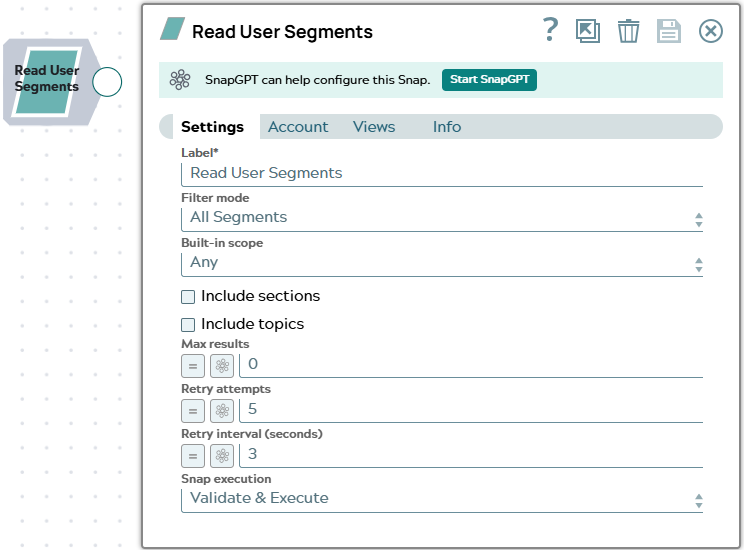
- This is a Read-type Snap.
 Works in Ultra Tasks
Supported Accounts
Prerequisites
None.
Snap views
| Type | Description | Examples of upstream and downstream Snaps |
|---|---|---|
| Input |
This Snap has at most one document input view. When connected, field values from the incoming document can be referenced
in expression-enabled fields using the |
|
| Output |
This Snap has one document output view. Each user segment is emitted as a separate document. When Include sections is selected, the Help Center sections restricted to each segment are included. When Include topics is selected, the community topics restricted to each segment are included. Both sideloads make additional API calls per segment. |
|
| Learn more about Error handling. | ||
Snap settings
| Field/Field set | Description |
|---|---|
Label* String |
Specify a unique name for the Snap. Modify this to be more appropriate, especially if more than one of the same Snaps is in the pipeline. Default value: Read User Segments |
Filter mode
Dropdown list |
Select the strategy for filtering the user segments to retrieve.
Default value: All Segments Example: By User |
Built-in scope
Dropdown list |
Appears when Filter mode is All Segments, Applicable, or By User. Select to filter the segments list by whether they are built-in (default) or
custom (created by your account). Valid values:
Default value: Any Example: Built-in only |
User segment ID*
String/Expression |
Appears when Filter mode is By ID. Enter the numeric Zendesk user segment ID of the segment to retrieve. Default value: None Example: |
User ID*
String/Expression |
Appears when Filter mode is By User. Enter the numeric Zendesk user ID to retrieve all user segments that this user belongs to. Default value: None Example: |
Include sections
Checkbox |
When selected, the Snap makes an additional API call per segment to retrieve the Help Center sections restricted to each segment, and includes them in the output document. Default value: Not selected |
Include topics
Checkbox |
When selected, the Snap makes an additional API call per segment to retrieve the community topics restricted to each segment, and includes them in the output document. Default value: Not selected |
Max results
Integer/Expression |
Specify the maximum number of user segment
records to emit per execution. Enter Default value: 0 Example: |
Retry attempts
Integer/Expression |
Enter the number of times the Snap should
retry the API call on connection errors or 5xx responses. On a 429 response,
the Snap automatically retries after the interval specified in the server's
Default value: 5 Example: |
Retry interval (seconds)
Integer/Expression |
Enter the number of seconds to wait between retry attempts. Default value: 3 Example: |
|
Snap execution Dropdown list
|
Choose one of the three modes in
which the Snap executes. Available options are:
Default value: Validate & execute |