


Google Sheets Subscribe
Overview
The Google Sheets Subscribe Snap subscribes to the specified spreadsheet for notifications of changes in the Google Sheet.
- This is a Read-type Snap.
 Works in Ultra Tasks
Prerequisites
None.
Limitations
- This Snap does not support Shared Drive or other Drives. It supports only My Drive.
- You will receive multiple notifications if you subscribe to a Spreadsheet with multiple channels simultaneously.
- If you configure Webhook URL using a Triggered task, there is a two to four-minute delay in receiving notifications on the Channel or Spreadsheet.
Snap views
| Type | Description | Examples of upstream and downstream Snaps |
|---|---|---|
| Input |
This Snap has at most one document input view. Expected input: The Spreadsheet name or ID, Channel ID, and Webhook URL. |
|
| Output |
This Snap has exactly one document output view. Expected output: The Snap returns ID, resource ID, and resource URI. |
|
| Learn more about Error handling. | ||
Snap settings
- Expression icon (
 ): Allows using
pipeline parameters to set field values dynamically (if enabled). SnapLogic Expressions
are not supported. If disabled, you can provide a static value.
): Allows using
pipeline parameters to set field values dynamically (if enabled). SnapLogic Expressions
are not supported. If disabled, you can provide a static value. - SnapGPT (
 ): Generates SnapLogic Expressions
based on natural language using SnapGPT. Learn
more.
): Generates SnapLogic Expressions
based on natural language using SnapGPT. Learn
more. - Suggestion icon (
 ): Populates a
list of values dynamically based on your Snap configuration. You can select only one
attribute at a time using the icon. Type into the field if it supports a comma-separated
list of values.
): Populates a
list of values dynamically based on your Snap configuration. You can select only one
attribute at a time using the icon. Type into the field if it supports a comma-separated
list of values. - Upload
 : Uploads files. Learn more.
| Field/Field set | Description |
|---|---|
Label String |
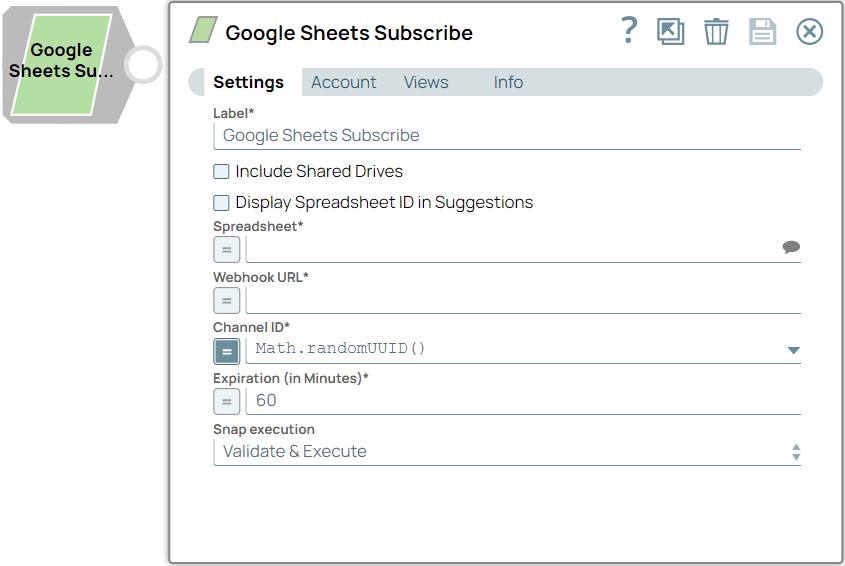
Specify a unique name for the Snap. Modify this to be more appropriate, especially if more than one of the same Snaps is in the pipeline. Default value: Google Sheets Subscribe Example: Subscribe Accounts |
Include Shared Drives Checkbox |
Note: This Snap does not support Shared Drive or other Drives. It supports only My
Drive; this checkbox has no effect.
Default value: Deselected Example: Selected |
Display Spreadsheet ID in Suggestions Checkbox |
Select this checkbox to display Spreadsheets ID with the Spreadsheet name in
the Spreadsheets Suggestions list. Default value: Deselected Example: Selected |
Spreadsheet String/Expression/ Suggestion |
Specify or select the spreadsheet name or ID (or both) containing the worksheet
to be subscribed to. Default value: N/A Example: My Google Sheet |
Webhook URL String/Expression |
Specify the Webhook URL to allow Google to send notifications. Webhook URL is similar to Target URL. To get a target URL, you must create a triggered task. Learn more about Creating Triggered Tasks and Running a Triggered Task. Default value: N/A Example: https://snap.elastic.snaplogicdev.com/api/1/rest/slsched/feed/QA/AccountValidation/shared/Test_Pipeline |
Channel ID String/Expression |
Specify a UUID or similar unique string that identifies the channel. Default value: Math.randomUUID() Example: Math.randomUUID() |
Expiration (in Minutes) Integer/Expression |
Specify the time in minutes after which the subscription expires. Note: The
maximum allowed subscription time is 24 hours.
Default value: 60 Example: 40 |
Snap execution Dropdown list |
Choose one of the three modes in
which the Snap executes. Available options are:
|
The following video demonstrates how to obtain a Webhook URL.