


PostgreSQL Execute
Executes arbitrary SQL statements on a PostgreSQL database.
Overview
Valid JSON paths that are defined in the where clause for queries/statements will be substituted with values from an incoming document. Documents will be written to the error view if the document is missing a value to be substituted into the query/statement.
If a select query is executed, the query's results are merged into the incoming document and any existing keys will have their values overwritten. On the other hand, the original document is written if there are no results from the query.
- This is a Write-type Snap.
 Works in Ultra Tasks
Prerequisites
A valid PostgreSQL Account with the required permissions.
Support and Limitations
- Does not support
$$as an escape character for enclosing string input, as$is a reserved character for variable substitution in SnapLogic.
Behavior Change
Starting with the Snap Pack version released in May 2024, the Database Execute Snaps have been enhanced to improve query execution behavior.
Previous Behavior: When the SQL statement field was configured without the expression toggle, bind parameters were not consistently applied across all query types.
Current Behavior: Bind parameters are now properly applied for both SELECT and DML statements when the expression toggle is not selected, ensuring consistent and secure query execution.
This change improves security by reducing SQL injection risks and provides more predictable behavior across different query types.
Snap views
| Type | Description | Examples of upstream and downstream Snaps |
|---|---|---|
| Input | This Snap allows zero or one input views. If the input view is defined, then the where clause can substitute incoming values for a given expression. | |
| Output | This Snap allows zero or one output view and produces documents in the view. | |
| Learn more about Error handling. | ||
Snap settings
| Field/Field set | Type | Description | |||||||||
|---|---|---|---|---|---|---|---|---|---|---|---|
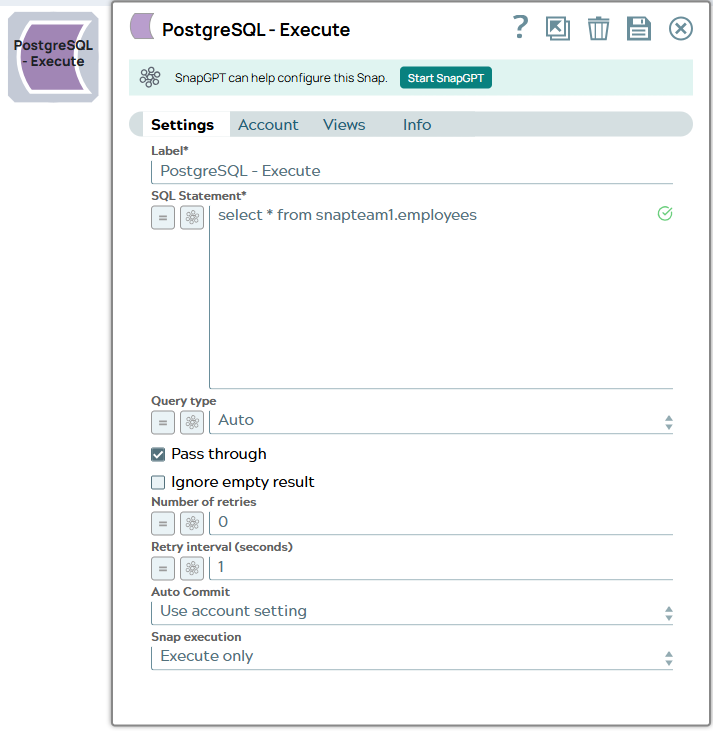
| Label
|
Required. Specify a unique name for the Snap. Modify this
to be more appropriate, especially if more than one of the same Snaps is in the
pipeline. Default value: PostgreSQL - Execute Example: Execute Query |
||||||||||
| SQL statement
|
Required. Specify the SQL statement to execute on the server. Note: Scenarios to successfully execute your SQL statements You must understand the following scenarios to successfully execute your SQL statements: Scenario 1: Executing SQL statements without expressions If the expression toggle of the SQL statement field is not selected:
Example: Additionally, the JSON path (e.g. $myName) is allowed only in the WHERE clause. If the SQL statement starts with SELECT (case-insensitive), the Snap regards it as a select-type query and executes once per input document. If not, it regards it as write-type query and executes in batch mode. Scenario 2: Executing SQL queries with expressions If the expression toggle of the SQL statement field is selected:
Note: Table name and column names must not be provided as bind parameters. Only values can be provided as bind parameters. Example: Note: We recommend you to add a single query in the SQL Statement field. Note: Known Issues
The non-expression form uses bind parameters, so it is much faster than executing N arbitrary SQL expressions. Warning: Using expressions that join strings together to create SQL queries or conditions has a potential SQL injection risk and hence unsafe. Ensure that you understand all implications and risks involved before using concatenation of strings with '=' Expression enabled. Note:
Note:
Warning: Single quotes in values must be escaped Any relational database (RDBMS) treats single quotes ( For example:
Default value: N/A |
||||||||||
| Query type
|
Select the type of query for your SQL statement (Read or Write). When Auto is selected, the Snap tries to determine the query type automatically. If the execution result of the query is not as expected, you can change the query type to Read or Write. Default value: Auto Example: Read |
||||||||||
| Pass through
|
Select this checkbox to pass the input document to the output view under the key 'original'. This property applies only to the Execute Snaps with SELECT statement. Default value: Selected |
||||||||||
| Ignore empty result
|
If selected, no document will be written to the output view when a SELECT operation does not produce any result. If this property is not selected and the Pass through property is selected, the input document will be passed through to the output view. Default value: Not selected |
||||||||||
| Number of retries
|
Specify the maximum number of retry attempts the Snap must make in case of network failure. Note: When you set the Number of retries to more than 0, the Snap generates duplicate records when the connection is not established. To prevent duplicate records, we recommend that you follow one of the following:
Default value: 0 Example: 3 |
||||||||||
| Retry interval (seconds)
|
Specifies the time interval between two successive retry requests. A retry happens only when the previous attempt resulted in an exception. Default value: 1 Example: 10 |
||||||||||
| Auto commit
|
Select one of the options for this property to override the state of the Auto commit property on the account. The Auto commit at the Snap-level has three values: True, False, and Use account setting. The expected functionality for these modes are:
Note: 'Auto commit' may be enabled for certain use cases if PostgreSQL jdbc driver is used in either Redshift, PostgreSQL or generic JDBC Snap. But the JDBC driver may cause out of memory issues when Select statements are executed. In those cases, "Auto commit" in Snap property should be set to 'False' and the Fetch size in the "Account setting" can be increased for optimal performance. Note: Behavior of DML Queries in Database Execute Snap when auto-commit is false DDL queries used in the Database Execute Snap will be committed by the Database itself, regardless of the Auto-commit setting. When Auto commit is set to false for the DML queries, the commit is called at the end of the Snap's execution. The Auto commit needs to be true in a scenario where the downstream Snap does depend on the data processed on an Upstream Database Execute Snap containing a DML query. When the Auto commit is set to the Use account setting on the Snap, the account level commit needs to be enabled. Default value: Use account setting |
||||||||||
| Snap Execution
|
Choose one of the three modes in which the Snap executes. Available options are:
Default value: Execute only Example: Validate & Execute |
||||||||||
Troubleshooting
| Error | Reason | Resolution |
|---|---|---|
| Pipeline is no longer running. | When you use numerous self-joins in SQL SELECT statements with bind values, the Snap is likely to fail after the 11th statement. | Use either of the following workaround solutions to avoid Pipeline failure:
|