


Zendesk OAuth2 Account
Overview
Use this account type to connect Zendesk Snaps to your Zendesk instance using OAuth 2.0 authentication. This account supports both the Authorization Code (three-legged) and Client Credentials (two-legged) grant types.
Expression-enabled fields support Secrets Management, a SnapLogic add-on that allows you to store endpoint credentials in a third-party secrets manager such as AWS Secrets Manager, Azure Key Vault, or HashiCorp Vault.
Prerequisites
- An OAuth2 client registered in the Zendesk Admin Center under Apps and integrations > APIs > OAuth clients.
- The client ID and client secret from the registered OAuth2 client.
- The authorization endpoint URL and token endpoint URL for your Zendesk instance.
These follow the pattern
https://<subdomain>.zendesk.com/oauth/authorizations/newandhttps://<subdomain>.zendesk.com/oauth/tokensrespectively. - For Authorization Code grant: The SnapLogic redirect URI registered in your Zendesk OAuth2 client settings.
Known issues
None.
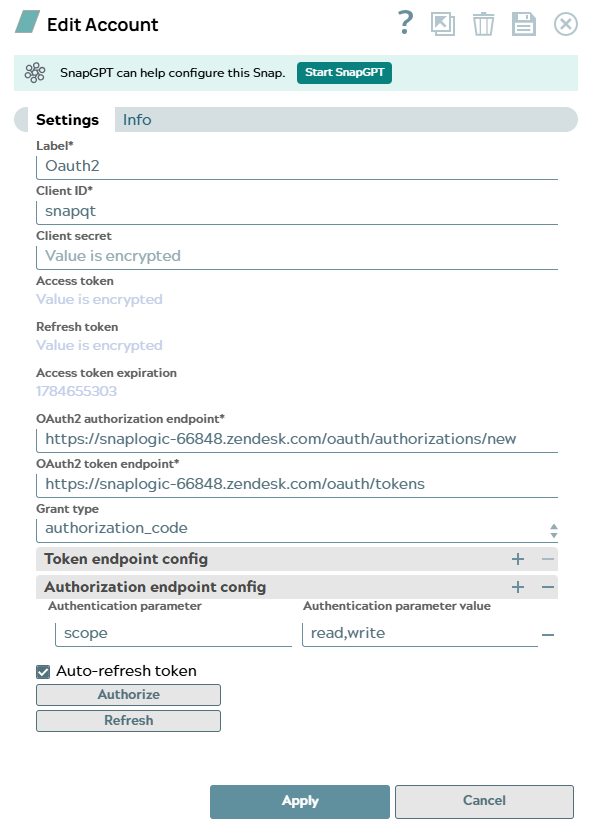
Account settings
| Field/Field set | Description |
|---|---|
Label*
String |
Unique name for the account.
Default value: None Example: |
Client ID*
String/Expression |
Enter the unique identifier (client ID) of the
OAuth2 client registered in the Zendesk Admin Center.
Default value: None Example: |
Client secret
String/Expression |
Enter the client secret associated with the OAuth2 client. This field is
obfuscated after saving.
Default value: None Example: |
Access token
String/Expression |
The OAuth2 access token. This field is populated automatically after you click Authorize. It is obfuscated after saving. |
Refresh token
String/Expression |
The OAuth2 refresh token used to obtain a new access token when the current one expires. This field is populated automatically after authorization and is obfuscated after saving. |
Access token expiration
String/Expression |
The expiration timestamp of the current access token, expressed as a Unix epoch value. This field is populated automatically after authorization. |
OAuth2 authorization endpoint*
String/Expression |
Enter the authorization endpoint URL for
your Zendesk instance. Used to initiate the OAuth2 Authorization Code flow.
Default value: None Example:
|
OAuth2 token endpoint*
String/Expression |
Enter the token endpoint URL for your
Zendesk instance. Used to exchange the authorization code for an access token,
and to refresh the token.
Default value: None Example:
|
Grant type
Dropdown list |
Choose the OAuth 2.0 grant type to use for authentication.
Default value: authorization_code Example: client_credentials |
| Token endpoint config |
Use this field set to specify additional parameters to include in the token endpoint request. Add one row per parameter. |
Authentication parameter
String/Expression |
Enter the name of the parameter to include in the token endpoint request. Default value: None Example: |
Authentication parameter value
String/Expression |
Enter the value for the corresponding authentication parameter. Default value: None Example: |
| Authorization endpoint config |
Use this field set to specify additional parameters to include in the authorization endpoint request, such as OAuth2 scopes. Add one row per parameter. |
Authentication parameter
String/Expression |
Enter the name of the parameter to include in the authorization endpoint request. Default value: None Example: |
Authentication parameter value
String/Expression |
Enter the value for the corresponding authentication parameter. Default value: None Example: |
Auto-refresh token
Checkbox |
Select this checkbox to automatically refresh the access token before it
expires, using the refresh token. When not selected, the token must be refreshed
manually by clicking Refresh.
Default value: Selected |
| Authorize
|
Click to initiate the OAuth2 authorization flow. The account is saved before authorizing. SnapLogic fetches the Access token, Refresh token, and Access token expiration values and populates these fields automatically. |
| Refresh
|
Click to manually refresh the access token using the stored refresh token. Available after the account has been saved and authorized. |
Click Apply to save the account settings.
Troubleshooting
| Error | Reason | Resolution |
|---|---|---|
| 401 Unauthorized | The access token is invalid or has expired. | Re-authorize the account. For Authorization Code grant, click Authorize in the account settings to restart the OAuth flow. For Client Credentials, verify the client ID and secret are correct. |
| invalid_client | The client ID or client secret is incorrect. | Verify the client ID and client secret match the values in the Zendesk Admin Center under Apps and integrations > APIs > OAuth clients. |
| Failed to validate account: Invalid subdomain | The subdomain value contains the full URL or invalid characters. | Enter only the subdomain portion without https:// or
.zendesk.com. |