


AWS S3 Account for Hadoop
Overview
You can use this account type to connect Hadoop Snaps with data sources that use AWS S3 accounts.
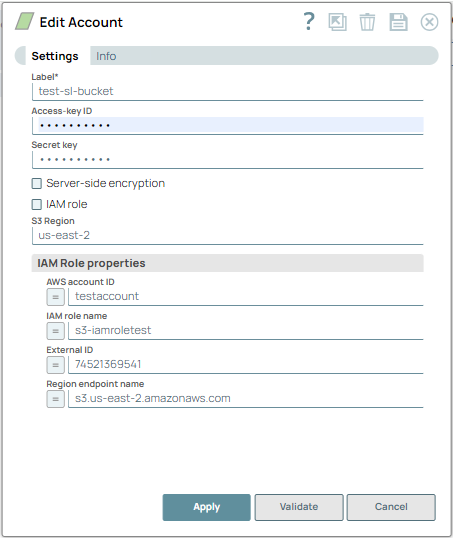
Prerequisites
- S3 accounts must have full access.
- S3 ListAllMyBuckets permission is required for the S3 account to be validated successfully.
Account settings
| Field/Field set | Description | ||
|---|---|---|---|
| Label
|
Specify a unique label for the account. Default value: N/A Example: S3 Account |
||
| Access-key ID
|
Required when IAM role is deselected. Specify the unique access key ID part of AWS authentication. Default value: N/A Example: ASTPPGC2DCFDB5DW9GHI |
||
| Secret key
|
Required when IAM role is deselected. Specify the secret key part of AWS authentication. Default value: N/A Example: FGSDFG5465F4G6D5F4DFG5DFD5FGD5F5FGD58 |
||
| Server-side encryption
|
Required for writing to S3. Select this checkbox to enable the server-side encryption to use for the objects. Learn more, Protecting Data Using Server-Side Encryption with Amazon S3-Managed Encryption Keys. Default Value: Deselected Example: N/A |
||
| IAM role
|
If you select this checkbox, the IAM role stored in the EC2 instance is used to access the S3 bucket. Note:
Default Value: Deselected Example: N/A |
||
| S3 Region
|
Specify the name of the region in which the S3 bucket resides. Warning:
You need to specify S3 Region only if you have to access the S3 buckets in the cross-region or proxied cross-regions. If you leave this field blank and try to access cross-region S3 buckets, the Snap displays
Bad request error.
Default Value: None Example: us-east-2 |
||
| IAM Role properties |
Use this field set to enter information associated with the IAM Role. Note:
Use this field set only if you do not plan to provide the Access key ID and Secret key, and if IAM role, above, is selected.
Default value: N/A |
||
AWS account ID
|
Specify the Amazon Web Services account ID associated with the AWS S3 account that you want to use. Default value: N/A |
||
IAM role name
|
Specify the name of the IAM role that can access the AWS S3 account identified above. Default value: N/A |
||
External ID
|
Specify an external ID that might be required by the role to assume. Default value: N/A Example: 74521369541 |
||
Region Endpoint name
|
Specify the endpoint name of the region to which the target AWS S3 bucket belongs. Protocols supported: S3 Default value: N/A Example: s3.us-east-2.amazonaws.com |
||
Troubleshooting
| Error Message | Reason | Resolution |
|---|---|---|
| Failed to validate account: Invalid IAM role setting |
Access-key ID and Secret key should be empty if IAM role is selected. This means that you selected the IAM role check box but also provided access-key ID and secret key information. |
Address the reported issue. Do not provide both IAM role and access-key details for the same account. |
| Failed to validate account |
Failed to validate account
This typically means that your IAM role details are incorrect. |
Verify if the provided credentials are correct. |
| Failed to validate account | Access key cannot be null. | Verify if the provided credentials are correct. |
| Failed to validate account: The AWS Access Key Id you provided does not exist in our records. | Access key is invalid. | Verify if the provided credentials are correct. |