


Azure Data Lake Storage Gen2 OAuth2 Account
Overview
Use this account type to connect Binary Snaps with data sources that use Azure Data Lake Storage Gen 2 OAuth2 accounts.
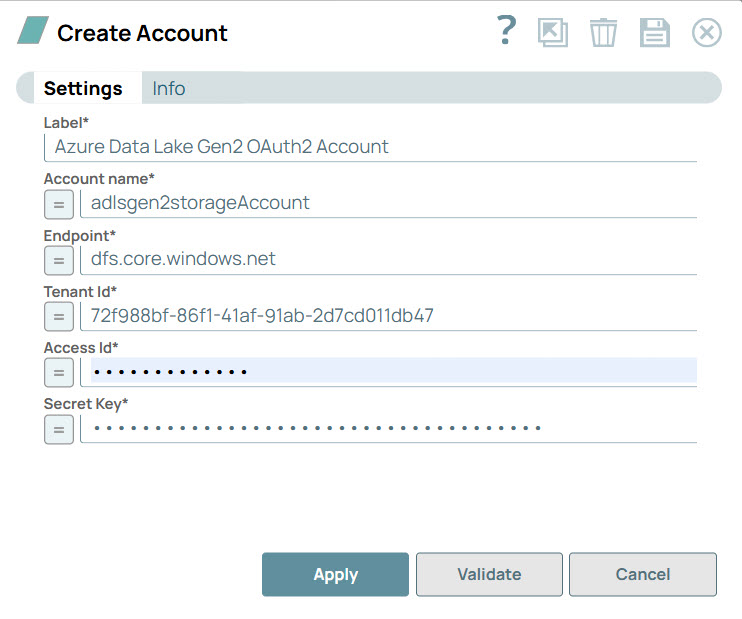
Account Settings
Legend:
- Expression icon (
 ): Allows using
JavaScript syntax to access SnapLogic Expressions to set field values dynamically (if
enabled). If disabled, you can provide a static value. Learn more.
): Allows using
JavaScript syntax to access SnapLogic Expressions to set field values dynamically (if
enabled). If disabled, you can provide a static value. Learn more. - SnapGPT (
 ): Generates SnapLogic Expressions
based on natural language using SnapGPT. Learn
more.
): Generates SnapLogic Expressions
based on natural language using SnapGPT. Learn
more. - Suggestion icon (
 ): Populates a
list of values dynamically based on your Snap configuration. You can select only one
attribute at a time using the icon. Type into the field if it supports a comma-separated
list of values.
): Populates a
list of values dynamically based on your Snap configuration. You can select only one
attribute at a time using the icon. Type into the field if it supports a comma-separated
list of values. - Upload
 : Uploads files. Learn more.
| Field/Field set | Type | Description |
|---|---|---|
| Label*
|
String |
Specify a unique label for the account. Default value: N/A Example: Azure Data Lake Gen2 OAuth2 Account |
| Account name | String/Expression | Required. The name of the ADLS Gen 2 storage account
that you created in the Azure portal. Default value: N/A Example: adlsgen2oauth2test1 |
| Endpoint | String/Expression | Required. The endpoint provided by Microsoft Azure. The
protocols supported are HTTPS, ADL, and ADLS. Note: In addition to standard Azure
ADLS Gen2, this account also supports Microsoft Fabric ADLS Gen2 endpoints, such
as: dfs.fabric.microsoft.com. Learn more.Default value: N/A Example:
|
| Tenant ID | String/Expression | Required. The Directory ID of the Azure Active
Directory. You must retrieve this information from your Azure account. For
information on creating a Tenant ID in Azure, see Quickstart: Create a new tenant in Azure Active
Directory. Default value: N/A Example: 4464acc4-0c44-46ff-560c-65c41354405f |
| Access ID | String/Expression | Required. The Application ID of the application in the
Azure Active Directory. You must retrieve this information from your Azure Active
Directory Application. For information on working with access IDs, see How to: Use the portal to create an Azure AD
application and service principal that can access resources. Default value: N/A Example: e3d5b6cf-9c42-4f40-9c02-7b96f5a9d123 |
| Secret Key | String/Expression | Required. The authentication key for accessing the Azure
Active Directory. You must retrieve this information from your Azure Active
Directory Application. For information on secret keys, see How to: Use the portal to create an Azure AD
application and service principal that can access resources. Default value: N/A Example: q1~.flO8N7jYh8o9XeTsdEXAMPLEKEYk8Z.EO |
Troubleshooting
| Error Message | Reason | Resolution |
|---|---|---|
| Failed to validate account: An error occurred while getting a new access token. |
Bad Request The Tenant ID, Access ID, or Secret Key details are incorrect. |
Check the account information and try again |