


Cache Service Guide
The Cache Service is a platform-based feature set at the environment (Org) level that provides caching capabilities at the data plane layer for dynamically referenced accounts, pipelines, expression libraries, and tasks. Since pipeline validations and executions can be slow due to information that needs to be fetched for pipeline prepare, the Cache Service optimizes the fetch mechanism by decreasing the dependency on the control plane for such operations. Task caching covers Scheduled Tasks (Snaplex 4.44.3.0 or later), and — starting in Snaplex 4.45.1.0 (the September 2026 release) — Ultra Tasks and ground Triggered Tasks, unifying all task types under the Cache Service.
Benefits
- Avoid bottlenecks during asset loading at execution time.
- Reduce time for pipeline initialization.
- Improved performance when resolving the noted asset types during pipeline execution.
- Reduce Scheduled Task start latency by eliminating a control plane round-trip each time a task fires.
- Reduce Ultra Task startup latency and improve resilience after node restarts by caching Ultra Tasks locally on the Snaplex, so UltraKeeper can load tasks immediately on startup without sending a request to the control plane and waiting for a response.
- Reduce ground Triggered Task start latency and control plane load by serving the root pipeline, dependent child pipelines, accounts, and expression libraries from the local cache on the Snaplex node, eliminating a synchronous control plane round-trip on each execution.
- Improved cache data freshness (Snaplex 4.45.0.0 or later): stale assets are automatically self-corrected within a 1-hour age threshold if a control plane push invalidation is missed.
Support matrix
| Asset | Support | Notes |
|---|---|---|
| Groundplexes |  |
None |
| Cloudplexes | |
None |
| Pipelines | |
Child pipelines and error pipelines are cached as long as the reference resolves to an exact, existing asset path. A child pipeline must be in the same environment (Org) as the parent pipeline. See cache-svc-about.html#cache-service-about__asset-references. |
| Accounts | |
Cached when the reference resolves to an exact, existing account path. See cache-svc-about.html#cache-service-about__asset-references. |
| Expression libraries | |
Must be referenced by an exact, existing path. The asset fallback mechanism does not apply to expression libraries. See cache-svc-about.html#cache-service-about__asset-references. |
| Scheduled Tasks | |
Requires Snaplex 4.44.3.0 or later. |
| Ultra Tasks | |
Requires Snaplex 4.45.1.0 (the September 2026 release) or later. |
| Triggered Tasks | |
Requires Snaplex 4.45.1.0 or later. Caching applies only to ground Triggered Tasks that you run through the Snaplex URL (secured or unsecured). Triggered Tasks run through the Cloud (control plane) URL are not cached. |
Feature Enablement
All Cache Service caching (pipelines, accounts, expression libraries, Scheduled Tasks, Ultra Tasks, and Triggered Tasks) is disabled by default and requires feature flag enablement per environment. Contact your CSM to enable:
com.snaplogic.cc.cache.CacheClientProvider.CACHE_SERVICE_ENABLED=trueTo disable the Cache Service, contact your CSM to set the flag to false.
Background refresh is available in Snaplex 4.45.0.0 or later and requires no additional configuration.
Usage Guidelines
Cache Configurations
- Default TTL (Time to Live): 96 hours
- Max Asset Size: 10 MB
You can update these configurations via the Snaplex global properties.
- Global TTL for all caches (in hours):
jcc.cache_expiry=96 - Single item max size cap (per asset in MB):
jcc.cache.file.max_mb=10
Eviction Rules
The oldest cached asset will be evicted if the limit is reached. The following lists the limit by asset type.
- Files: 1000
- Accounts: 5000
- Pipelines: 2500
- Tasks: 2500
Limitations
- The Cache Service does not support running parent and child pipelines in separate environments (Orgs). The child pipeline must be in the same environment (Org) as the parent pipeline.
- Scheduled Task caching requires Snaplex version 4.44.3.0 or later.
- Ultra Task caching requires Snaplex version 4.45.1.0 (the September 2026 release) or later.
- Triggered Task caching requires Snaplex version 4.45.1.0 (the September 2026 release) or later.
- Triggered Task caching applies only to ground Triggered Tasks that you run through the Snaplex URL (secured or unsecured). Triggered Tasks run through the Cloud (control plane) URL are not cached.
- A Triggered Task might intermittently fail to be cached. When this happens, the task still executes normally through the control plane fetch path; only the background caching is skipped. As a result, that execution does not gain the caching latency improvement, but it is not slower than an uncached execution.
- The maximum number of cached tasks is 2,500. This limit applies to Scheduled Tasks, Ultra Tasks, and Triggered Tasks combined.
Asset References
For an asset to be cached, its reference must resolve to an exact path that exists in the control plane. When you reference an asset with the Expression Language, what matters is that the resolved value is such a path.
For pipelines and accounts, if an asset cannot be found via the exact path (whether selected from the drop-down or typed in), the asset fallback mechanism searches for the referenced asset. The platform searches for the asset first in the project space's shared directory, then second in the global shared folder. If an identically named asset exists in these locations, the pipeline executes using the reference. In this case, the Cache Service caches the resolved path rather than the path you requested, so subsequent executions that request the original path do not get a cache hit. The fallback mechanism does not apply to expression libraries, which must be referenced by their exact path.
Using the Expression Language to reference an asset does not prevent caching. What matters
is that the resolved value of the expression is an explicit path that exists in the
control plane. For example, passing an account through a pipeline parameter such as
_srcAccount, or reading it from an expression library, is fully
supported — as long as the value it evaluates to is the exact path of an existing
account.
Example: how the resolved account path affects caching
Suppose an account is referenced through a variable _account1 that
resolves to /org/project_space/project/account1.
Cached correctly. If the control plane contains an account at that exact path — for example, alongside other same-named accounts:
/org/project_space/project/account1/org/project_space/shared/account1/org/shared/account1
then _account1 resolves to an existing exact path, and the Cache Service
caches the account without any issue.
Not cached (fallback). If the exact path does not exist and only the shared variants do:
/org/project_space/shared/account1/org/shared/account1
then the asset fallback mechanism resolves the reference to
/org/project_space/shared/account1. The pipeline still runs
successfully, but because the requested path and the resolved path differ, the Cache
Service caches the resolved path rather than the requested
/org/project_space/project/account1. Executions that request the
original path therefore do not get a cache hit.
Verify caching with the Designer lint warning
To confirm whether an asset reference is being cached, validate the pipeline in Designer and check the affected Snap in the Pipeline Validation Statistics. When a requested path is resolved to a different path through the fallback mechanism, Designer displays a lint warning stating that the requested path resolved to another path and that the Cache Service caches only the resolved path, which can result in additional cache misses. The warning includes the resolved path to use for better cache performance.
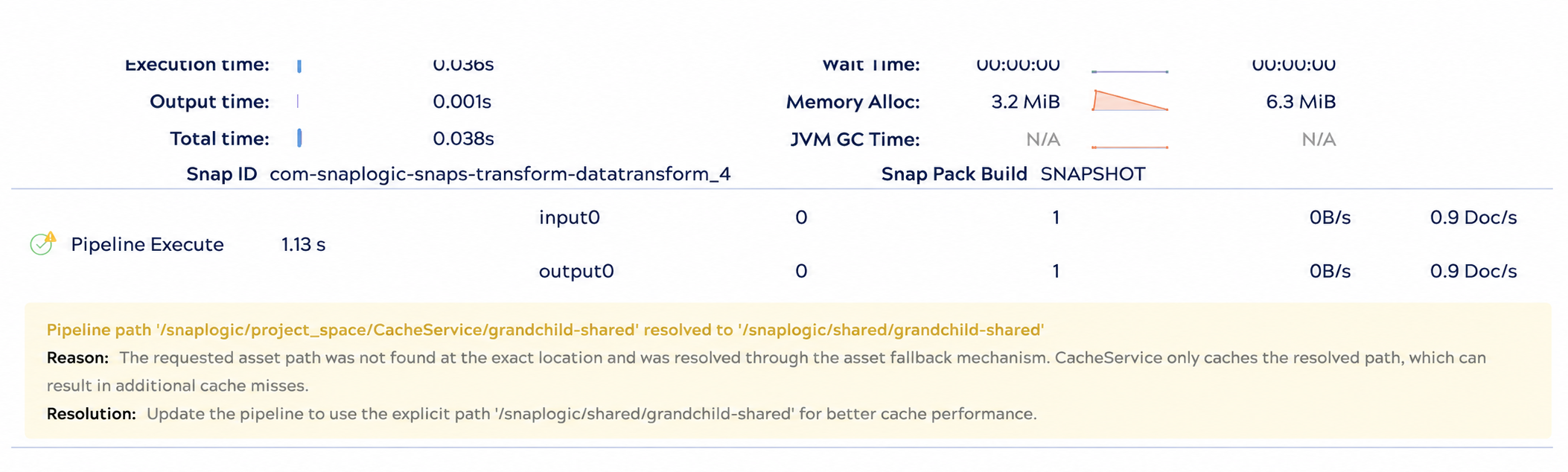
If you see this warning, update the reference so its resolved value matches the explicit path shown in the warning. When no such warning appears, the asset resolves to its exact path and the Cache Service caches it.
- Minor UI latency while account metadata is being retained.
- If a pipeline or account asset is deleted, the view of the pipeline state for related historical runtime executions might not be visible in the Pipeline Validation Statistics via Designer. Runtime history details remain accessible in Monitor.
Asset Updates
When an account or pipeline is updated, the control plane pushes these updates to the JCC nodes so that the JCC gets the updated asset and the cache is undisturbed.
- When a project or Project space is updated, all downstream assets become invalid and do not remain in the cache.
When a Scheduled Task, Ultra Task, or Triggered Task is updated in the control plane, the cached version is refreshed and propagated immediately. A full re-link through the control plane is not required.
If the Cache Service is unavailable or encounters an error while building the cached task bundle, execution falls back to the direct control plane fetch path (legacy linking). Cached tasks are retained rather than evicted on failure.
Background Refresh
The Cache Service includes a background refresh mechanism that automatically re-fetches assets that have not been refreshed within 1 hour, ensuring the cache self-corrects even if a control plane push invalidation is missed. This complements (and does not replace) the existing control plane push invalidation mechanism.
- Requires Snaplex 4.45.0.0 or later.
- Age threshold: 1 hour. Assets that have not been refreshed within 1 hour are treated as soft-invalidated and re-fetched in the background.
- Covers accounts and pipelines only in this release. Files and expression libraries are not included.
- No pipeline or task configuration changes are required.
Soft vs. hard invalidation: A hard invalidation (control plane push) immediately removes an asset from the cache and forces a synchronous re-fetch. A soft invalidation marks an asset as stale but allows it to continue serving until the background refresher replaces it, avoiding a synchronous request to the control plane on the critical execution path.
Troubleshooting
-
When a requested asset path resolves to a different path, the cache service now sets a new flag in
has_warnings. In Designer, a lint warning is displayed on the relevant Snap/Pipeline/Asset when your path is being implicitly resolved.