


Snaplexes
An overview of Snaplexes (both Cloudplex and Groundplex).
Snaplexes are the data processing engines of the SnapLogic Platform. They execute:
- Standard, Resumable, and Cache Pipelines
- Scheduled, Triggered, and Ultra Tasks
- Classic APIM Versions, Proxies, and Policies
- APIM 3.0 Services and Policies
- AutoSync integrations
- MCP Servers
- AgentCreator Agent and Tool pipelines
Snaplex nodes
Snaplex nodes are the data processing engines in SnapLogic that execute integration pipelines. They can be deployed as either Groundplex nodes (self-managed) or Cloudplex nodes (managed by SnapLogic in the cloud) and perform the following functions:
- Support scaling to handle varying workloads, ensuring optimal performance even under high load conditions.
- Enable configuration for optimizing data processing, including cache management, proxy settings, and WebSocket connections.
Snaplex types
SnapLogic supports two types of Snaplexes:
- Cloudplex: Managed and provisioned by SnapLogic. For Cloudplex deployment contact SnapLogic CSM.
- Groundplex: Managed and provisioned by user. A Groundplex can be set up on-premises or in the cloud.
| Type of Snaplex | Advantages | Disadvantages |
|---|---|---|
|
|
|
|
|
For more information on Groundplex planning and installation, refer to Groundplex Deployment Guides.
Snaplex architecture
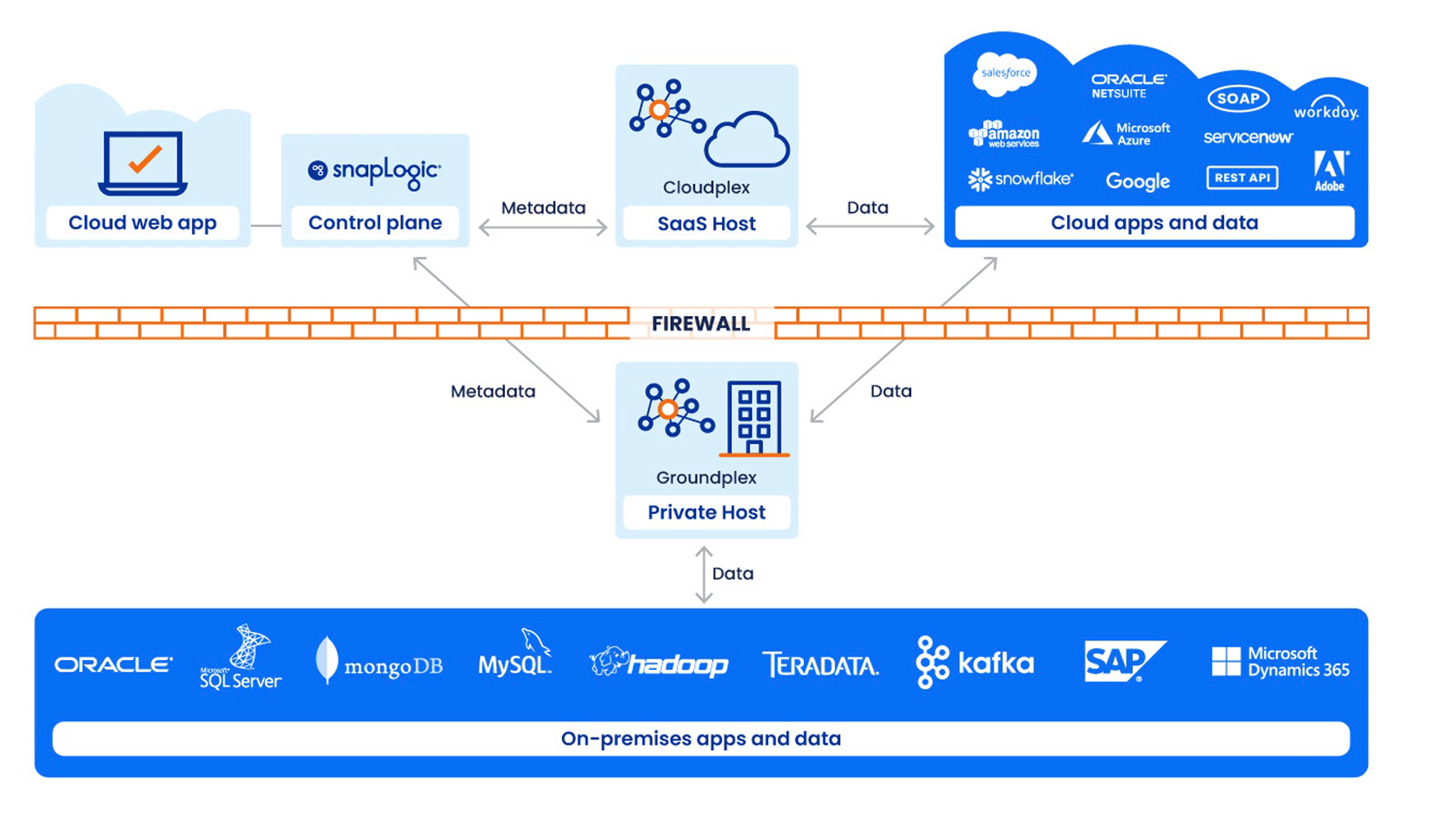
The Snaplex represents the data plane in the SnapLogic Platform. A Snaplex comprises:
- One or more JCC nodes
- Load balancer
- FeedMaster
The load balancer handles inbound requests for both Ultra Tasks (via FeedMaster nodes) and MCP Servers. For Cloudplex deployments, load balancers are provisioned automatically when Ultra or MCP Server features are enabled. For Groundplex deployments, you must configure your own load balancer.
The following diagram illustrates the data flow in the SnapLogic architecture for both types of Snaplexes and the relationship between the control plane and the data plane.
Load balancing algorithm
Depending on the number of active threads, the load-balancing algorithm sends the execution requests to nodes with the lightest loads first. If multiple nodes have similar light loads, the algorithm randomly selects a node among them and sends the execution request to it.
Security
To perform most administrative tasks in a Snaplex, you must be an Environment admin. For a Groundplex, you also need admin access to your on-premises network. Learn more at SnapLogic Platform overview
Monitor
You can monitor Snaplexes in the Monitor app. You can view Snaplex and infrastructure pages.
For advanced monitoring, you can also integrate with third-party Observability services via OpenTelemetry.
Snaplex administration
Snaplex administration tasks are performed in Admin Manager by Environment admins. These tasks include adding and configuring Groundplexes, managing Snaplex versions, and controlling Snap Pack subscriptions.
- Snaplexes: View and manage all Snaplexes in the environment, including version management and auto-upgrade settings.
- Add a Groundplex: Add and configure a new Groundplex in Admin Manager.
- Update a Snaplex: Upgrade or downgrade a Snaplex to a different version.
- Cloudplex Secure Connectivity: Configure a secure link between Cloudplexes and the SnapLogic control plane.
- Snap Packs: Control the default version of Snaps used during pipeline execution.
Snaplex documentation
| Topic | Description |
|---|---|
| Cloudplexes | Overview of Cloudplexes, the SnapLogic-managed Snaplexes running in the Integration Cloud, including architecture, features, and deployment. |
| Groundplexes | Overview of Groundplexes, self-managed Snaplexes hosted by your organization for customizable deployment with access to on-premises data. |
| Release process | Overview of the SnapLogic release process, including version lifecycle, grace periods, and mandatory upgrade timelines. |
| Snaplex and Snap Pack compatibility | Version compatibility between Snaplexes and Snap Packs, including how environment admins control upgrade timing and supported version combinations. |
| Manage Snap Pack versions | How to configure which Snap Pack versions are used, including Latest and Stable options and version management rules across Snaplex versions. |
| Snaplex version | Details on mandatory Snaplex upgrades that occur after quarterly releases, including auto-update settings and version testing procedures. |
| Test new releases | Step-by-step instructions for testing new Snaplexes and Snap Packs during the grace period before mandatory updates take effect. |
| Downgrade a Snaplex | How to downgrade a Snaplex or Snap Pack to a previous version during the grace period. |
| Add the SnapLogic Platform to your Allowlist | Reference for configuring network allowlists to enable Snaplex communication with the SnapLogic Platform, including IP address ranges for different regions. |
| Snaplex monitoring | Overview of Snaplex monitoring, including configuring notifications, running diagnostics, and monitoring health metrics for high availability. |
| Snaplex state transitions | The states that Snaplex nodes transition through — default, cooldown, and maintenance mode — and how each transition is triggered. |
| Monitoring processes and best practices | Recommendations for scheduling health checks, monitoring resource usage, and running diagnostics to maintain Snaplex availability. |
| Configure Snaplex notifications | Steps to configure email and Slack notifications for Snaplex resource metrics, including CPU, memory, disk space, and network I/O thresholds. |
| Run Snaplex diagnostics | Instructions for running diagnostic utilities on Snaplex nodes to generate reports checking hardware requirements, thread limits, RAM, and disk storage. |
| Snaplex logs | The types of logs generated by Snaplex components, their storage locations, and log rotation policies. |
| Monitor Snaplex health | How to check Snaplex health using HTTP health check endpoints and integrate with load balancers to ensure nodes are functioning properly. |
| Cache Service | Environment-level caching for accounts, pipelines, and expression libraries to optimize performance and reduce control plane dependency. |