


Azure Data Source AI Search
Overview
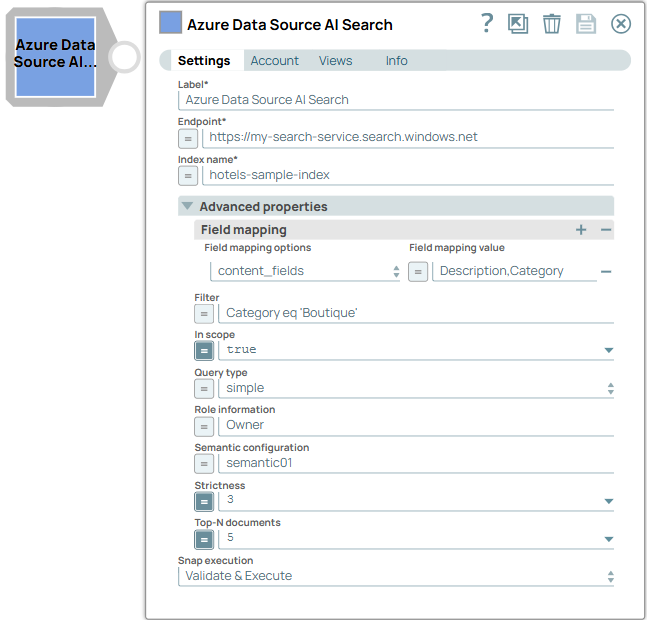
- This is a Transform-type Snap.
 Works in Ultra Tasks
Prerequisites
- A configured Azure AI Search service.
- An index within the search service.
Limitations and known issues
None.
Snap views
| Type | Description | Examples of upstream and downstream Snaps |
|---|---|---|
| Input | This Snap supports a maximum of one document input view. | Mapper |
| Output | This Snap has at the most one document output view. The Snap provides the search results from the Azure AI Search index in the configured format. | Mapper |
| Learn more about Error handling. | ||
Snap settings
- Expression icon (
 ): Allows using
JavaScript syntax to access SnapLogic Expressions to set field values dynamically (if
enabled). If disabled, you can provide a static value. Learn more.
): Allows using
JavaScript syntax to access SnapLogic Expressions to set field values dynamically (if
enabled). If disabled, you can provide a static value. Learn more. - SnapGPT (
 ): Generates SnapLogic Expressions
based on natural language using SnapGPT. Learn
more.
): Generates SnapLogic Expressions
based on natural language using SnapGPT. Learn
more. - Suggestion icon (
 ): Populates a
list of values dynamically based on your Snap configuration. You can select only one
attribute at a time using the icon. Type into the field if it supports a comma-separated
list of values.
): Populates a
list of values dynamically based on your Snap configuration. You can select only one
attribute at a time using the icon. Type into the field if it supports a comma-separated
list of values. - Upload
 : Uploads files. Learn more.
| Field/Field set | Type | Description |
|---|---|---|
Label
|
String |
Required. Specify a unique name for the Snap. Modify this to be more appropriate, especially if more than one of the same Snaps is in the pipeline. Default value: Azure Data Source AI Search Example: Create customer support chatbots |
| Endpoint | String/Expression | Required. Specify the absolute endpoint path for the Azure AI Search resource to use. Default value: N/A Example: https://my-search-service.search.windows.net |
| Index name | String/Expression |
Required. Specify the name of the index to use in the referenced Azure AI Search resource. Default value: N/A Example: hotels-sample-index |
| Advanced properties | Configure additional settings to refine search behavior and relevance. | |
| Field mapping | Use this field set to customize field mapping behavior to use when interacting with the search index. | |
| Field mapping options | Dropdown list | Choose the option for the field mapping to use for the Azure AI Search
resource. Available options include:
Default value: content_fields Example: title_field |
| Field mapping value | String/Expression |
Specify the field mapping value to use when interacting with the search index. Important: Field mapping value must be a string or an array of
strings.
Default value: N/A Example: HotelName |
| Filter | String/Expression | Specify the search filter to narrow down the search results based on conditions applied to index fields. Learn more. Default value: N/A Example: rating ge 4 and category eq 'luxury' |
| In scope | Checkbox/Expression |
Select this checkbox to restrict queries to use only indexed data for search results. Default status: Selected |
| Query type | Dropdown list | Choose the query type to use with Azure AI Search. Available options include:
Note: If you select vector-related query type, configure embedding dependency in the
Azure OpenAI Chat Completions Snap.
Default value: simple Example: vector |
| Role information | String/Expression | Specify the instructions for the model on how to behave, the context to reference, and the response formatting. You can also choose to specify the assistant's personality. Default value: N/A Example: Owner |
| Semantic configuration | String/Expression | Specify the semantic configurations for the query. Learn more. Important: This
field is required when the Query type is either
semantic or
vector_semantic_hybrid. Default value: N/A Example: semantic01 |
| Strictness | Integer/Expression | Specify the strictness of the search relevance filtering. Higher strictness increases precision but reduces recall. Default value: 3 Example: 5 |
| Top-N documents | Integer/Expression | Specify the maximum number of documents to retrieve for the configured query. Default value: 5 Example: 10 |
| Snap execution
|
Dropdown list |
Choose one of the three modes in
which the Snap executes. Available options are:
Default value: Validate & Execute Example: Execute only |