


Deployment architecture for Ultra Tasks
Low-latency Ultra Tasks require a FeedMaster node that sits between clients and Snaplex JCC nodes, receiving inbound HTTP requests and routing them to pipeline instances for processing. This topic describes the supported deployment architectures, from a minimal single-FeedMaster setup to multi-region disaster recovery. For Headless Ultra Tasks, which do not require a FeedMaster, refer to Headless Ultra Tasks.
Low-latency Ultra architecture
The minimum configuration for a Low-latency Ultra Task consists of one FeedMaster node deployed alongside one or more Snaplex JCC nodes. The FeedMaster:
- Receives inbound HTTP or HTTPS requests from clients
- Queues requests and routes each one to an available pipeline instance on a JCC node
- Returns the pipeline output as an HTTP response to the original caller
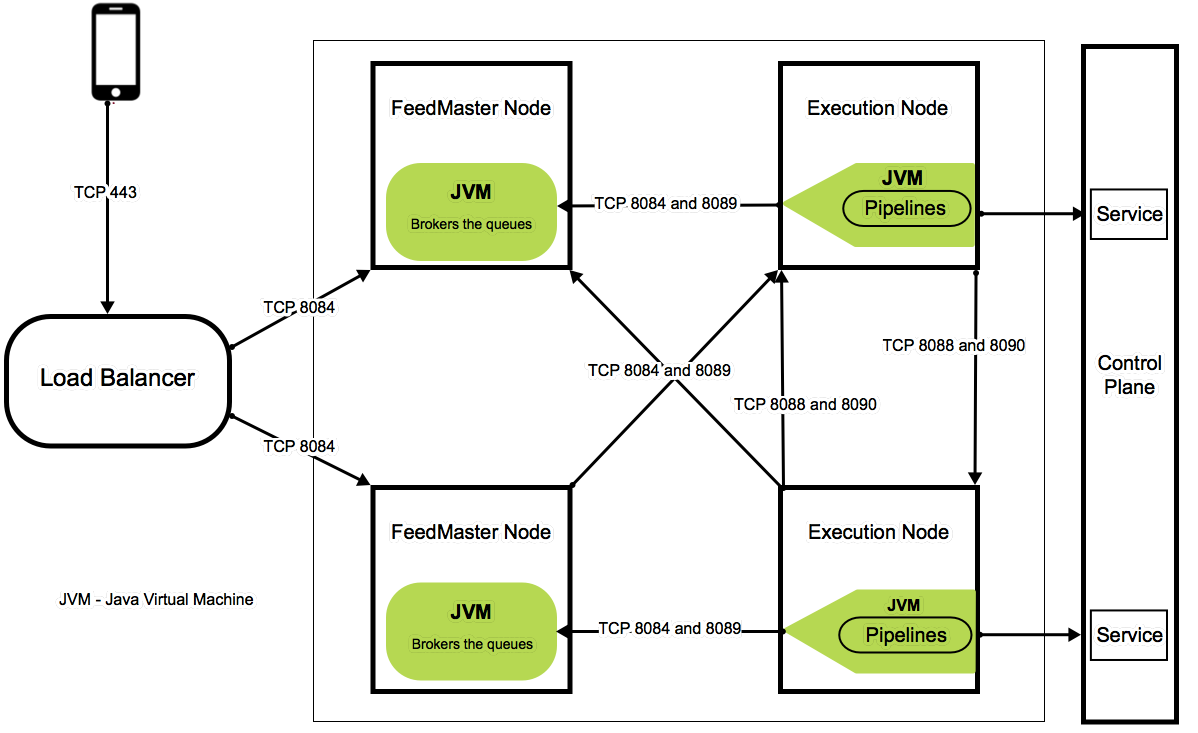
The FeedMaster uses the following ports. The server hosting the FeedMaster must have these ports available in the local firewall:
- 8084: HTTPS port for inbound client requests
- 8089: Embedded ActiveMQ broker TLS (SSL) port that JCC nodes use to exchange Ultra Task messages with the FeedMaster's broker
- 8091: Default HTTP port for the FeedMaster node
The following diagram illustrates the standard Ultra Task architecture, including component communication and port assignments.
High availability and disaster recovery
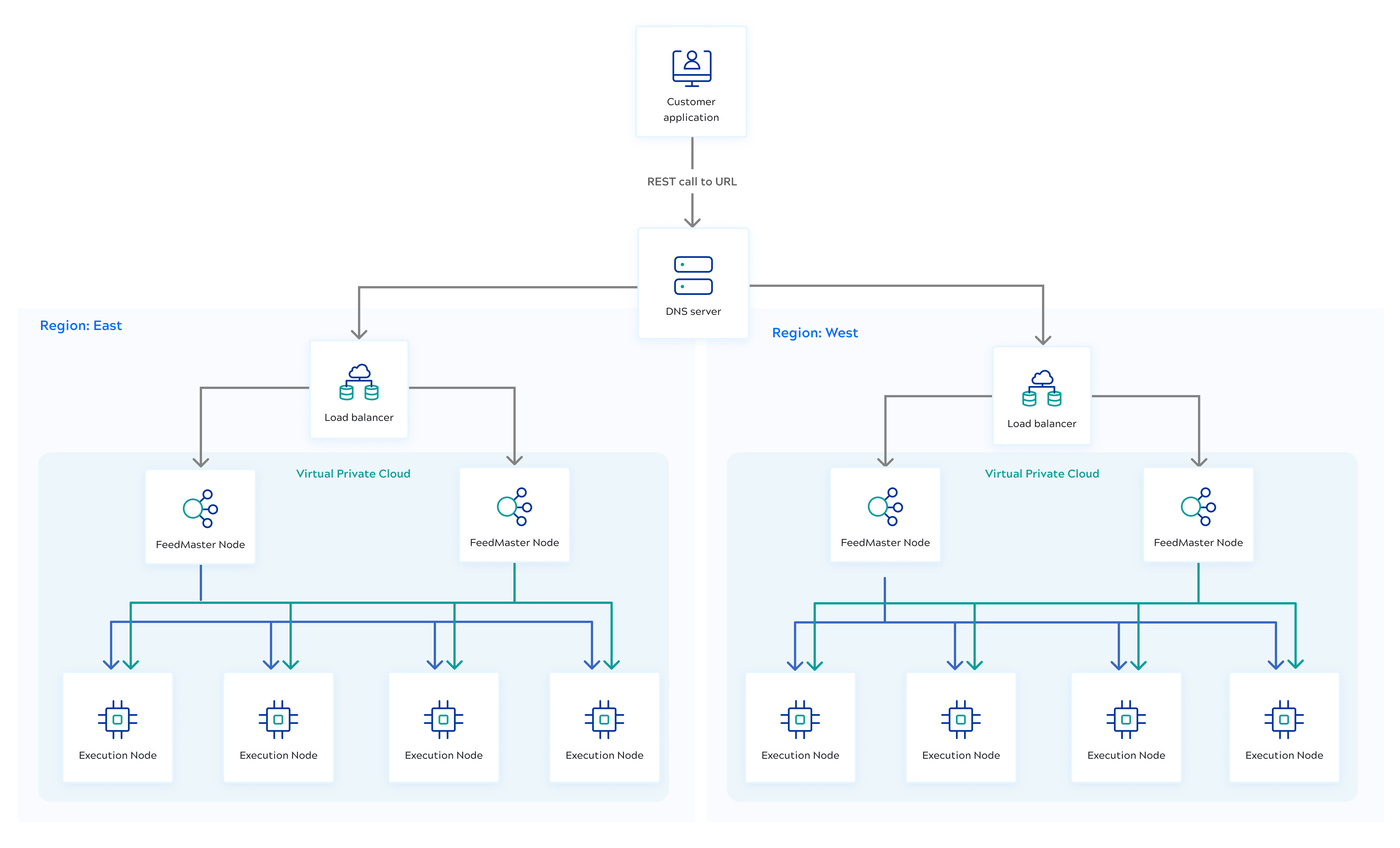
The recommended production architecture places two FeedMaster nodes behind a load balancer. If one FeedMaster becomes unavailable, the load balancer routes requests to another healthy FeedMaster node, eliminating the FeedMaster as a single point of failure. For cross-region disaster recovery, deploy Snaplexes in separate regions, each with FeedMaster nodes behind a regional load balancer. Configure each regional load balancer to monitor FeedMaster health via the HealthZ URL and stop routing to unresponsive nodes. When a region becomes unavailable, configure your load balancer to redirect traffic to the Snaplex in the surviving region.
Role of the Alias
The Alias functionality provides an alternative way to call the same pipeline with another task. Two tasks can have the same Alias value, so when a Snaplex is unavailable in one region, another Snaplex can execute the pipeline via the specified Alias. The main task is the primary invocation method of the pipeline, and the second task with the same Alias serves as the backup. We strongly recommend using regional load balancers. Each regional load balancer routes traffic to the FeedMaster nodes in its Snaplex and runs a background health check via the HealthZ URL. If the FeedMaster nodes become unresponsive, traffic can be rerouted to the other Snaplex via the Alias task.
Requirements for using the Alias for failover:
- Both tasks must run the same pipeline.
- Both tasks must reside in the same project folder.
- Both tasks must have the same Alias value.
- Each task must be deployed to a different Snaplex.
- A load balancer must be deployed in front of the FeedMasters.
For examples of how to call an Ultra Task and its Alias, see Invoke Ultra Tasks. For information on configuring an alias, see Configure an alias for High Availability.
Load balancer configuration
- Configure the load balancer with FeedMaster port 8084.
- Use the HealthZ URL
https://<HOSTNAME>:8084/healthzfor health checks between the load balancers and the FeedMasters.
The following diagram illustrates the high availability and disaster recovery architecture.
FeedMaster storage limits
Because the FeedMaster node has to queue up requests, a certain amount of storage is required. The requests stay in the queue and take up space on disk until the message has been processed by the pipeline.
- The default space for queued messages is 10 GB.
- The maximum storage which can be configured depends on the disk space available.
- As the storage limit is reached, the FeedMaster rejects new requests with
HTTP 503 Service Unavailableand a message such asRequest storage is low, try again later
. - If an upstream service used by the pipeline is slow, the queue grows. Setting a higher storage limit allows more requests to queue, but also delays notifying clients about upstream slowness.
- Storage is counted per FeedMaster node. In a multi-FeedMaster deployment, each request occupies space on one node.
- All Ultra Tasks executing on the same FeedMaster node share that node's disk space. The
broker.disk_limitproperty sets the maximum disk space for queued messages, specified in bytes. The default is 10 GB (10737418240bytes).- If your Snaplex uses the
slpropzconfiguration method, set this value in in Manager by specifying the limit in bytes in the Global properties field — for example, to set a 20 GB limit:broker.disk_limit=21474836480 - If your Snaplex does not use
slpropz, add thebroker.disk_limitvalue to theglobal.propertiesconfiguration file.
- If your Snaplex uses the
- You can change the storage location for broker files using the properties
broker_data_dir,broker_sched_dir, andbroker_tmp_dir. By default these are thedata,sched, andtmpsubdirectories of$SL_ROOT/run/broker. Ensure the mount has sufficient disk space and that thesnapuseraccount has full access to the data location.
When running multiple Tasks on one FeedMaster node:
- If one Task is slow, the FeedMaster queues its requests and those callers receive errors. Other Tasks on the FeedMaster node are unaffected.
- If more than half the Tasks are slow, those Tasks receive errors but the others remain unaffected.
To ensure complete isolation between workloads, use separate Snaplex instances for different Ultra Tasks and configure sufficient storage for each to meet your SLAs.
Timeout between FeedMaster and clients
The timeout between the FeedMaster and the client is user-configurable. You can set
the timeout per request by passing an X-SL-RequestTimeout header
with the value in milliseconds (default: 900000, or 15 minutes). To set a global
timeout for the FeedMaster, use the llfeed.request_timeout global
property. If a request times out, the FeedMaster fails it with HTTP 504
Gateway Timeout. A request can be redelivered up to
ultra.max_redelivery_count times (default: 5) before it is
treated as failed.