


Retrieve details of tasks from catalog
GET https://{controlplane_path}/api/1/rest/public/catalog/{env_org}/tasksPrerequisites
- Environment (Org) admin permissions
Path parameters
| Parameter | Description | Required |
|---|---|---|
controlplane_path |
The path to the SnapLogic control plane:
elastic.snaplogic.com
For the UAT or EMEA control plane, substitute the name for
elastic. For example:
|
Yes |
env_org |
The name of the SnapLogic Environment/Org. | Yes |
Query parameters
| Parameter | Description | Required |
|---|---|---|
page |
An integer specifying the page of results to return (zero-based). Default is 0. | No |
size |
An integer specifying the number of items per page. Default is 20. Maximum is 100. | No |
Request header
Basic authentication
To use basic authentication, specify Basic for authorization in the request
header, add your credentials (email and password for your SnapLogic user or service account), and
specify application/json for content type. For example:
Authorization: Basic {base64_encoded <email>:<password>}
Content-Type: application/json
Example of basic authentication using Postman:
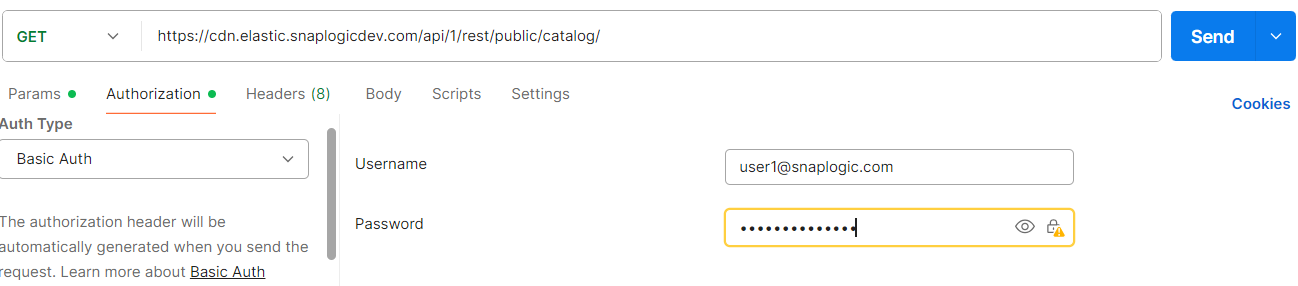
Learn more about the basic authentication header in REST API requests.
JWT authentication
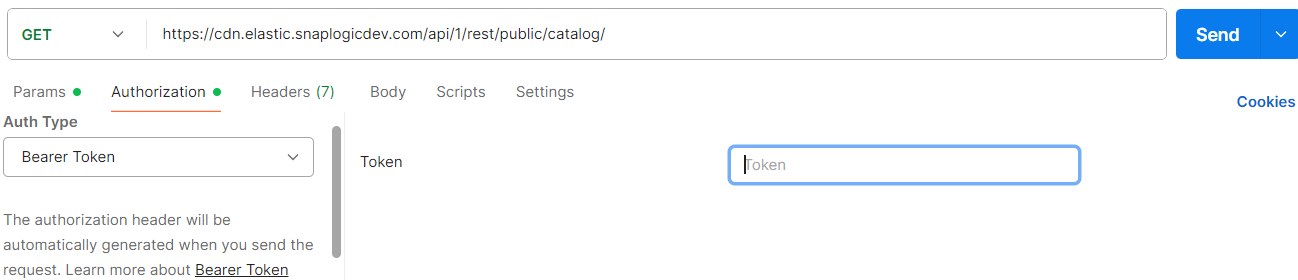
When using JWT authentication, the API request includes specific headers. In the request header,
specify Bearer Token for authorization, add the token, and specify
application/json for content type. These headers are automatically added when
you configure bearer token authentication in your API client. The authorization header contains
the word Bearer followed by a space and your JWT.
Authorization: Bearer Token {token}
Content-Type: application/json
Example of JWT authentication using Postman:
Response
A successful response returns 200 OK with a paginated envelope containing the following top-level fields:
size: The number of items returned on this page.page: The current page number (zero-based).total_pages: The total number of pages.total_elements: The total number of tasks in the org.sync_status: The status of the last catalog sync.table_last_upd_time: The timestamp of the last catalog sync.content: An array of task objects. Each object contains details of a task in the environment.summary: An object containing aggregate statistics for the result set, includingtotal_rows,assets_with_executions, and per-column sums and averages.
table_last_upd_time field shows when the snapshot was last updated. {
"size": 0,
"page": 0,
"total_pages": 0,
"total_elements": 0,
"sync_status": "",
"table_last_upd_time":"",
"content": [
json1, json2, json3
],
"summary": {
"total_rows": 0,
"assets_with_executions": 0
}
}
Example 1: Basic request
Assuming a task request in a development environment:
https://cdn.elastic.snaplogicdev.com/api/1/rest/public/catalog/DEV/tasks?size=2
{
  "size": 2,
  "page": 0,
  "total_pages": 51,
  "total_elements": 101,
  "sync_status": "finished",
  "table_last_upd_time": "1970-01-01T00:00:00.000Z",
  "content": [
    {
      "name": "test",
      "path": "shared",
      "job_id": "66dcac4121f30f5d80b61918",
      "enabled": true,
      "schedule": null,
      "pipeline": {
        "name": null,
        "sources": [],
        "targets": [],
        "accounts": [],
        "snode_id": "66ce570738e21acb5a642cbe",
        "pipeline_id": null
      },
      "type": "triggered",
      "created_by": "[email protected]",
      "created_at": "2024-02-26T15:20:34.815Z",
      "updated_at": "2024-02-26T15:20:34.815Z",
      "snode_id": "66dcac4260a74c87c68b7fce",
      "custom_metadata": {
        "customField1": "",
        "customField2": "",
        "customField3": "",
        "custom_field_1": "",
        "Type": "",
        "my_coll": ""
      },
      "operational_data": {
        "total_executions": 0,
        "stopped_executions": 0,
        "successful_executions": 0,
        "failed_executions": 0,
        "execution_failure_rate": 0.0,
        "average_duration_ms": 0,
        "average_docs_processed": 0
      },
      "plex_path": "shared/Cloud",
      "last_run_date": null,
      "last_run_status": null,
      "updated_by": "[email protected]"
    },
    {
      "name": "test_task",
      "path": "shared",
      "job_id": "66ce5744df8e96be262a64ad",
      "enabled": true,
      "schedule": null,
      "pipeline": {
        "name": null,
        "sources": [],
        "targets": [],
        "accounts": [],
        "snode_id": "66ce570738e21acb5a642cbe",
        "pipeline_id": null
      },
      "type": "triggered",
      "created_by": "[email protected]",
      "created_at": "2024-02-15T18:26:12.121Z",
      "updated_at": "2024-02-15T18:26:12.121Z",
      "snode_id": "66ce5744c6fb5b34f25155cd",
      "custom_metadata": {
        "customField1": "",
        "customField2": "",
        "customField3": "",
        "custom_field_1": "",
        "Type": "",
        "my_coll": ""
      },
      "operational_data": {
        "total_executions": 0,
        "stopped_executions": 0,
        "successful_executions": 0,
        "failed_executions": 0,
        "execution_failure_rate": 0.0,
        "average_duration_ms": 0,
        "average_docs_processed": 0
      },
      "plex_path": "shared/Cloud",
      "last_run_date": null,
      "last_run_status": null,
      "updated_by": "[email protected]"
    }
  ],
  "summary": {
    "total_rows": 101,
    "assets_with_executions": 45
  }
}
plex_path field is empty for tasks that run on CloudFeedMaster.Example 2: With pagination
Request with pagination (page 1, 10 items per page) in a development environment:
https://cdn.elastic.snaplogicdev.com/api/1/rest/public/catalog/DEV/tasks?page=1&size=10
Troubleshooting
| Error | Cause | Resolution |
|---|---|---|
403 Forbidden: Org is not subscribed to
the 'integration_catalog_metadata_collection'
feature |
The Asset Catalog feature is not enabled for the Environment/Org, or the user does not have Environment/Org admin access. | Ask your SnapLogic administrator to enable the Asset Catalog feature for the Environment/Org. Verify that the account used has Environment/Org admin access. |