


Retrieve details of pipelines
GET https://{controlplane_path}api/1/rest/public/catalog/{env_org}/pipelines Prerequisites
- Environment (Org) admin permissions
Path parameters
| Parameter | Description | Required |
|---|---|---|
controlplane_path |
The path to the SnapLogic control plane:
elastic.snaplogic.com
For the UAT or EMEA control plane, substitute the name for
elastic. For example:
|
Yes |
env_org |
The name of the SnapLogic Environment/Org. | Yes |
Query parameters
| Key | Value | Description | Required/Optional |
|---|---|---|---|
page |
Integer | An integer specifying the page of results to return (zero-based). Default is 0. | Optional |
size |
Integer | An integer specifying the number of items per page. Default is 20. | Optional |
Request header
Basic authentication
To use basic authentication, specify Basic for authorization in the request
header, add your credentials (email and password for your SnapLogic user or service account), and
specify application/json for content type. For example:
Authorization: Basic {base64_encoded <email>:<password>}
Content-Type: application/json
Example of basic authentication using Postman:
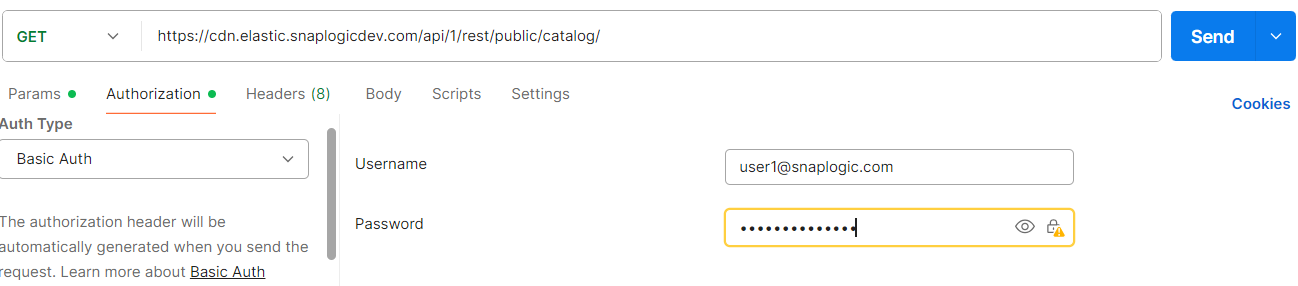
Learn more about the basic authentication header in REST API requests.
JWT authentication
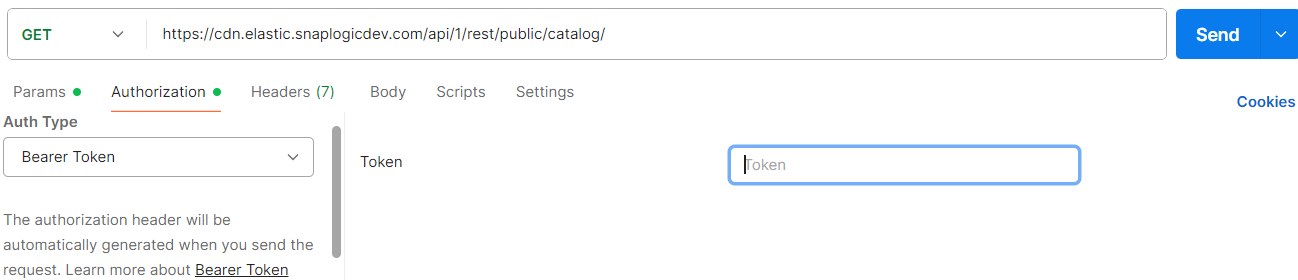
When using JWT authentication, the API request includes specific headers. In the request header,
specify Bearer Token for authorization, add the token, and specify
application/json for content type. These headers are automatically added when
you configure bearer token authentication in your API client. The authorization header contains
the word Bearer followed by a space and your JWT.
Authorization: Bearer Token {token}
Content-Type: application/json
Example of JWT authentication using Postman:
Response
Code 200 OK where: list: The list of pipelines.page: The current page of results.content: Each JSON object contains the data lineage for a pipeline in the OpenLineage Object Model.
{
  "size": 0,
  "page": 0,
  "total_pages": 0,
  "total_elements": 0,
  "sync_status": "",
  "table_last_upd_time": "",
  "content": [
    "json1",
    "json2",
    "json3"
  ]
}
Example 1: Basic request
Assuming a pipeline request in a development environment:
https://elastic.snaplogicdev.com/api/1/rest/public/catalog/DEV/pipelines
{
  "size": 2,
  "page": 0,
  "total_pages": 1,
  "total_elements": 2,
  "sync_status": "finished",
  "table_last_upd_time": "2024-06-18T12:23:04.535Z",
  "content": [
    {
      "name": "01.JDBC.slp_20240618142302457765",
      "path": "DEV/project1",
      "pipeline_id": "c2d27ca6-1951-4e77-926d-999056f8911b",
      "snode_id": "66717c287582f450c5689dac",
      "created_by": "[email protected]",
      "updated_by": "[email protected]",
      "last_run_status": null,
      "created_at": "2024-06-18T12:23:04.535Z",
      "updated_at": "2024-06-18T12:23:04.535Z",
      "last_run_date": null,
      "sources": [{"name": "JDBC"}],
      "targets": [{"name": "JDBC"}],
      "accounts": [],
      "operational_data": {
        "total_executions": 0,
        "stopped_executions": 0,
        "successful_executions": 0,
        "failed_executions": 0,
        "execution_failure_rate": 0.0,
        "average_duration_ms": 0,
        "average_docs_processed": 0
      },
      "custom_metadata": {"LOB": "Utility"}
    },
    {
      "name": "01.JDBC.slp_20240625173717460551",
      "path": "DEV/project1",
      "pipeline_id": "6e18482a-3016-430e-b041-ae125b101eaa",
      "snode_id": "667ae42f3ace493bf6dce1e7",
      "created_by": "[email protected]",
      "updated_by": "[email protected]",
      "last_run_status": null,
      "created_at": "2024-06-25T15:37:19.016Z",
      "updated_at": "2024-06-25T15:37:19.017Z",
      "last_run_date": null,
      "sources": [{"name": "JDBC"}],
      "targets": [{"name": "JDBC"}],
      "accounts": [],
      "operational_data": {
        "total_executions": 0,
        "stopped_executions": 0,
        "successful_executions": 0,
        "failed_executions": 0,
        "execution_failure_rate": 0.0,
        "average_duration_ms": 0,
        "average_docs_processed": 0
      },
      "custom_metadata": {"LOB": "Utility"}
    }
  ]
}
Example 2: With pagination
Request with pagination (page 2, 20 items per page) in a development environment:
https://elastic.snaplogicdev.com/api/1/rest/public/catalog/DEV/pipelines?page=2&size=20