


JWT configuration
The following describe how to:
- Configure the JWT provider
- Configure the SnapLogic environment
- Enable SnapLogic API users
- Troubleshoot
Configure the JWT provider
Any JSON Web Token (JWT) provider can generate tokens for SnapLogic public API authentication. Most providers require administrative permission for initial configuration. Configuration steps vary, so refer to your provider's documentation. The SnapLogic Platform requires the following:
-
RS256 or ES256 asymmetric signing algorithm.
- The token must include the following claims:
iat: Issued At. A timestamp (in seconds since the Unix epoch) indicating when the JWT was created. This value must be in the past and is generated by the provider.exp: Expiration Time. A future timestamp when the token becomes invalid. Also generated by the provider.sub: Subject. Identifies your organization. Supplied by you.aud: Audience. The SnapLogic Public API URL:https://<controlplane_path>/api/1/rest/publicSupplied by you.iss: Issuer. Identifies the token provider. Generated by the provider.org: The SnapLogic environment name. Supplied by you.
In addition SnapLogic supports snaplogic_org as custom claim for organization
identification, and snaplogic_aud as a new claim to handle the unmodifiable aud claim in
Microsoft Entra.
The aud (audience) claim is required for decoding and validating the
JWT. The aud claim must be present in the token.
If your identity provider cannot set aud to the SnapLogic public API URL
(for example, because the value is not configurable), include that URL in a custom claim
named snaplogic_aud. SnapLogic uses snaplogic_aud for
audience matching, but aud must still exist in the token.
AWS Cognito issues both an ID Token and an Access Token. SnapLogic accepts either token,
provided it contains the required claims with the expected values. However, the Access
Token (intended for authorization) does not include the aud claim by
default, so the ID Token (intended for authentication) is usually the better choice.
Your provider might generate additional claims, but the SnapLogic Platform only uses those mentioned above. The following example shows a generated token body with the required claims:
        {
        "iat": 1746477764,
        "exp": 1746481364,
        "sub": "[email protected]",
        "aud": "https://elastic.snaplogic.com/api/1/rest/public",
        "iss": "6255cabfb089cfac8f490573",
        "org": "MyEnvironment"
        }
Collect the following values from your provider:
- The issuer ID.
- The JWKS endpoint URL for fetching the public keys necessary to verify token signature.
Provide these values in Admin Manager to configure the SnapLogic environment.
Configure the SnapLogic environment
After you configure the JWT provider and obtain the issuer ID and JWKS endpoint URL, complete the following steps:
- In Admin Manager, select Authorization from the left navigation pane.
- Click the JWT tab.
- Enter the issuer ID and JWKS endpoint URL:
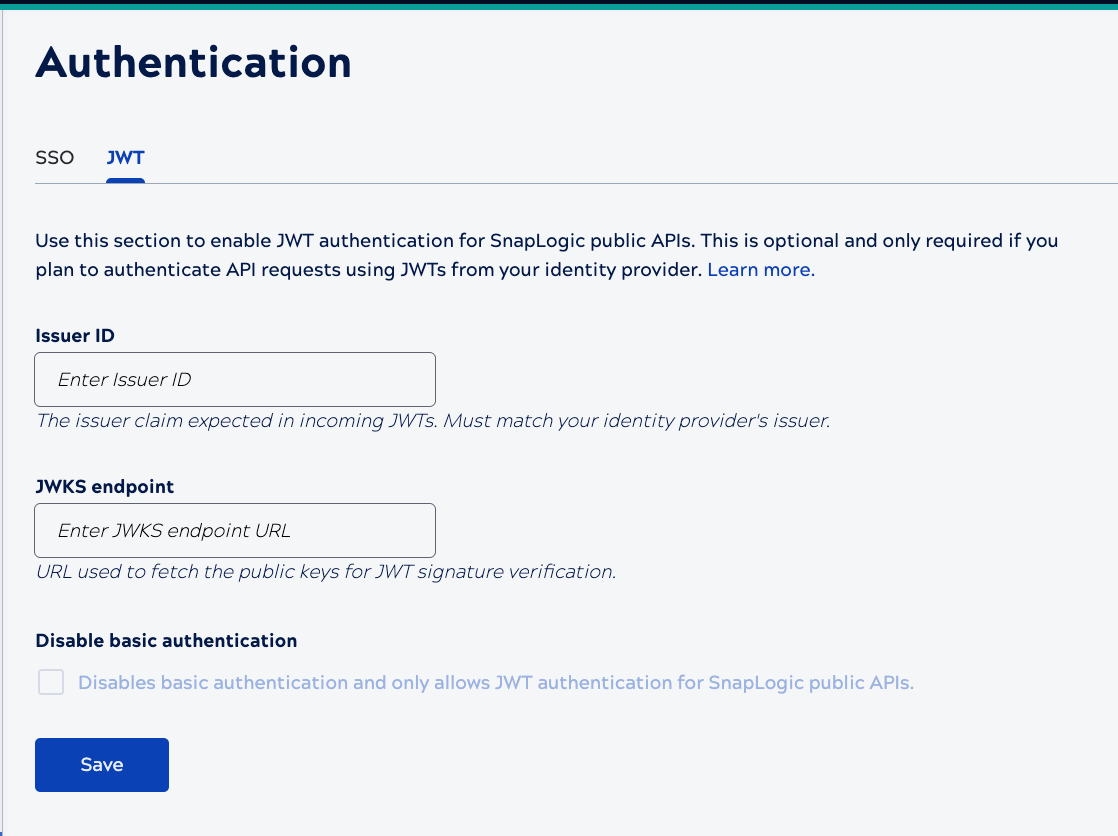
- Optionally, select Disable basic authentication to restrict authentication to use of JWTs.
- Click Save.
Enable SnapLogic API users
After configuring the JWT provider and SnapLogic environment, you need to provide API users the values they need to generate their own tokens. This will depend on the provider.
Troubleshooting
When requests using a JWT for authentication fail, check the runtime logs. You can download logs from Monitor by opening the details panel for the node that executed the request.
For detailed troubleshooting guidance, including common failure points and solutions, refer to JWT troubleshooting.
The following table lists log messages related to JWT authentication failure:
| Message | Problem |
|---|---|
| A public API request from {request.remote_addr} to {request.path} using JWT missed the custom claim 'org' in the JWT payload, required to fetch public key and verify JWT signature. | The token didn't include the required org claim with the environment
name for the value. |
| The provided organization in JWT claims did not match | The required org claim in the token did not match a valid environment
name, or the JWT authentication settings have not been configured for the specified
environment in Admin Manager. |
|
No such user {username}. |
The required sub claim in the token didn't match a valid user. |
|
User {username} called a public API using JWT but is not a member of {environment}. |
The required sub claim in the token didn't match a valid user in the
environment. |
|
{environment} is missing the JWKS URL in auth settings. |
The JWKS endpoint field in Admin Manager is empty. |
|
{environment} provided a wrong JWKS in the auth settings. |
The JWKS endpoint field value in Admin Manager is incorrect. |
|
{environment} issued a JWT for public APIs not using RS256 or ES256 algorithms. |
The token wasn't signed with a supported algorithm. |
|
{environment} called a public API with a JWT that was expired. |
The required exp claim in the token contained a value for a past date.
The expiration timestamp must be in the future |
|
{organization} called a public API with a JWT that was issued in the future |
The required iat claim in the token contained a value for a future date.
The issued timestamp must be in the past. |
|
{organization} called a public API with an invalid JWT. Error: Invalid issuer |
The required iss claim in the token didn't match the Issuer ID in Admin
Manager. |
|
{environment} called a public API with an invalid JWT. Error: Audience doesn’t match |
The required aud claim in the token didn't match the SnapLogic public
API URL. |
|
{environment} called a public API with an invalid JWT. Error: {error_message)}" |
Signature validation of the token failed. |