


Untrack a project
GET https://{controlplane_path}/api/1/rest/public/project/untrack/{project_path}
Stops tracking the specified project or project space with Git.
Prerequisites
- Write access to the assests to be added or updated
Limitations
- You cannot use SnapLogic service accounts to call any of the SnapLogic Git operation APIs.
Path parameters
| Key | Description |
|---|---|
controlplane_path |
Required. The SnapLogic control plane host:
elastic.snaplogic.com (US) or
emea.snaplogic.com (EU). |
project_path |
Required.
The path to the SnapLogic project.
Format:
Important: The path comparison is case-sensitive.
|
Query parameters
None.
Request header
Basic authentication
To use basic authentication, specify Basic for authorization in the request
header, add your credentials (email and password for your SnapLogic user or service account), and
specify application/json for content type. For example:
Authorization: Basic {base64_encoded <email>:<password>}
Content-Type: application/json
Example of basic authentication using Postman:
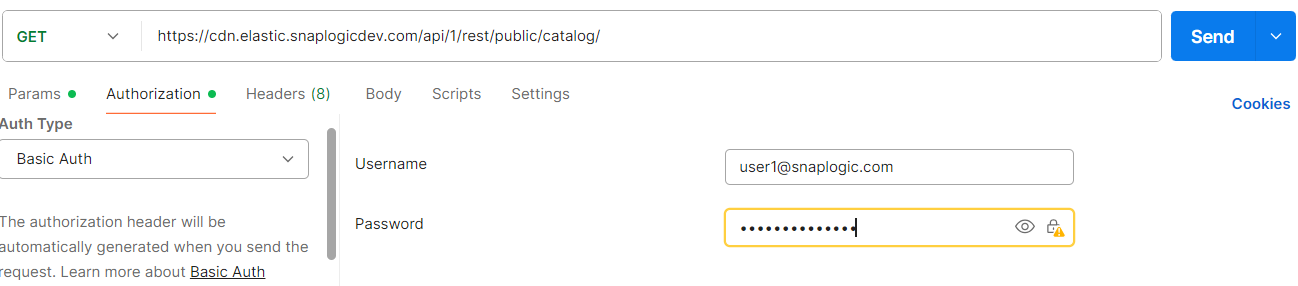
Learn more about the basic authentication header in REST API requests.
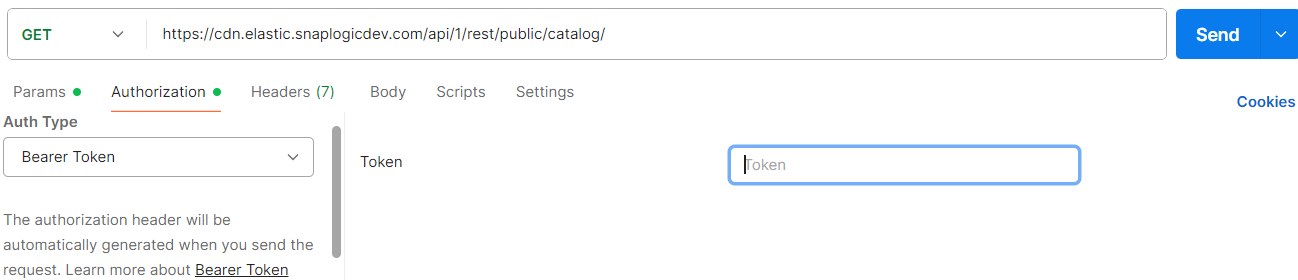
JWT authentication
When using JWT authentication, the API request includes specific headers. In the request header,
specify Bearer Token for authorization, add the token, and specify
application/json for content type. These headers are automatically added when
you configure bearer token authentication in your API client. The authorization header contains
the word Bearer followed by a space and your JWT.
Authorization: Bearer Token {token}
Content-Type: application/json
Example of JWT authentication using Postman:
Request body
None.
Response
 {
  "response_map": {
    "untracked_projects": : [
    (list of project and project space path)
]
},
"http_status_code": 200
}
}
Example
This example uses Basic authentication. For a JWT example, refer to Authentication.
curl -X GET \
  'https://elastic.snaplogic.com/api/1/rest/public/project/untrack/acme/MySpace/MyProject' \
  -H 'Authorization: Basic {base64_encoded email:password}'