


Read message data from JSON and send to JMS queue
This example demonstrates how to use the JMS Producer Snap to read data from a JSON file and add the data into the message queue.

Download this Pipeline
-
Configure the JSON
Generator Snap to generate employee records as JSON documents.
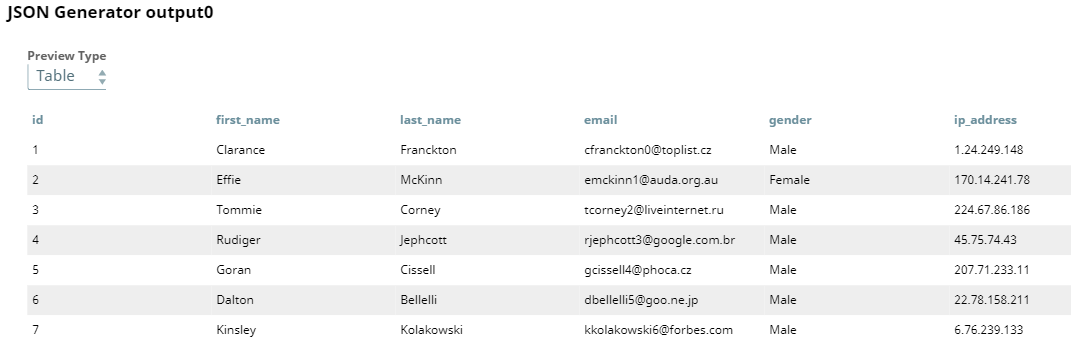
The sample input data consists of employee records. The JSON Generator Snap generates them as a JSON document. The following image shows a preview of the output from the JSON Generator Snap:
-
Configure the JMS Producer Snap to send messages to the JMS destination.
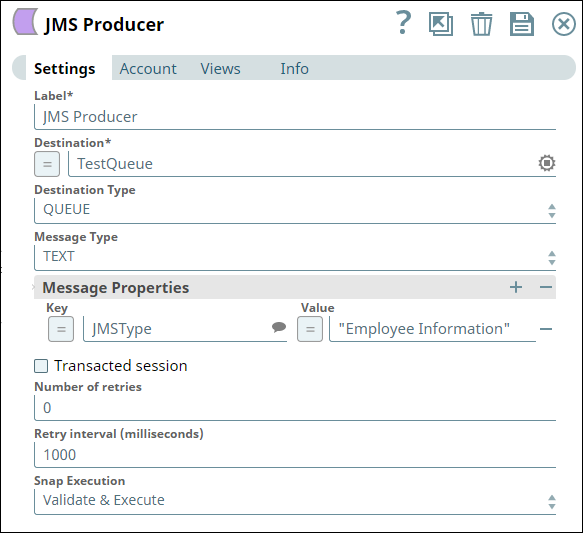
Upon execution, all the data is placed in the messaging queue.
- Download and import the SLP file into your Environment.
- Configure Snap accounts.
- Provide Pipeline parameters, if any.