


Vertica - Update
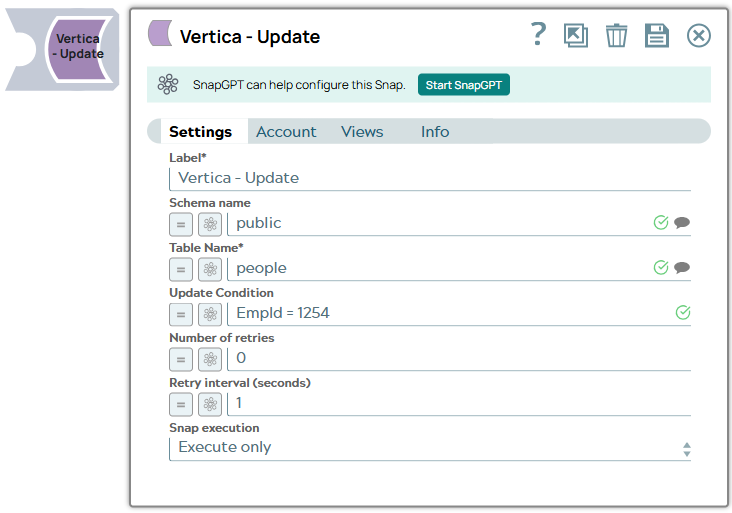
The Vertica - Update Snap executes a Vertica update.
- This is a Write-type Snap.
 Works in Ultra Tasks
Prerequisites
None.
Supported Accounts
Snap views
| Type | Description | Examples of upstream and downstream Snaps |
|---|---|---|
| Input |
This Snap has exactly one document input view. |
|
| Output |
This Snap has at most one document output view. |
|
| Error |
This Snap has at most one document error view and produces zero or more documents in the view. Warning: Database Write Snaps output all records of a batch (as
configured in your account settings) to the error view if the write fails during
batch processing.
|
In a scenario where the Auto commit on the account is set to true, and the downstream Snap depends on the data processed on an Upstream Database Bulk Load Snap, use the Script Snap to add delay for the data to be available.
For example, when performing a create, insert and a delete function sequentially on a pipeline, using a Script Snap helps in creating a delay between the insert and delete function or otherwise it may turn out that the delete function is triggered even before inserting the records on the table.
Snap settings
- Expression icon (
 ): Allows using
pipeline parameters to set field values dynamically (if enabled). SnapLogic Expressions
are not supported. If disabled, you can provide a static value.
): Allows using
pipeline parameters to set field values dynamically (if enabled). SnapLogic Expressions
are not supported. If disabled, you can provide a static value. - SnapGPT (
 ): Generates SnapLogic Expressions
based on natural language using SnapGPT. Learn
more.
): Generates SnapLogic Expressions
based on natural language using SnapGPT. Learn
more. - Suggestion icon (
 ): Populates a
list of values dynamically based on your Snap configuration. You can select only one
attribute at a time using the icon. Type into the field if it supports a comma-separated
list of values.
): Populates a
list of values dynamically based on your Snap configuration. You can select only one
attribute at a time using the icon. Type into the field if it supports a comma-separated
list of values. - Upload
 : Uploads files. Learn more.
| Field/Field set | Description |
|---|---|
| Label
|
Specify a unique name for the Snap. Modify this to be more appropriate, especially if more than one of the same Snaps is in the pipeline. Default value: Vertica Update Example: Vertica Update |
| Schema name
|
Specify the database schema name. Selecting a
schema filters the Table name list to show only those tables within the
selected schema. The property is suggestible and retrieves available database
schemas during suggest values. Note: The values can be passed using the pipeline
parameters but not the upstream parameter. Default value: N/A Example: public |
| Table name
|
Required. Specify the name
of the table to execute the update operation on. Note: The values can be passed using
the pipeline parameters but not the upstream parameter. Default value: N/A Example: emp |
| Update condition
|
Specify the SQL WHERE clause of the update
statement. You can define specific values or columns to update (Set condition) in
the upstream Snap, such as Mapper Snap, and then use the WHERE clause to apply these
conditions on the columns sourced from the upstream Snap. For instance, here is a
sample of an Update SQL query:Important: If the Update Condition
field is left blank, the condition is applied on all the records of the target
table. Note: In certain scenarios where you want to use specific data from
the upstream Snaps, and do not want to change that data in the Update Snap, then
you need to place the data in the original structure of the input document. Hence,
we recommend that you use the format for Update condition and input data format as
shown below:
Refer to the example to understand how to use the Update Condition. Examples: Without using expressions:
Using expressions:
Warning: Using expressions that join strings together to create SQL
queries or conditions has a potential SQL injection risk and is hence unsafe.
Ensure that you understand all implications and risks involved before using
concatenation of strings with '=' Expression enabled. Default value: N/A |
| Number of retries
|
Specify the maximum number of times that the
process must be retried before displaying an error. Default value: 0 Example: 2 |
| Retry interval (seconds)
|
Specify the maximum resting time in seconds
between subsequent retries. Default value: 1 Example: 2 |
| Snap Execution
|
Choose one of the three modes in which the Snap executes. The available options are: Validate & Execute: Performs limited execution of the Snap and generates a data preview during pipeline validation. Subsequently, performs full execution of the Snap (unlimited records) during pipeline runtime. Execute only: Performs full execution of the Snap during pipeline execution without generating preview data. Disabled: Disables the Snap and all Snaps that are downstream from it. Default value: Execute only Example: Validate & Execute |