


Sample query for Global Secondary Index
Demonstrates how to use the DynamoDB Query Snap to query a Global Secondary Index using the 'EffectiveDate-index' to retrieve records matching a specific date.
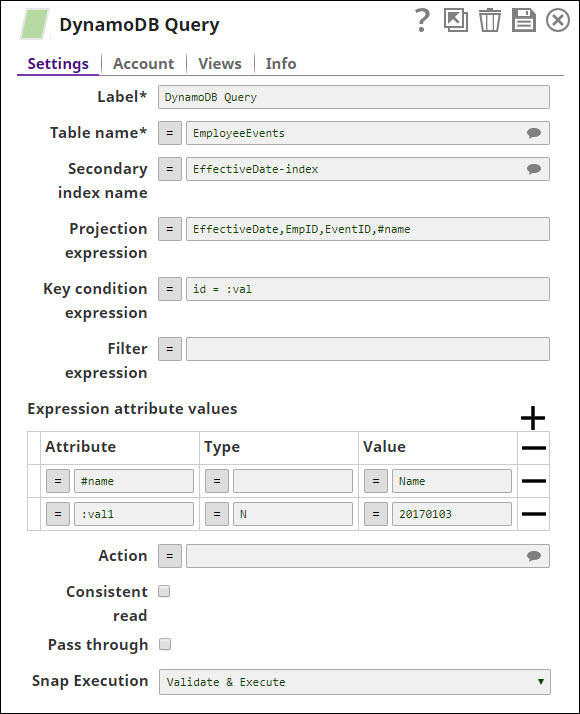
The 'EmployeeEvents' table has the following items in the above example:
| EmpID | Name | EventID | EffectiveDate |
|---|---|---|---|
| {"N":"3"} | {"S":"Paul"} | {"S":"103"} | {"N":"20170703"} |
| {"N":"2"} | {"S":"John"} | {"S":"102"} | {"N":"20170703"} |
| {"N":"3"} | {"S":"Paul"} | {"S":"102"} | {"N":"20170703"} |
| {"N":"20170210"} | {"S":"foobar"} | ||
| {"N":"1828"} | |||
| {"S":"Preferred Name Change Event"} | {"N":"1475218800000"} | ||
| {"N":"1"} | |||
| {"S":"101"} | {"N":"20170802"} |
The Snap processes Snap properties and sends the following HTTP request entity to DynamoDB:
{
    "TableName": "EmployeeEvents",
    "IndexName": "EffectiveDate-index",
    "ProjectionExpression": "EffectiveDate, EmpID, EventID, #nam",
    "KeyConditionExpression": "EffectiveDate = :val1",
    "ExpressionAttributeNames": {
        "#name": "Name"
    },
    "ExpressionAttributeValues": {
        ":val1": {
            "N": "20170703"
        }
    },
    "ReturnConsumedCapacity": "INDEXES"
}
Then, the Snap produces the output documents as following:
| EmpID | Name | EventID | EffectiveDate |
|---|---|---|---|
| {"N":"3"} | {"S":"Paul"} | {"S":"103"} | {"N":"20170703"} |
| {"N":"2"} | {"S":"John"} | {"S":"102"} | {"N":"20170703"} |
| {"N":"3"} | {"S":"Paul"} | {"S":"102"} | {"N":"20170703"} |