


SuccessFactors Basic Auth Account
Overview
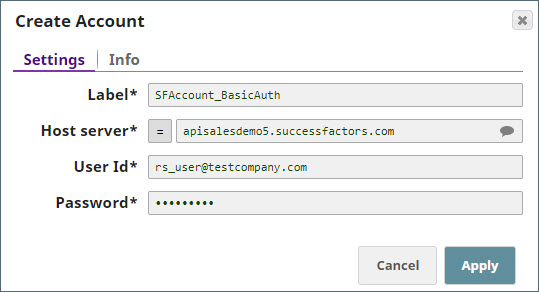
Use this account type to connect SuccessFactors Snaps with data sources that use SuccessFactors Basic Auth accounts.
Prerequisites
- A valid SuccessFactors host server.
- A valid user account with the required roles to perform the intended operations (Read, Create, Update, or Delete) on the selected entity.
Account settings
Note: Learn about
the common controls in the Snap settings dialog.
| Field/Field set | Description |
|---|---|
Label* String |
Required. Unique name for the account. Default value: N/A |
Host server String |
The host server of the SuccessFactors data center. Note: The suggestion
drop-down displays host names and descriptions of public SuccessFactors data
centers. If your required host server is not populated, you can manually enter it
in the text box. While entering the hostname, use the format shown in the example
at this link: apisalesdemo4.successfactors.com.
Default value: N/A Example: DC4 SalesDemo: Sandy, Arizona, U.S.A (demo.successfactors.com) |
User Id String |
The SuccessFactors user name and the company ID with the format of
"userName@companyID". Default value: N/A Example: sfadmin@SFPART123456 |
Password String |
The password of the SuccessFactors user ID. Default value: N/A |
Troubleshooting
| Error | Cause | Resolution |
|---|---|---|
| Authentication failed. | Incorrect user ID and password combination. | Check your user ID and ensure it is constituted by SuccessFactors user name and the company ID in the format "userName@companyID". If correct, contact your System Admin to check your login details. |
| Authentication failed. | Incorrect host server. | Check the host server you selected or entered. |