


Veeva Vault Account
Overview
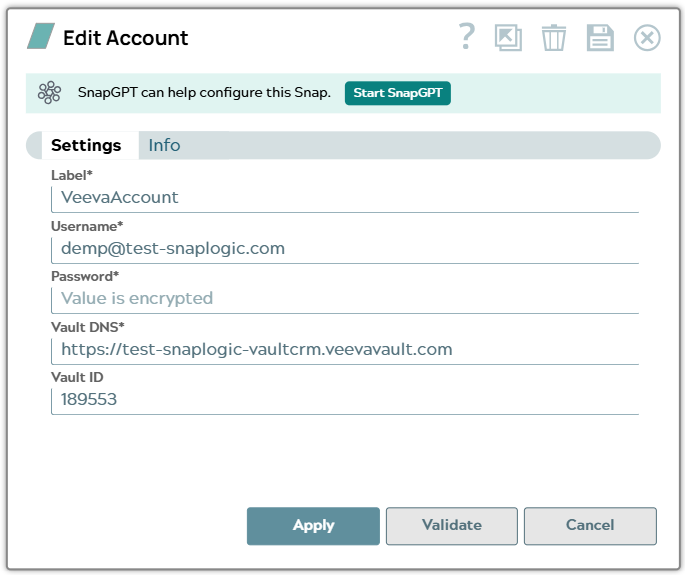
Use this account type to connect Veeva Vault Snaps with Veeva Vault instances using basic authentication (username and password). This account type supports direct credential-based authentication to Veeva Vault.
Prerequisites
- A valid Veeva Vault username and password
- API access enabled in your Veeva Vault instance
- The Veeva Vault domain URL for your instance
Account settings
Note: Learn about
the common controls in the Snap settings dialog.
| Field/Field set | Description |
|---|---|
| Label*
|
Specify a unique label for the account. Default value: N/A Example: Veeva Vault Production |
Username*
String |
The username for authenticating with Veeva Vault.
Default value: N/A Example: [email protected] |
Password*
String |
The password for authenticating with Veeva Vault. This field is obfuscated after you save the account.
Default value: N/A |
Vault DNS*
String |
The DNS of your Veeva Vault instance.
Default value: N/A Example: https://test-snaplogic-vaultcrm.veevavault.com |
Vault ID
String |
The ID of the Vault to connect to. Specify this field when your Veeva Vault domain contains more than one Vault.
Default value: N/A Example: 189553 |
Troubleshooting
| Error | Reason | Resolution |
|---|---|---|
Failed to validate account |
Invalid credentials or incorrect Vault DNS. | Verify that the username, password, and Vault DNS are correct. |
API access denied |
API access is not enabled for you | Ensure that API access is enabled in your Veeva Vault instance and you have appropriate permissions. |
Connection timeout |
Network connectivity issues or slow response from Veeva Vault. | Increase the Connection Timeout value or check network connectivity. |