


JMS Consumer
Overview
This Snap fetches the Java Message Service (JMS) messages from a JMS destination and acknowledges them.
Supported Accounts
- This is a Read-type Snap.
 Works in Ultra Tasks
Prerequisites
- A valid account with the required permissions.
Limitations
- Processes only the following types of messages:
- TEXT
- MAP
- BYTE
- STREAM
Snap views
| Type | Description | Examples of upstream and downstream Snaps |
|---|---|---|
| Input |
This Snap has at most one optional document input view. |
|
| Output |
This Snap has exactly one document output view. |
|
| Learn more about Error handling. | ||
Snap settings
| Field/Field set | Description |
|---|---|
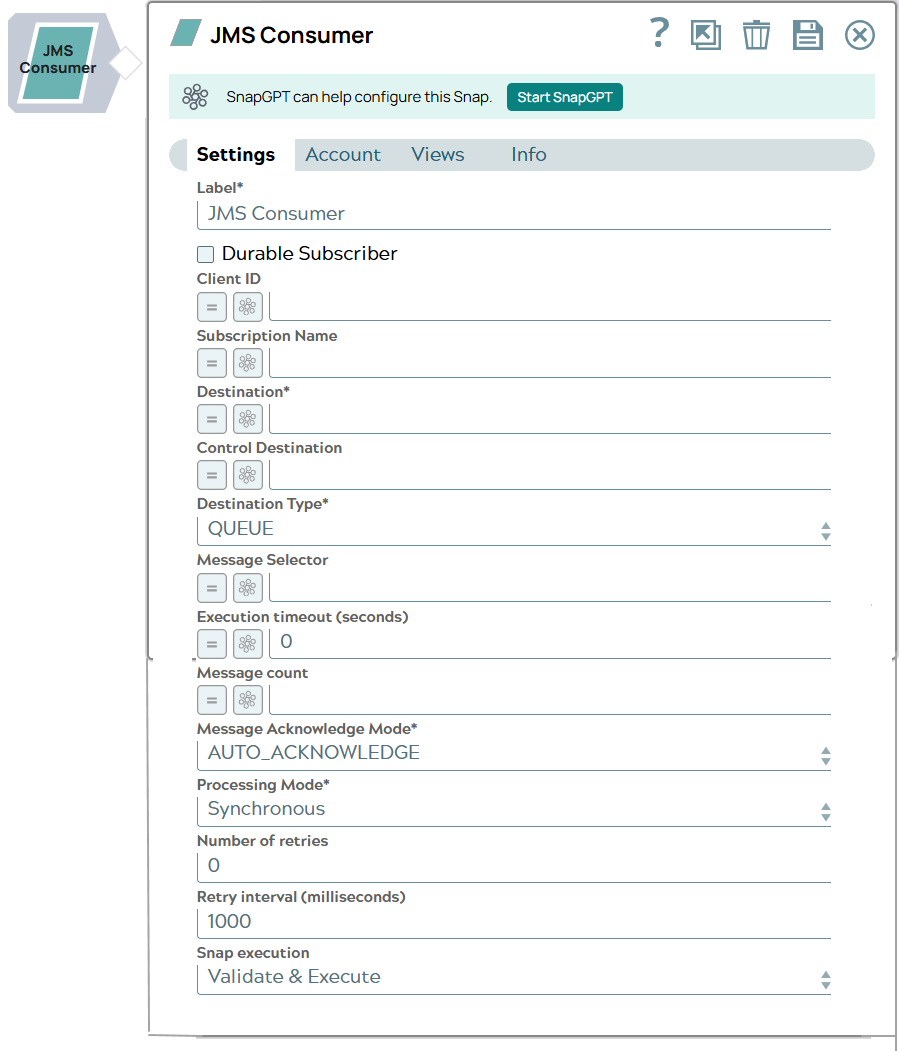
Label*
String |
The name for the Snap. You can modify this to be more specific, especially if you have more than one of the same Snap in your pipeline. Default value: N/A Example: JMS Consumer |
Durable subscriber
Checkbox |
A Boolean field to make the JMS Consumer Snap a durable subscriber. A durable subscriber consumer wants to receives the messages that were sent when the subscriber is disconnected from the messaging system, requiring the messaging provider to cache publications until the subscriber is back up. Default value: Not selected |
Client ID
String/Expression |
A client ID to be applied to the JMS connection inside this JMS consumer. This field is used only when Durable subscriber is selected. Default value: N/A Example: 0001Note: The values can be passed dynamically using the pipeline parameters but not via the upstream.
|
Subscription name
String/Expression |
The name of the subscription to be used when Durable subscriber is selected. This field is required when Durable subscriber is selected. Default value: N/A Example: TestSubscriptionNote: The values can be passed dynamically using the pipeline parameters but not via the upstream.
|
Destination*
String/Expression |
The Java Naming and Directory Interface (JNDI) lookup name of the regular JMS destination. Note: This destination is used to fetch regular JMS messages.
Note:
Example:
|
Control destination
String/Expression |
The JNDI lookup name of the control JMS destination. Note: This destination is used to fetch control JMS messages to stop this JMS consumer from fetching regular JMS messages. The destination must be specified with the JMS Server Name and JNDI context path. Specify the destination in this format: JMS_Server_Name@JNDI_context_path
Default value: N/A Example: JMSTestServer@JNDIContextPathNote: The values can be passed dynamically using the pipeline parameters but not via the upstream.
|
Destination type*
Dropdown list |
A type of JMS destination. Valid options are:
Default value: Queue Example: Topic |
Message selector
String/Expression |
A SQL92 style expression to filter the JMS messages. The message selector value can be used to filter the messages from the destination, but cannot reference the message body. A message that evaluates the expression as true will pass on to the consumer. See your providers documentation for supported expressions. Note: The SQS account does not support Message Selector values—it expects the value to be null. Learn more: Support for Message selectors.
Example:
|
Execution timeout (seconds)
Integer/Expression |
The maximum time, in seconds, the Snap waits for execution to complete. If the time exceeds, the Snap stops processing and completes execution. The default value 0 indicates no timeout.
Default value: 0 Example: 30 |
Message count
Integer/Expression |
Maximum messages to read before execution stops. A negative value will make this JMS Consumer run indefinitely. Set to zero to consume all the messages in the destination queue/topic and then exit. Note: When you validate the Snap, the Snap consumes only one message irrespective of the value in the Message count.
Default value: -1 (when this Snap has no input views) or 1 (when the Snap has an input view) |
Message acknowledge mode*
Dropdown list |
A message acknowledgment mode for non-transacted sessions. Valid options are:
For a description of these modes, go to http://docs.oracle.com/javaee/6/tutorial/doc/bncfu.html#bncfw Default value: AUTO_ACKNOWLEDGE Example: CLIENT_ACKNOWLEDGE |
Transacted session
Checkbox |
Appears when Message acknowledge mode is CLIENT_ACKNOWLEDGE. Select this checkbox to let the Snap use a transacted session with the JMS provider. Deselect it if your JMS provider doesn't support transacted sessions, for example, a Solace client profile where transacted sessions are turned off. The Snap then uses a non-transacted session, and messages are still acknowledged. Warning: If this checkbox is selected and the provider doesn't support transacted sessions, the Snap fails with an error such as
Capability Mismatch: Router does not support transacted sessions.Default value: Selected Example: Deselected (for a Solace client profile with transacted sessions turned off) |
Processing mode*
Dropdown list |
A mode of message processing (Synchronous or Asynchronous).
Default value: Synchronous |
Number of retries
Integer |
The maximum number of attempts the Snap must make to fetch JMS messages when there is a network failure. Default value: 0 Example: 3 |
Retry interval (milliseconds)
Integer |
The minimum time in milliseconds for which the Snap must wait before attempting recovery from a network failure. Default value: 1000 Example: 1500 |
Snap execution
Dropdown list |
Choose one of the three modes in
which the Snap executes. Available options are:
|
Temporary files
During execution, data processing on Snaplex nodes occurs principally in-memory as streaming and is unencrypted. When processing larger datasets that exceed the available compute memory, the Snap writes unencrypted pipeline data to local storage to optimize the performance. These temporary files are deleted when the pipeline execution completes. You can configure the temporary data's location in the Global properties table of the Snaplex node properties, which can also help avoid pipeline errors because of the unavailability of space. Learn more about Temporary Folder in Configuration Options.