


Zendesk Account
Overview
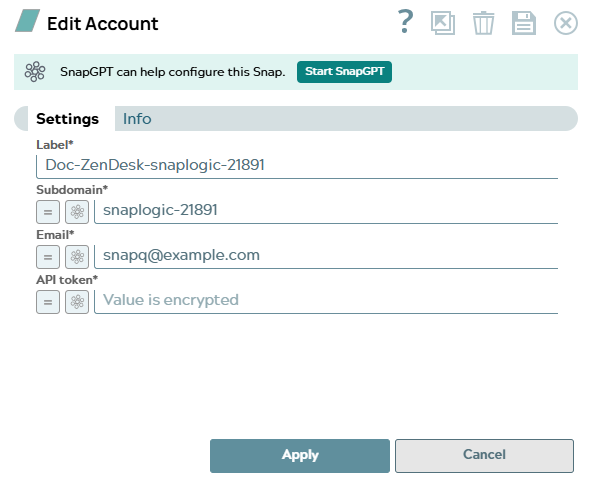
Use this account type to connect Zendesk Snaps to your Zendesk instance using email and API token authentication. Expression-enabled fields allow you to supply the token dynamically at pipeline runtime, making this account suitable for multi-tenant pipelines or integrations that manage tokens externally.
Expression-enabled fields support Secrets Management, a SnapLogic add-on that allows you to store endpoint credentials in a third-party secrets manager such as AWS Secrets Manager, Azure Key Vault, or HashiCorp Vault. During validation and execution, pipelines obtain the credentials directly from the secrets manager. Learn more: Configure Accounts to use secrets.
Prerequisites
- An active Zendesk account with Agent or Admin role.
- API token access enabled in Zendesk Admin Center under Apps and integrations > APIs > Zendesk API.
- A valid API token generated in the Zendesk Admin Center.
Account settings
| Field/Field set | Description |
|---|---|
Label*
String |
Unique name for the account.
Default value: None Example: |
Subdomain*
String/Expression |
The subdomain of your Zendesk instance.
Enter only the subdomain portion, without the scheme or
.zendesk.com suffix.
Default value: None Example: If your Zendesk URL is
|
Email*
String/Expression |
The email address of the Zendesk user
associated with the API token.
Default value: None Example: |
API token*
String/Expression |
The API token generated in the Zendesk
Admin Center. This field is obfuscated after saving.
To generate a token, go to Admin Center > Apps and integrations > APIs > Zendesk API and click Add API token. Default value: None Example: |
Click Apply to save the account settings.
Troubleshooting
| Error | Reason | Resolution |
|---|---|---|
| Failed to validate account: 401 Unauthorized | Invalid email or API token, or API token access is disabled in Zendesk. | Verify that the email address matches the Zendesk user associated with the token. Confirm that API token access is enabled in the Zendesk Admin Center under Apps and integrations > APIs > Zendesk API. |
| Failed to validate account: Invalid subdomain | The subdomain value contains the full URL or invalid characters. | Enter only the subdomain portion without https:// or
.zendesk.com. For example, enter mycompany,
not https://mycompany.zendesk.com. |
| 403 Forbidden | The Zendesk user does not have sufficient permissions to access the requested resource. | Ensure the user associated with the API token has an Agent or Admin role in Zendesk. Some resources require Admin role access. |