


Tc Participant Get Types
Use this Snap to get the types defined for participants in the Teamcenter system. Type information includes a list of object types the participant can be used on.
Supported Accounts
- This is a Read-type Snap.
 Works in Ultra Tasks
Prerequisites
- A valid Teamcenter account with the required permissions.
Snap views
| Type | Description | Examples of upstream and downstream Snaps |
|---|---|---|
| Input |
Optional.This Snap has at the most one document input view. The input of the snap is optionally a defined type to get participant types for. |
|
| Output |
This Snap has exactly one document output view. The output of the snap is the participant type information including name and usableOn list. |
|
| Learn more about Error handling. | ||
Examples
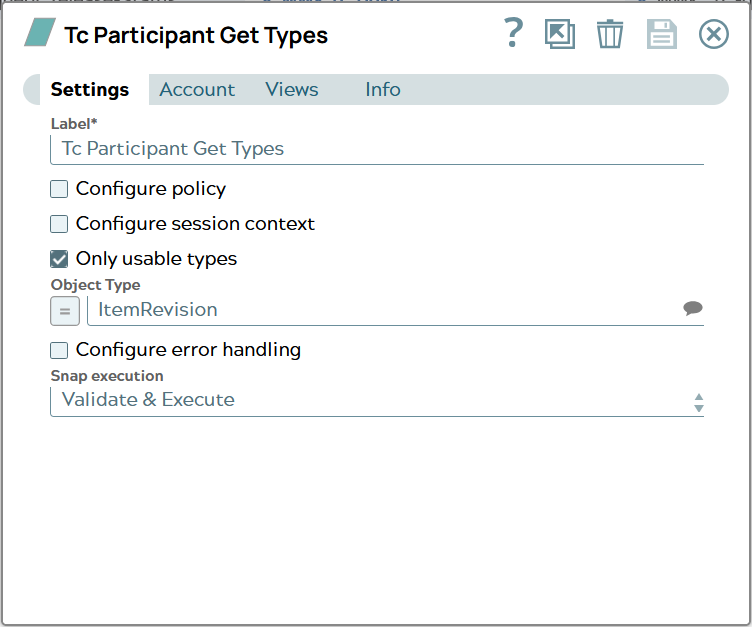
Tc Participant Get Types: Get usable participant types for ItemRevisionSnap settings
| Field/Field set | Description |
|---|---|
Label
String |
Specify a unique name for the Snap. Modify this to
be more appropriate, especially if there are more than one of the same Snap in the
pipeline.
Default value: Tc Participant Get Types |
Configure policy
Checkbox |
Select this checkbox to run the Snap with a specific named Teamcenter policy. A policy determines the set of object properties that Teamcenter returns. Learn more: Configure policy. Default status: Deselected |
Configure session context
Checkbox |
Select this checkbox to run the Snap with a group, role, or project other than the one configured in the account. Learn more: Configure session context. Default status: Deselected |
Only usable types
Checkbox |
Of all possible Types only the ones shall be returned for certain Object typedefined next. Default value: Unselected Example: Selected |
Object Type
String/Expression/ Suggestion |
Specify the type for the object whose participant types shall be found for. In JSON document the content for path can look like this: Name of the JSON property has to be the technical name of a valid type in Teamcenter datamodel. Default value: N/A Example: ItemRevision |
Configure error handling
Checkbox |
Select this checkbox to define how the Snap behaves when Teamcenter returns an error. Use these settings for analysis and debugging. Learn more: Configure error handling. Default status: Deselected |
Snap execution
Dropdown list |
Choose one of the three modes in
which the Snap executes. Available options are:
|