


SAP S/4HANA Cloud Basic Auth Account
Overview
You can use this account type to connect SAP S/4HANA Snaps with datasources that use the SAP S/4HANA Cloud Basic Auth Account.
Prerequisites
- Valid Communication Arrangement which includes Catalog Service at the SAP S/4HANA Cloud instance
- Valid tenant URL
- Valid user ID
- Valid password
Account settings
Note: Learn about
the common controls in the Snap settings dialog.
| Field/Field set | Description |
|---|---|
| Label
|
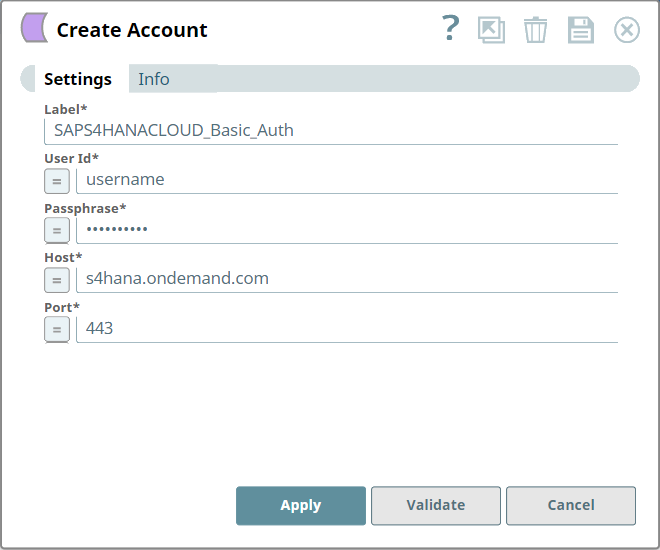
Required. Specify a unique label for the account. Default value: N/A Example: SAPS4HANACLOUD_Basic_Auth |
| User Id*
|
Specify the user name to connect to the SAP S/4HANA Cloud. Default value: N/A Example: Username |
| Passphrase*
|
Specify the password associated with the entered user name. Default value: N/A Example: MyPassword |
| Host*
|
Specify the hostname of SAP S/4HANA Cloud. Default value: N/A Example: s4hana.ondemand.com |
| Port*
|
Specify the port on which the SAP S/4HANA Cloud listens for connection
requests. Default value: N/A Example: 443 |
Note: Click Validate
after entering the required details to ensure that all fields have been filled accurately.
Click Apply to save the settings.
Troubleshooting
| Error | Cause | Resolution |
|---|---|---|
| Failed to validate account: Error on line 1: Content is not allowed in prolog. | Wrong logon details or the logon account is locked. |
|