


BigQuery - Bulk Upsert (Streaming)
Performs bulk update or insert (upsert) operations into a BigQuery table from existing tables or any input data stream.
Overview
This Snap enables you to perform bulk update or insert (upsert) operations into a BigQuery table from existing tables or any input data stream. The upsert operation updates existing rows if the specified value exists in the target table and inserts a new row if the specified value does not exist in the target table.
- Snap Type: Write
 Does not support Ultra Tasks
Prerequisites
Write access for the Google BigQuery Account is required.
Limitations and Known Issues
None.
Supported Accounts
This Snap works with the following account types. For more information, see Configuring Google BigQuery Accounts.
Snap Views
| Type | Format | Number of Views | Examples of Upstream and Downstream Snaps | Description |
|---|---|---|---|---|
| Input | Document |
|
|
This Snap has exactly one document input view. Input can come from any Snap that can pass a document to the output view, such as Structure or JSON Generator. Pipeline parameters can also be passed for project ID, dataset ID, and table ID, and so on. |
| Output | Document |
|
|
The output is in document view format. The data from the incoming document that is loaded to the destination table is the output from this Snap. It gives the load statistics after the operation is completed The output view contains information about the bulk load details in the temporary table to better understand the flow. This also helps with error handling. The output view also lists the number of rows that were updated, modified, or inserted in the target table. |
| Learn more about Error handling. | ||||
Snap Settings
| Field/Field set | Description | ||
|---|---|---|---|
| Label String |
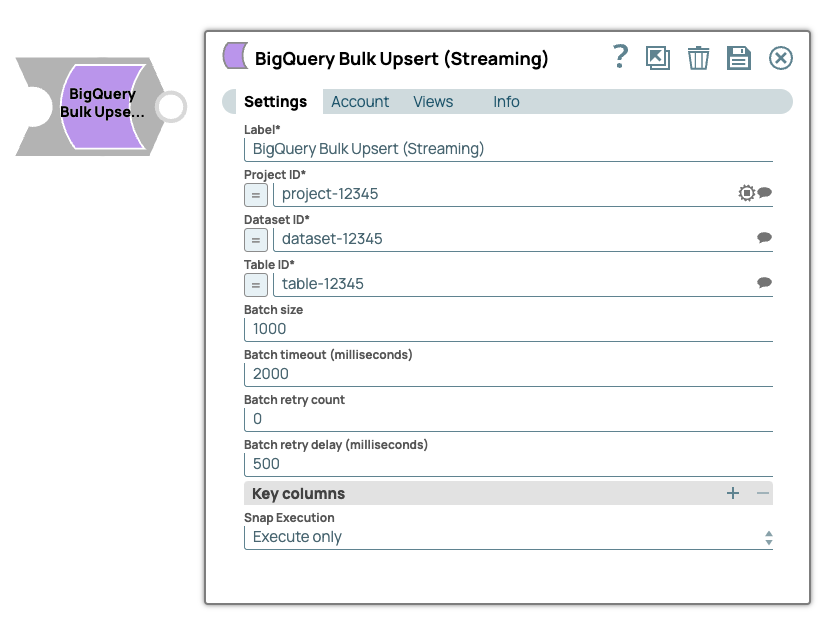
Specify the name for the Snap. You can modify this to be more specific, especially if you have more than one of the same Snap in your pipeline. Default value: BigQuery Bulk Upsert (Streaming) Example: GBQ Load Employee Tables |
||
| Project ID String/Expression |
Specify the project ID in which the dataset resides. Default value: N/A Example: test-project-12345 |
||
| Dataset ID String/Expression |
Specify the dataset ID of the destination. Default value: N/A Example: dataset-12345 |
||
| Table ID String/Expression |
Specify the table ID of the table you are creating. Default value: N/A Example: table-12345 |
||
| Batch size String |
The number of records batched per request. If the input has 10,000 records and the batch size is set to 100, the total number of requests would be 100. Default value: 1000 |
||
| Batch timeout (milliseconds) String |
Time in milliseconds after which the batch will be processed (even though it might be less than the specified batch size). Batch timeout value must be set with care. When this limit is reached, the batch will be flushed whether or not all the records in the batch were loaded. Default value: 2000 |
||
| Batch retry count String |
The number of times the server should try to load a failed batch. Default value: 0 |
||
| Batch retry delay (milliseconds) String |
The time delay between each retry. Default value: 500 |
||
Snap execution
Dropdown list |
Choose one of the three modes in
which the Snap executes. Available options are:
Default value: Validate & Execute Example: Execute only |
||
Troubleshooting
| Error/Error scenario | Reason | Resolution |
|---|---|---|
| In Google BigQuery, recently streamed data might not be available for DML operations for up to 90 minutes. As a result, you might encounter an error if you execute the BigQuery Bulk Upsert (Streaming) Snap on a table that has been modified within the last 30 minutes. | This is a limitation of the BigQuery service when using DML statements. Learn more: https://cloud.google.com/bigquery/docs/data-manipulation-language#dml-limitations
Although Google states that it can take up to 90 minutes to be able to perform upserts on a recently modified table, the time needed to wait is often much less than that and data may be available within minutes. |
To attempt retries, configure the Batch retry count and Batch retry delay (milliseconds) settings in the BigQuery Bulk Upsert (Streaming) Snap. |
| Key column name is required. | No key column(s) specified for checking for existing entries. | Please enter one or more key column names. |
| Key column name is not present in target table. | Incorrect key column(s) specified for checking for existing entries. | Please select one or more key column names from the suggestion box. |
| All columns in target table are key columns. | The merge will fail as all columns in the target table are key columns. | Please select one or more (but not all) key column names from the suggestion box. |