


Eloqua Basic Auth Account
Overview
Use this account type to connect Eloqua Snaps with datasources that use Eloqua Basic Auth accounts.
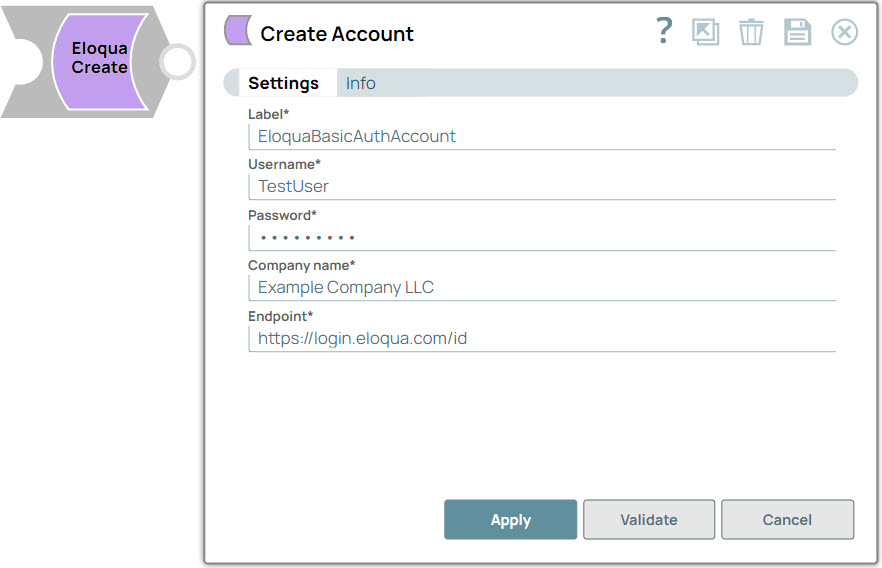
Account settings
- Expression icon (
 ): Allows using
JavaScript syntax to access SnapLogic Expressions to set field values dynamically (if
enabled). If disabled, you can provide a static value. Learn more.
): Allows using
JavaScript syntax to access SnapLogic Expressions to set field values dynamically (if
enabled). If disabled, you can provide a static value. Learn more. - SnapGPT (
 ): Generates SnapLogic Expressions
based on natural language using SnapGPT. Learn
more.
): Generates SnapLogic Expressions
based on natural language using SnapGPT. Learn
more. - Suggestion icon (
 ): Populates a
list of values dynamically based on your Snap configuration. You can select only one
attribute at a time using the icon. Type into the field if it supports a comma-separated
list of values.
): Populates a
list of values dynamically based on your Snap configuration. You can select only one
attribute at a time using the icon. Type into the field if it supports a comma-separated
list of values. - Upload
 : Uploads files. Learn more.
| Field Name/Field Type | Description | |
|---|---|---|
| Label
|
Required. The name for the account. Preferably, update the account name if your project includes more than one account of the same type. Default value: Eloqua Basic Auth Account |
|
| Username
|
Required. The user name for the Eloqua account. Default value: None Example: [email protected] |
|
| Password
|
Required. The password for the account. Default value: None Example: <Encrypted> |
|
| Company name
|
Required. Company name associated with the Eloqua login. Default value: None Example: MyCompany |
|
| Endpoint
|
Required. URI for fetching base REST API URI. Eloqua supports multiple data centers, and the https://login.eloqua.com/id endpoint lets you interface with Eloqua regardless of the location of the Eloqua install. For more information on endpoint URIs, see Determining Base URLs. Default value: https://login.eloqua.com/id |
|