


Tc Requirement Set Rich Content
This Snap upload HTML-rich content to either a Requirement or a Paragraph revision.
Supported Accounts
- This is a Write-type Snap.
 Works in Ultra Tasks
Prerequisites
- A valid Teamcenter account with the required permissions.
Snap views
| Type | Description | Examples of upstream and downstream Snaps |
|---|---|---|
| Input |
Optional.This Snap has at the most one document input view. The required input of the snap is the Object ID and html Rich Content of the file that needs to be uploaded to Teamcenter. |
|
| Output |
This Snap has exactly one document output view. The output of the snap is a JSON response with object „success“ (true or false). |
|
| Learn more about Error handling. | ||
Examples
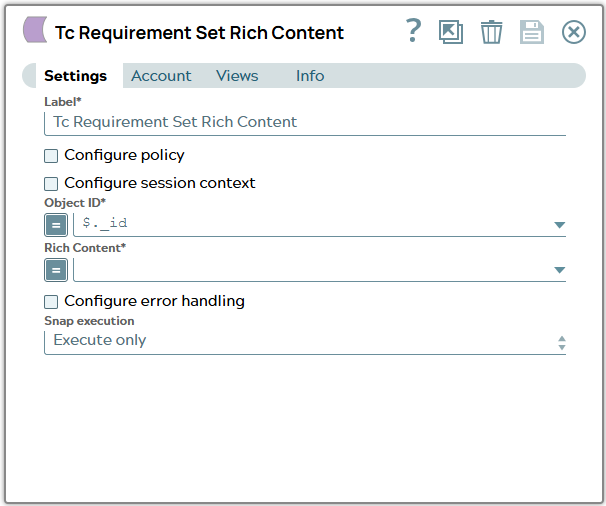
Tc Requirement Set Rich Content: Set Rich ContentSnap settings
| Field/Field set | Description |
|---|---|
Label
String |
Specify a unique name for the Snap. Modify this to
be more appropriate, especially if there are more than one of the same Snap in the
pipeline.
Default value: Tc Requirement Set Rich Content |
Configure policy
Checkbox |
Select this checkbox to run the Snap with a specific named Teamcenter policy. A policy determines the set of object properties that Teamcenter returns. Learn more: Configure policy. Default status: Deselected |
Configure session context
Checkbox |
Select this checkbox to run the Snap with a group, role, or project other than the one configured in the account. Learn more: Configure session context. Default status: Deselected |
Object ID*
String/Expression |
Select the UID (unique identifier) or the Teamcenter adapter ID of the requirement or paragraph object. Default value: $._id Example: $.req_uid |
Rich Content*
String/Expression |
Specify the HTML rich content to upload to the requirement/paragraph revision. Default value: N/A Example: $.richContent |
Configure output
Checkbox |
Select this checkbox to specify the Teamcenter properties that the Snap includes in the output. This Snap offers the output settings described in Basic settings. Default status: Deselected |
Snap execution
Dropdown list |
Choose one of the three modes in
which the Snap executes. Available options are:
|