


Open Table Iceberg - Execute
Overview
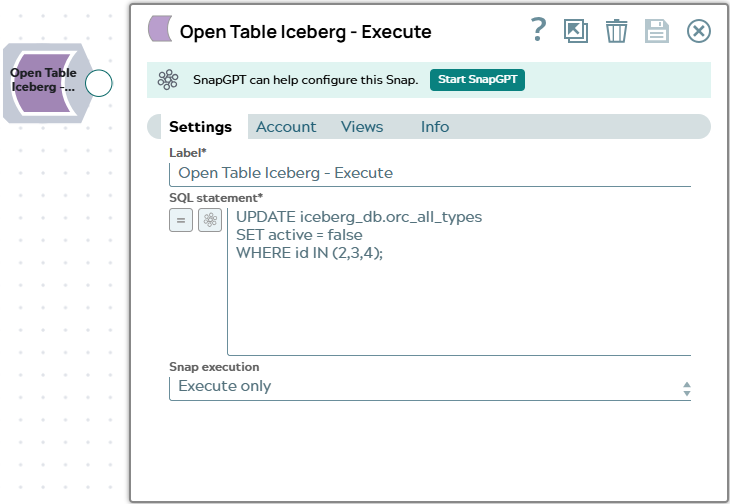
The Open Table Iceberg - Execute Snap executes an arbitrary Spark SQL statement against the Iceberg catalog. Use this Snap to run DDL statements (such as CREATE TABLE, ALTER TABLE, DROP TABLE), DML statements (such as INSERT INTO, MERGE INTO, DELETE), or any other Spark SQL supported by the Iceberg catalog.
When the SQL statement returns rows (for example, a SELECT), the Snap emits one document per row. For statements that do not return rows, the Snap emits a single status document. Execution errors are routed to the error view and do not halt pipeline execution for subsequent input documents.
The SQL statement field is expression-enabled, so you can reference fields from upstream
documents using $field notation to build dynamic queries.
- This is a Write-type Snap.
 Works in Ultra Tasks
Known issues
- Open Table Iceberg Snaps may abort with zero output and no actionable error when executed on a JRE 21 Snaplex; the same pipelines execute successfully on a JRE 11 Snaplex.
Prerequisites
- A configured Open Table Iceberg Account with appropriate permissions on the catalog for the SQL operations to be performed.
Supported Accounts
Snap views
| Type | Description | Examples of upstream and downstream Snaps |
|---|---|---|
| Input |
This Snap has at most one document input view. When connected, each input
document triggers one execution of the SQL statement. Field values from the input
document can be referenced in the SQL expression using
|
|
| Output |
For SELECT statements and other SQL that returns rows, the Snap emits one document per result row. For DDL and DML that returns no rows, the Snap emits one status document per
execution: |
|
| Learn more about Error handling. | ||
Snap settings
| Field/Field set | Description |
|---|---|
Label* String |
Specify a unique name for the Snap. Modify this to be more appropriate, especially if more than one of the same Snaps is in the pipeline. Default value: Open Table Iceberg - Execute Example: Iceberg Create Orders Table |
SQL Statement*
String/Expression |
Specify the Spark SQL statement to execute against the Iceberg catalog. The
field supports expressions, allowing you to reference upstream document fields
using Supported statement types include SELECT, CREATE TABLE, INSERT INTO, ALTER TABLE, DROP TABLE, MERGE INTO, and other Spark SQL with Iceberg extensions. Default value: None Example:
Important: Executing a DROP TABLE statement using this Snap removes the table entry from the
Iceberg catalog successfully, but not the associated data and metadata files from the
MinIO storage. As a workaround, use the
DROP TABLE <iceberg_db.test_table>
              			PURGE
construct instead for a clean drop table operation. |
|
Snap execution Dropdown list
|
Choose one of the three modes in
which the Snap executes. Available options are:
Default value: Execute only Example: Validate & Execute |
Troubleshooting
| Error | Reason | Resolution |
|---|---|---|
| SQL execution error | The SQL statement contains a syntax error, references a table or column that does not exist, or the account does not have sufficient permissions. | Review the SQL statement for syntax errors. Confirm that all referenced tables and columns exist. Verify that the account role has the required catalog permissions. |
| Stale schema after ALTER TABLE | Subsequent Snaps in the pipeline use a cached version of the table schema that does not reflect the ALTER TABLE changes. | The Snap automatically refreshes the Spark catalog cache for the altered table
before execution. If the issue persists, add a separate Execute Snap to run
REFRESH TABLE <table> after the ALTER TABLE statement. |