


Oracle - Parallel Load
Overview
The Oracle - Parallel Load Snap inserts data parallelly across multi-threaded tasks for high-performance data load.
Compared to the Oracle Bulk Load Snap, this Snap executes a high-performance data load.
- The Oracle - Parallel Load Snap always auto-commits its database operations. The Auto commit setting either in the Oracle Thin Account or the Oracle Thin Dynamic Account configured for the Snap does not affect the Snap's behavior.
- This Snap supports Kerberos authentication for Oracle.
- This is a Write-type Snap.
 Does not support Ultra Tasks
Prerequisites
- A valid Oracle Thin Account or Oracle Thin Dynamic Account.
Known issues
Both the Schema name and the Table name settings accept schema from upstream Snap and offer suggestions for expressions. However, we recommend that you do not use those suggestions because they cause incorrect behavior.
Snap views
| Type | Description | Examples of upstream and downstream Snaps |
|---|---|---|
| Input |
This Snap has at least one document input view (minimum 1, maximum 2). Requires both the Schema name and the Table name to process a specific number of input documents into a prepared insert query and execute all of the prepared input document values on that query as a batch. |
|
| Output |
This Snap has at most one document output view (minimum 0, maximum 1). The Snap outputs the number of documents successfully inserted into the target table in the output. |
|
| Learn more about Error handling. | ||
Snap settings
- Expression icon (
 ): Allows using
pipeline parameters to set field values dynamically (if enabled). SnapLogic Expressions
are not supported. If disabled, you can provide a static value.
): Allows using
pipeline parameters to set field values dynamically (if enabled). SnapLogic Expressions
are not supported. If disabled, you can provide a static value. - SnapGPT (
 ): Generates SnapLogic Expressions
based on natural language using SnapGPT. Learn
more.
): Generates SnapLogic Expressions
based on natural language using SnapGPT. Learn
more. - Suggestion icon (
 ): Populates a
list of values dynamically based on your Snap configuration. You can select only one
attribute at a time using the icon. Type into the field if it supports a comma-separated
list of values.
): Populates a
list of values dynamically based on your Snap configuration. You can select only one
attribute at a time using the icon. Type into the field if it supports a comma-separated
list of values. - Upload
 : Uploads files. Learn more.
| Field/Field set | Description |
|---|---|
Label* String |
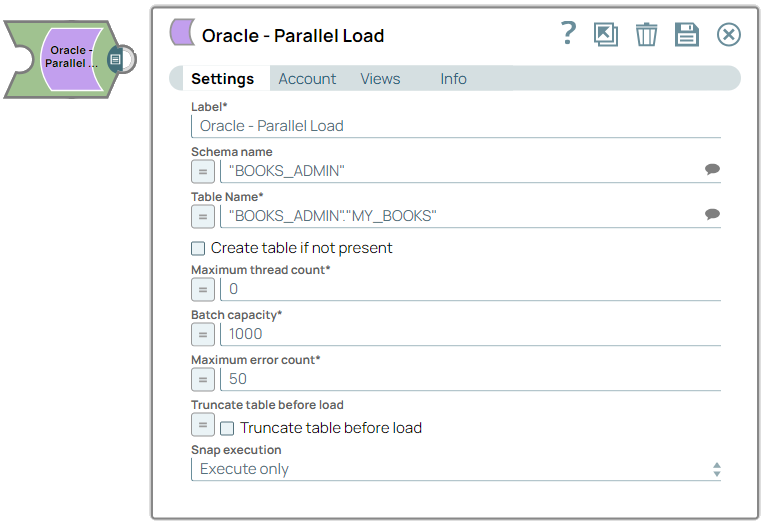
Specify a unique name for the Snap. Modify this to be more appropriate, especially if more than one of the same Snaps is in the pipeline. Default value: Oracle - Parallel Load |
Schema name
String/Expression |
Specify the database schema name. The suggestions in the Schema field are populated only when at least a single table exists in the schema. If no tables exist to use that schema, only SYS, SYSTEM, and XDB are populated. Note: You can pass the values as expressions using the pipeline parameters but cannot use values from the upstream Snap.
Default value: N/A Example: SYS |
Table name*
String/Expression |
Required. Specify the table that the rows will be inserted into. This list is populated based on the tables associated with the selected schema. Note: You can pass the values as expressions using the pipeline parameters but cannot use values from the upstream Snap.
Default value: N/A Example: people |
Create table if not present
Checkbox |
Select this checkbox to automatically create the target table if it does not exist.
Note: The newly created table is not visible to subsequent database Snaps during runtime validation because of implementation details. If you want to immediately use the newly updated data, you must use a child pipeline invoked through the
Pipeline
Execute
Snap.
Default value: Deselected |
Maximum thread count*
Integer/Expression |
Required. Specify the maximum number of threads allowed to perform data insertions simultaneously. If the value is 0, the Snap automatically sets the number of threads equal to the number of available processors on the system. Note: There is no upper limit for the Maximum thread count, therefore you should exercise caution when setting this value to avoid unexpected behavior or performance degradation.
Default value: 0 Example: 20 |
Batch capacity*
Integer/Expression |
Required. Specify the maximum number of records allowed in a single batch for an insertion task. Note: There is no upper limit for Batch capacity, therefore you should exercise caution when setting this value to avoid unexpected behavior or performance degradation.
Snap memory usage: To gracefully handle failed record insertions, the Snap must retain some input document data in memory during the Snap execution. To calculate the memory usage follow this formula: Max thread count * Batch capacity * 2 * typical record size For example, with a Maximum thread count of 4, a Batch capacity of 10,000, and an average record size of 50 bytes, the input document data in Snap memory might peak at 4 million bytes. Default value: 1000 Example: 500 |
Maximum error count*
Integer/Expression |
Required. Specify the maximum number of record insertion errors allowed before execution stops on the next error. For example, if you specify a value of 10, the pipeline execution continues until the number of failed records exceeds 10. Note: A value of -1 means no limit. At least one more error document than the specified maximum value is expected, but task concurrency may result in additional error documents. This applies only when the error behavior is set to Route Error Data to Error View.
Default value: 50 Example: 10 |
Truncate table before load
Checkbox/Expression |
Select this checkbox to truncate the target table before loading data. Default value: Deselected |
|
Snap execution Dropdown list
|
Choose one of the three modes in
which the Snap executes. Available options are:
Default value: Execute only Example: Validate & execute |
Troubleshooting
Pre-load truncation of the target table failed
Either the target table might not exist or a database access error might have occurred when trying to execute the TRUNCATE statement.
Verify your database credentials and ensure the target table exists, then retry.
Unable to determine target table column names
The connection used to retrieve table metadata displayed an exception before closing.
Verify the target table column names and retry.
Behavior of Parallel Load Execution with Open Error Views
The following table describes the expected behavior for the general outcomes of Parallel Load execution when the Snap has an open error view (that is, when you select Route Error Data to Error View for When error occurs).
| Committed Database Insertions | Error View | Output Preview | Snap Outcome | Final Snap State |
|---|---|---|---|---|
| All insertions committed. | N/A | One document containing the insert_count field with an integer value indicating the number of successfully inserted records. |
All input records are successfully inserted into the target database. | Success |
| All insertions committed. | One error document for each record that failed to insert. | One document containing the insert_count field with an integer value indicating the number of successfully inserted records. |
Some input records individually fail to insert into the target database, but do not exceed maximum error count. | Success |
| Insertions made successfully prior to the Maximum error count being exceeded may be committed. | Multiple error documents, one for each record that failed to insert. The total number of error documents should be equal to at least the Maximum error count plus one, but might be more because of concurrency of attempted insertions. | One document containing the insert_count field with an integer value indicating the number of inserted records successfully before exceeding maximum error count. |
Enough input records individually fail to insert to exceed the Maximum error count and cause the Snap to end execution early. | Success |
| Insertions made successfully prior to the Snap-failing error may be committed. | One error document for each record that individually failed insertion (if any). | One document containing insert_count field with an integer value indicating the number of inserted records successfully before the (Snap-failing) error. |
An error occurs beyond the scope of any individual record. | Failure |