


Veeva Upsert
Overview
The Veeva Upsert Snap creates or updates records in Veeva Vault objects.
Use this Snap to insert new records or update existing records in Veeva Vault objects based on a unique key field.
Supported Accounts
- This is a Write-type Snap.
 Works in Ultra Tasks
Snap views
| Type | Description | Examples of upstream and downstream Snaps |
|---|---|---|
| Input |
This Snap has exactly one document input view. The input document should contain the fields and values for the record. If a record with the specified key exists, it is updated; otherwise, a new record is created. |
|
| Output |
This Snap has exactly one document output view. The output document contains the response from Veeva Vault, including the record ID and operation performed. |
|
| Learn more about Error handling. | ||
Snap settings
| Field/Field set | Description |
|---|---|
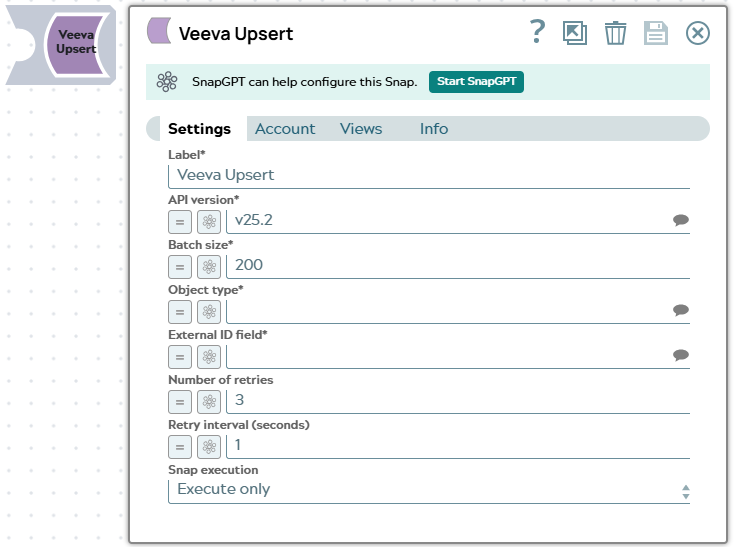
| Label*
|
Specify a unique name for the Snap. Modify this to be more appropriate, especially if more than one of the same Snaps is in the pipeline. Default value: Veeva Upsert |
| API version*
|
The Veeva Vault API version to use for this Snap. Default value: v25.2 Example: |
| Batch size*
|
The number of records to upsert in a single batch. Batching improves performance by reducing the number of API calls. Default value: 200 Example: |
| Object type*
|
The name of the Veeva Vault object to perform the upsert operation on. Default value: N/A Example: |
| External ID field*
|
The external ID field to use for matching existing records. If a record with this external ID exists, it is updated; otherwise, a new record is created. Default value: N/A Example: |
| Number of retries
|
The number of retry attempts for failed API calls. The Snap retries the request if it receives a transient error from Veeva Vault. Default value: 3 Example: |
| Retry interval (seconds)
|
The time interval in seconds between retry attempts. Default value: 1 Example: |
|
Snap execution Dropdown list
|
Choose one of the three modes in
which the Snap executes. Available options are:
Default value: Execute only |