


ServiceNow Attachment Download
Overview
The ServiceNow Attachment Download Snap downloads attachments from a
ServiceNow instance. It takes a sys_id from the upstream Snap as input and
returns the attachments as binary data if they exist.
- This is a Read-type Snap.
 Works in Ultra Tasks
Supported Accounts
Prerequisites
- A valid account with the required permissions.
Snap views
| Type | Description | Examples of upstream and downstream Snaps |
|---|---|---|
| Input |
This Snap has exactly one document input view. The Snap expects a document containing the |
|
| Output |
This Snap has exactly one output view: a binary output view when the attachment exists, and a document output view when no attachment is found. If a matching attachment is found for the given |
|
| Learn more about Error handling. | ||
Snap settings
| Field/Field set | Description |
|---|---|
Label* String |
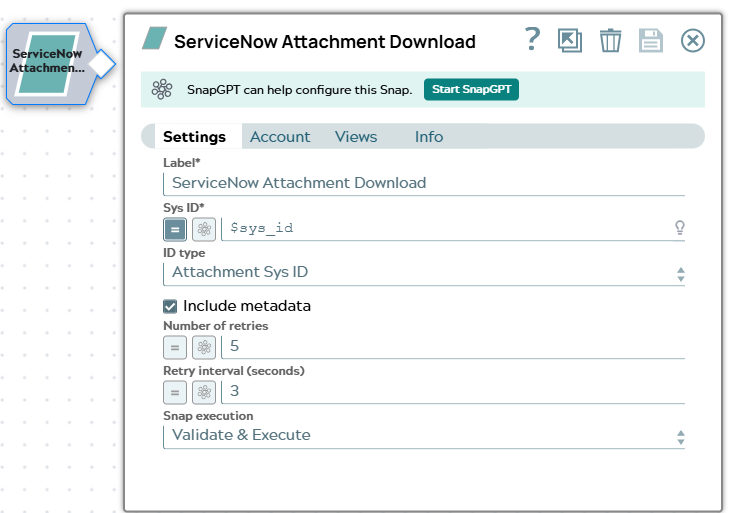
Specify a unique name for the Snap. Modify this to be more appropriate, especially if more than one of the same Snaps is in the pipeline. Default value: ServiceNow Attachment Download Example: ServiceNow Attachment Download |
Sys ID*
String/Expression |
Specify either the Sys ID of the record that contains attachments or the Sys ID of the attachment to download, depending on the value selected in ID type. Default value: Example: |
ID type
Dropdown list |
Select how the Snap interprets the value in Sys ID. Valid
values:
Default value: Attachment Sys ID Example: Record Sys ID |
Include metadata
Checkbox |
Select this checkbox to include the attachment metadata, such as the content type and the size of the file, in the binary output header. Default value: Selected |
Number of retries
Integer/Expression |
Specify the maximum number of attempts the Snap makes to reconnect to the ServiceNow instance if the initial connection attempt fails, before it stops execution and displays an error. Default value: 5 Example: |
Retry interval (seconds)
Integer/Expression |
Specify the number of seconds the Snap waits between each retry attempt. Default value: 3 Example: |
|
Snap execution Dropdown list
|
Choose one of the three modes in
which the Snap executes. Available options are:
Default value: Validate & Execute Example: Validate & Execute |