


HDFS Delete
Overview
You can use this Snap to delete the specified file, group of files, or directory from the supplied path and protocol in the Hadoop Distributed File System (HDFS), Azure Blob File System (ABFS), Windows Azure Storage Blob (WASB) and Azure Data Lake (ADL).
Supported Accounts
- This is a Write-type Snap.
 Works in Ultra Tasks
Snap views
| Type | Description | Examples of upstream and downstream Snaps |
|---|---|---|
| Input | This Snap has at most one document input view. The file filter, file, and directory details of the file to be deleted. |
|
| Output | This Snap has exactly one document output view. The deleted file or a group of files. |
|
| Learn more about Error handling. | ||
Snap settings
| Field/Field set | Description | ||
|---|---|---|---|
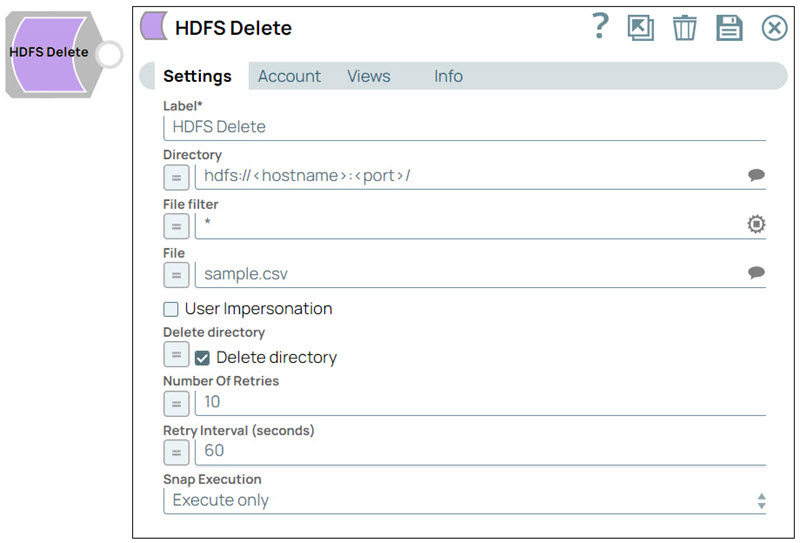
| Label
|
Specify a unique name for the Snap. Modify this to be more appropriate, especially if more than one of the same Snaps is in the pipeline. Default value: HDFS Delete Example: Hadoop delete |
||
| Directory
|
Specify the URL for the HDFS directory. It should start with the HDFS file protocol in the following format:
The Directory property is used only in the Suggest operation. When you click the Suggestion icon, the Snap displays a list of subdirectories under the specific directory. It generates the list by applying the value specified in the File Filter property. Default value: hdfs://<hostname>:<port>/ Example: hdfs://ec2-54-198-212-134.compute-1.amazonaws.com:8020/user/john/input/ |
||
| File filter
|
Specify the Glob filter pattern. A file filter is a criteria to include or exclude specific files when processing data in HDFS. Note: Use glob patterns to display a list of directories or files when you click the
Suggest icon in the Directory or File property. A complete glob pattern
is formed by combining the value of the Directory property with the File Filter
property. If the value of the Directory property does not end with "/", the Snap
appends one so that the value of the Filter property is applied to the directory
specified by the Directory property.
Default value: * Example: ? |
||
| File
|
Specify the file name or a relative path to a file under the directory specified in the Directory property. It should not start with a URL separator "/". The value of the File property depends on the name of the directory specified in the Directory property and the criterion specified in the File filter property. Default value: N/A Example:
|
||
| User Impersonation
|
Select this checkbox to enable user impersonation. Note: Hadoop allows you to configure proxy users to access HDFS on behalf of other users; this is called impersonation. When user impersonation is enabled on the Hadoop cluster, any jobs submitted using a proxy are executed with the impersonated user's existing privilege levels rather than those of the superuser associated with the cluster. For more information on user impersonation in this Snap, refer to the section on User Impersonation below.
Default value: Deselected |
||
| Delete Directory
|
Select this checkbox to enable you to delete all the paths in the specified directory. Default value: Deselected |
||
| Number Of Retries
|
Specify the maximum number of attempts to be made to receive a response. Note:
Default value: 0 Example: 12 |
||
| Retry Interval (seconds)
|
Specify the time interval between two successive retry requests. A retry happens only when the previous attempt resulted in an exception. Default value: 1 Example: 30 |
||
| Snap execution
|
Choose one of the three modes in
which the Snap executes. Available options are:
Default value: Execute Only Example: Validate & Execute |
||
Troubleshooting
| Error | Reason | Resolution |
|---|---|---|
| Remote filesystem access failed. | The user credentials or URL might be incorrect, or the remote server may be inaccessible. It indicates a problem with the communication between the nodes in your Hadoop cluster or an issue with the underlying HDFS. | Check the user credentials and URL and retry. Check the permissions and access rights of the Hadoop files and directories. Ensure that you have the required permissions to access and modify the data. |
| A directory is not a valid string. | The expression or value specified in the Directory property is either not existing in HDFS or not accessible. | Please check if a valid expression is entered in the Directory property and if the correct document data is at the input view. |