


Workday Cancel
Overview
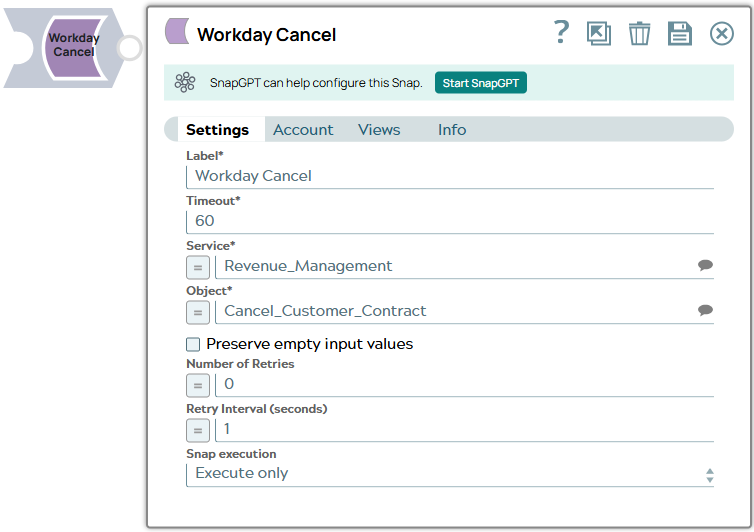
- The Snap collects the Workday service and object input for the Workday server to process with the expected upstream information. You can map the fields using an upstream Mapper Snap, which allows you to map fields or values to the fields available on the selected service object.
- The Snap transforms the input document data, matching the Workday input schema, to create and submit a SOAP request.
- On a successful Workday server response, the Snap displays one output document for every record updated; hence, any document processing Snap can be used downstream.
- The Snap converts the returned SOAP XML response into JSON for the output view.
- If there is an exception, the Snap writes an error to the output view.
- This is a Write-type Snap.
 Works in Ultra Tasks
Prerequisites
- A valid Workday Account.
- Data to query.
- Workday security access to the objects that you want to cancel. Contact your organization's Workday Security Administrator for appropriate access.
- Workday recommends using an Integration System User (ISU) with APIs.
Snap views
| Type | Description | Examples of upstream and downstream Snaps |
|---|---|---|
| Input |
This Snap has exactly one document input view. The fields that match the object to be canceled are provided on the input view of the Snap and can be mapped using an upstream Mapper Snap. |
|
| Output |
This Snap has exactly one document output view. A document that represents the record structure of the retrieved Workday service object. Each record is represented as one document on the output view. |
|
| Learn more about Error handling. | ||
Snap settings
- Expression icon (
 ): Allows using
pipeline parameters to set field values dynamically (if enabled). SnapLogic Expressions
are not supported. If disabled, you can provide a static value.
): Allows using
pipeline parameters to set field values dynamically (if enabled). SnapLogic Expressions
are not supported. If disabled, you can provide a static value. - SnapGPT (
 ): Generates SnapLogic Expressions
based on natural language using SnapGPT. Learn
more.
): Generates SnapLogic Expressions
based on natural language using SnapGPT. Learn
more. - Suggestion icon (
 ): Populates a
list of values dynamically based on your Snap configuration. You can select only one
attribute at a time using the icon. Type into the field if it supports a comma-separated
list of values.
): Populates a
list of values dynamically based on your Snap configuration. You can select only one
attribute at a time using the icon. Type into the field if it supports a comma-separated
list of values. - Upload
 : Uploads files. Learn more.
| Field/Field set | Description |
|---|---|
Label
String |
Required. Specify a unique name for the Snap. Default value: Workday Cancel Example: Cancel Cost Center List from Workday |
Timeout
Integer |
Required. Specify the timeout value for each Workday SOAP request. The value of 0 indicates no timeout. As the Workday Cancel supports Workday SOAP pagination, multiple SOAP requests can occur for one execution. Consequently, the timeout can be less than the time it takes to complete writing documents to the output view. Default value: 60 Example: 0 |
Service
String/Expression/ Suggestion |
Required. Specify the name of the web service that you want to use for cancelling the objects. Though all available services are selectable, only Resource_Management, Revenue_Management, Financial_Management, Integrations, Cash_Management may have objects that provide cancellations. Default value: N/A Example: Revenue_Management |
Object
String/Expression/ Suggestion |
Required. Specify the object to write. The objects are suggested based on the selected service, such as selecting the service Payroll will retrieve all objects for Payroll that are retrievable from Workday. Default value: N/A Example: Cancel_Customer_Invoice |
Preserve empty input values
Checkbox |
Select this checkbox to preserve empty input values when creating the SOAP request. Default value: Deselected |
Number of Retries
Integer |
Specify the number of attempts the Snap should make, in case of connection failure or timeout. Default value: 0 Example: 3 |
Retry Interval (seconds)
Integer |
Specify the time interval in seconds between the retry attempts. Default value: 1 Example: 3 |
Snap execution
Dropdown list |
Choose one of the three modes in
which the Snap executes. Available options are:
|
Troubleshooting
| Error | Cause | Resolution |
|---|---|---|
| HTTP/1.1 407 Proxy Authentication required. | The Snap is unable to tunnel through proxy. | Add the following key-value pair values to your Groundplex configuration and restart the plex to reflect the changes.
Key: Value: |
Limitations and Known Issues
None.