


Symmetric Crypto account
This account type provides the secret key to use for encryption or decryption by the AES, Blowfish, and Twofish Snaps.
Account Configuration
In Manager, you can navigate to the required folder and create an account in it (see Accounts). To create an account for binary files:
- Click Create, then select Binary, then Symmetric crypto account.
- Supply an account label.
- Supply the necessary information.
- (Optional) Supply additional information on this account in the Notes field of the Info tab.
- Click Apply.
Account Settings
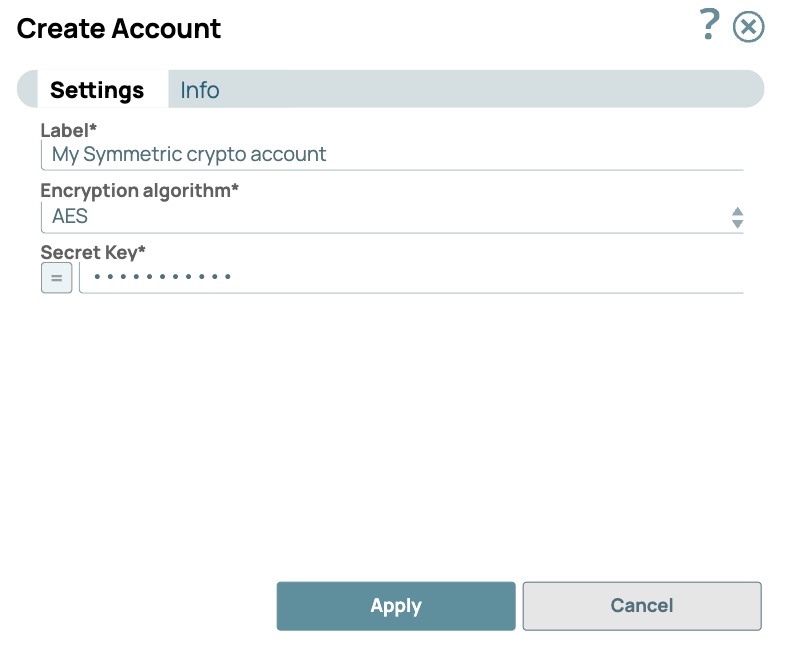
Legend:
- Expression icon (
 ): Allows using
JavaScript syntax to access SnapLogic Expressions to set field values dynamically (if
enabled). If disabled, you can provide a static value. Learn more.
): Allows using
JavaScript syntax to access SnapLogic Expressions to set field values dynamically (if
enabled). If disabled, you can provide a static value. Learn more. - SnapGPT (
 ): Generates SnapLogic Expressions
based on natural language using SnapGPT. Learn
more.
): Generates SnapLogic Expressions
based on natural language using SnapGPT. Learn
more. - Suggestion icon (
 ): Populates a
list of values dynamically based on your Snap configuration. You can select only one
attribute at a time using the icon. Type into the field if it supports a comma-separated
list of values.
): Populates a
list of values dynamically based on your Snap configuration. You can select only one
attribute at a time using the icon. Type into the field if it supports a comma-separated
list of values. - Upload
 : Uploads files. Learn more.
| Field/Field set | Type | Description |
|---|---|---|
| Label*
|
String |
Specify a unique label for the account. Default value: None. Example: Symmetric Crypto Account |
| Encryption algorithm | Dropdown list | Required. Algorithm used for encryption. Options
available include:
Default value: AES |
| Secret key | String/Expression | Required. Secret key part of the encryption. Warning: This is an expression-enabled property, you can pass values for
this property dynamically as a pipeline parameter. Default value: None. |
Account Encryption
| Standard Encryption |
If you are using Standard Encryption, the High sensitivity settings under Enhanced Encryption are followed. |
| Enhanced Encryption | If you have the Enhanced Account Encryption feature, the following describes
which fields are encrypted for each sensitivity level selected per each account.
|