


Read Help Center Articles
Overview
The Read Help Center Articles Snap retrieves article records from your Zendesk Help Center, with filtering options by article ID, section, category, label, user, or incremental export since a given date.
Each article record is emitted as a separate document on the output view. You can optionally sideload attachment metadata and user segment information alongside each article. Results can be sorted by various fields and limited using Max results.
Use the Incremental Export filter mode to retrieve only articles that have
been created or updated since a specific timestamp, which is useful for synchronization
pipelines. Unlike other filter modes, Incremental Export uses a next_page
URL-based pagination mechanism, not cursor-based pagination.
- This is a Read-type Snap.
 Works in Ultra Tasks
Supported Accounts
Prerequisites
None.
Snap views
| Type | Description | Examples of upstream and downstream Snaps |
|---|---|---|
| Input |
This Snap has at most one document input view. When connected, field values from the incoming document can be referenced
in expression-enabled fields using the |
|
| Output |
This Snap has one document output view. Each Help Center article is emitted as a separate document. When Include attachments is selected, attachment metadata is included in each article document. When Include user segments is selected, user segment information is included in each article document. |
|
| Learn more about Error handling. | ||
Snap settings
| Field/Field set | Description |
|---|---|
Label* String |
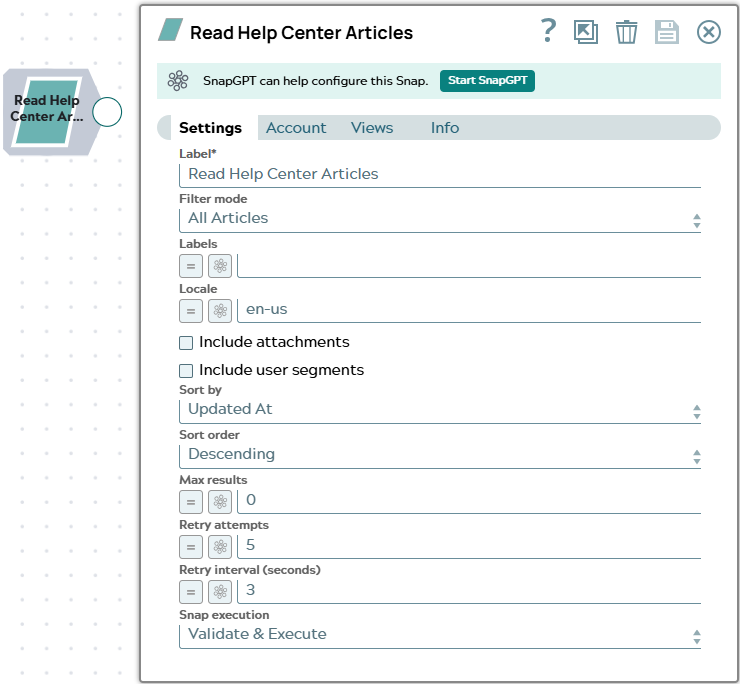
Specify a unique name for the Snap. Modify this to be more appropriate, especially if more than one of the same Snaps is in the pipeline. Default value: Read Help Center Articles |
Filter mode
Dropdown list |
Select the strategy for filtering the articles to retrieve.
Default value: All Articles Example: By Section |
Article ID*
String/Expression |
Appears when Filter mode is By ID. Enter the numeric Zendesk article ID of the article to retrieve. Default value: None Example: |
Section*
String/Expression/ Suggestion |
Appears when Filter mode is By Section. Specify the Help Center section to filter by. Suggestions are populated from your Zendesk instance when the account is configured. Default value: None Example: |
Category*
String/Expression/ Suggestion |
Appears when Filter mode is By Category. Specify the Help Center category to filter by. Suggestions are populated from your Zendesk instance when the account is configured. Default value: None Example: |
Labels*
String/Expression |
Appears when Filter mode is By Label. Enter a comma-separated list of article label names to filter by. Only articles that have all of the specified labels are returned. Default value: None Example: |
User ID*
String/Expression |
Appears when Filter mode is By User. Enter the numeric Zendesk user ID of the article author to retrieve all articles authored by this user. CAUTION: The By User filter mode may not function correctly
in all deployments due to a known property key mismatch in the Snap. If no
results are returned when using this mode, verify that the user ID is valid,
or use the All Articles mode with downstream filtering instead.
Default value: None Example: |
Since date*
String/Expression |
Appears when Filter mode is Incremental Export. Enter the earliest update timestamp to use as the export start point. Only articles created or updated at or after this time are returned. Must be in ISO 8601 format. The value is converted internally to Unix epoch seconds before being submitted to the Zendesk API. Default value: None Example:
|
Locale
String/Expression |
Specify a locale to restrict results to articles in that locale. Leave empty to return articles in all locales. Default value: en-us Example: fr |
Include attachments
Checkbox |
When selected, the Snap makes an additional API call per article to retrieve attachment metadata, which is included in the article output document. This increases the number of API requests proportionally to the number of articles retrieved. CAUTION: This field defaults to Selected, meaning attachment
metadata is fetched by default. For large Help Centers, this can significantly
increase API usage and execution time. Clear this field if attachment metadata
is not needed.
Default value: Selected |
Include user segments
Checkbox |
When selected, the Snap retrieves and includes user segment information for each article. Segment data is cached to reduce the number of API calls. Default value: Not selected |
Sort by
Dropdown list |
Select the field to sort results by. Valid
values:
Default value: Updated At Example: Created At |
Sort order
Dropdown list |
Select the direction in which to sort results.
Default value: Descending Example: Ascending |
Max results
Integer/Expression |
Specify the maximum number of article records
to emit per execution. Enter Default value: 0 Example: |
Retry attempts
Integer/Expression |
Enter the number of times the Snap should
retry the API call on connection errors or 5xx responses. On a 429 response,
the Snap automatically retries after the interval specified in the server's
Default value: 5 Example: |
Retry interval (seconds)
Integer/Expression |
Enter the number of seconds to wait between retry attempts. Default value: 3 Example: |
|
Snap execution Dropdown list
|
Choose one of the three modes in
which the Snap executes. Available options are:
Default value: Validate & execute |