


Oracle HCM Insert
Supported Accounts
- This is a Write-type Snap.
 Works in Ultra Tasks
Snap views
| Type | Description | Examples of upstream and downstream Snaps |
|---|---|---|
| Input | Each input document provides details associated with the data that must be posted to the target Oracle HCM instance. | |
| Output | Each output document contains details associated with the outcome of the Oracle HCM instance. | |
| Learn more about Error handling. | ||
Snap settings
| Field/Field set | Description |
|---|---|
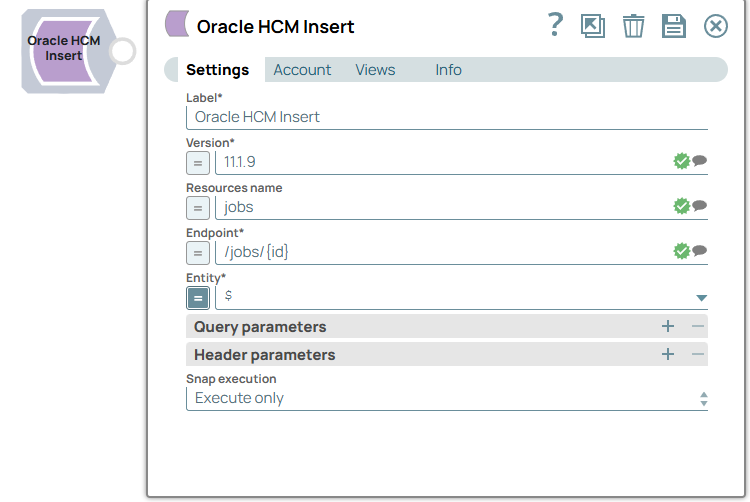
Label* String |
Specify a unique name for the Snap. Default value: Oracle HCM Insert Example: Insert workers |
Version* String/Expression/ Suggestion |
Specify the Oracle HCM instance version. The suggestions list retrieves all available versions. Default value: N/A Example: 11.13.18.05 |
Resources name String/Expression |
Specify the Oracle HCM resources (Tasks). The property is suggestible and will retrieve all available resources based on selected version. Default value: N/A Example: absences, elementEntries, workers |
Endpoint* String/Expression/ Suggestion |
Specify the Oracle HCM endpoint. The suggestions list retrieves all available endpoints based on selected resource. Default value: N/A Example: /workers |
Entity String |
Specify the JSON path to the HTTP entity data in the input map data. You can leave this field blank if there is no entity data to send to the service URL. Default value: $ (the HTTP entity data is at the root of the input Map data) Example: $.entity (if the HTTP entity data is the value of the "entity" key at the root of the input Map data) |
| Query parameters | Use this field set to add query parameters to your request. |
Query parameter String |
Specify the name of the query parameter. Default value: N/A Example: id |
Query parameter value String/Expression |
Specify the value that you want to assign to the parameter. Default value: N/A Example: $widget.id |
| Header parameters | Use this field set to create the HTTP header key-value pairs. |
Header parameter String |
Specify the name of the HTTP header. Default value: N/A Example: content-type |
Header parameter value String/Expression |
Specify the value that you want to assign to the HTTP header. Default value: N/A Example: application/json |
Snap execution Dropdown list |
Choose one of the three modes in
which the Snap executes. Available options are:
|