


Active Directory Remove Member
Overview
The Active Directory Remove Member Snap removes an existing member from a specified group in Active Directory.
- This is a Write-type Snap.
 Works in Ultra Tasks
Supported Accounts
Prerequisites
- A valid account with the required permissions.
Snap views
| Type | Description | Examples of upstream and downstream Snaps |
|---|---|---|
| Input |
This Snap has at most one document input view. A document containing the details of the member to be removed. |
|
| Output |
This Snap has exactly one document output view. A confirmation message about the removed member. |
|
| Learn more about Error handling. | ||
Snap settings
| Field/Field set | Description |
|---|---|
Label
String |
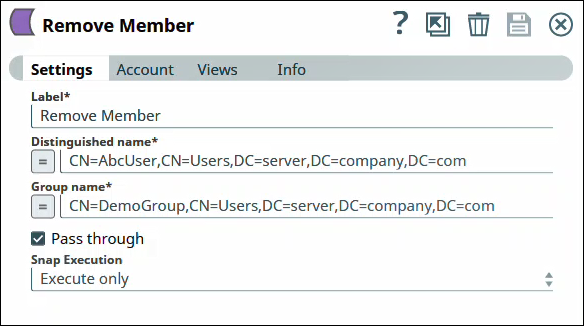
Specify a unique name for the Snap. Modify this to be more appropriate, especially if more than one of the same Snaps is in the pipeline. Default value: Remove Member |
Distinguished name
String/Expression |
Required. The LDAP API references an LDAP object by its distinguished name (DN). A DN is a sequence of relative distinguished names (RDN) connected by commas. An RDN is an attribute with an associated value in the form attribute=value, normally expressed in a UTF-8 string format. The typical RDN attribute types include:
This field is applicable only to existing users. If the user does not exist, create an entry using the Active Directory Create Entry Snap first. You can also use special characters in the distinguished name. See using special characters in Distinguished Name. Default value: None Example: |
Group name
String/Expression |
Required. The name of the group as RDN (Relative distinguished name) from which you want to remove the user. When removing a member from a group, make sure that the member and the group already exist. Members and groups can be created by the Active Directory Create Entry Snap. Default value: None Example: |
Pass through
Checkbox |
Select to include the entire input data in the Snap's output. The Snap includes this data within the Default value: Not selected |
Snap execution
Dropdown list |
Choose one of the three modes in
which the Snap executes. Available options are:
|
Troubleshooting
| Error | Cause | Resolution |
|---|---|---|
| Cannot remove the member | Error while removing the member from the group. Entered values are invalid. | Verify the entered values for the distinguished name and group are valid. |