


SQL Server Select
Overview
This Snap executes a SELECT query against a SQL Server database and outputs the result in a document format.
You can use this Snap to fetch data from an SQL Server database by providing the database and table details. Queries produced by the Snap have the following format:
SELECT [output fields] FROM [table] WHERE [where clause] ORDER BY [ordering] LIMIT [limit] OFFSET [offset]- JSON paths can be used in a query and will have values from an incoming document substituted into the query. However, documents missing values for a given JSON path will be written to the Snap's error view. After a query is executed, the query's results are merged into the incoming document overwriting any existing keys' values. The original document is output if there are no results from the query.
- This Snap supports SQL Server 2008 or higher version.
- The sub-millisecond time accuracy for all date/time data types is not supported.
Supported Accounts
- This is a Read-type Snap.
Snap views
| Type | Description | Examples of upstream and downstream Snaps |
|---|---|---|
| Input | Optional. This Snap has at most one document input view. If an input view is defined, then values from the incoming document can be used as substitution variables in the SQL query. | |
| Output | This Snap has exactly one document output view. | |
| Learn more about Error handling. | ||
Snap settings
| Field/Field set | Description |
|---|---|
|
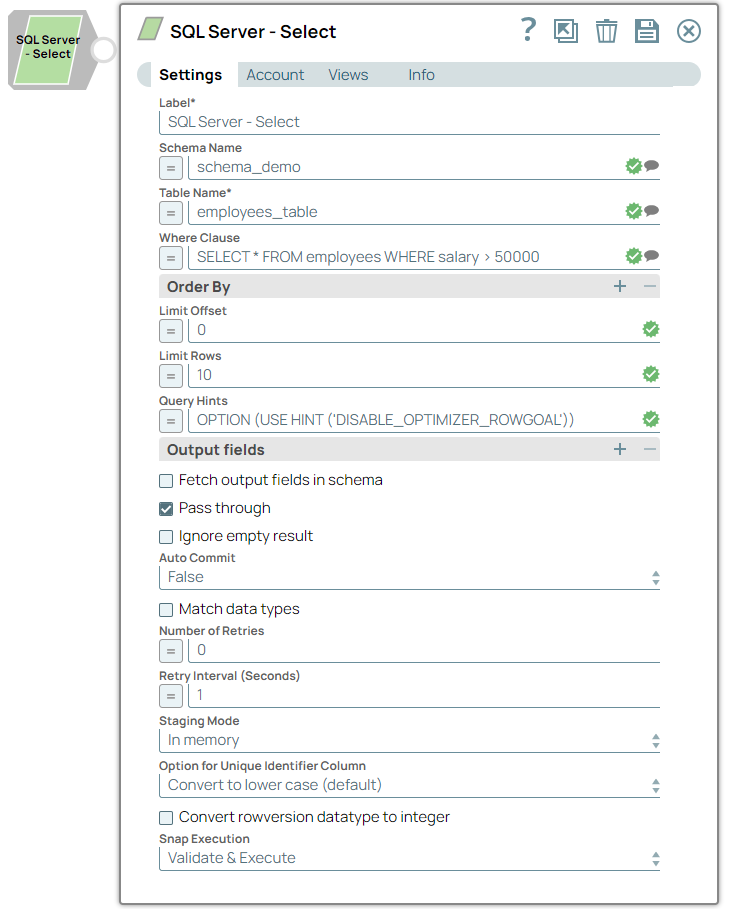
Label String
|
Specify a unique name for the Snap. Modify this to
be more appropriate, especially if there are more than one of the same Snap in the
pipeline.
Default value: SQL Server - Select |
Schema Name String/Expression/ Suggestion |
Optional. Specify the database schema name. In case it is not defined, then the suggestion for the Table Name will retrieve all tables names of all schemas. The property is suggestible and will retrieve available database schemas during suggest values. Note: The values can be passed using the pipeline parameters but not the upstream parameter.
Default value: N/A Example: dbo |
Table Name String/Expression/ Suggestion |
Optional. Specify the name of the table from which to fetch data. The table name is suggestible and requires an account setting. Note: The values can be passed using the pipeline parameters but not the upstream parameter.
Default value: N/A Example: Customers |
SELECT * FROM <table name> Checkbox |
Select this checkbox to execute a basic SELECT * FROM <table name> query based on the Schema Name and Table Name. If this option is selected, the SQL Statement property will be ignored. Use the Where Clause and Order By Clause properties to refine your query if needed. Default status: Deselected |
SQL Statement String/Expression |
Optional. Specify the SQL query to execute. Note: This property is ignored if SELECT * FROM <table name> is selected.
Default value: N/A Example: SELECT * FROM employees WHERE Salary>50000 |
Where Clause String/Expression |
Optional. Specify the WHERE clause of the SELECT statement to filter the results from the table. The Default value: N/A Example: SELECT * FROM employees WHERE Salary>50000 |
Order By Clause String/Expression |
Optional. Specify the ORDER BY clause to sort the results returned from the SELECT statement. Default value: N/A Example: CustomerName ASC |
Pass through Checkbox |
Select this checkbox to pass the input document through to the output view under the key 'original'. Default status: Deselected |
Number of retries Integer/Expression |
Specify the maximum number of attempts to be made to receive a response. The request is terminated if the attempts do not result in a response. Default value: 0 Example: 3 |
Retry interval (seconds) Integer/Expression |
Specify the time interval between two successive retry requests. A retry happens only when the previous attempt resulted in an exception. Default value: 1 Example: 10 |
Output Fields String/Expression |
Optional. Specify the output fields to include in the output document. Default value: N/A Example: CustomerID, CustomerName, City |
Query Type Dropdown list |
Specify whether the query is a Read or Write operation.
Default value: Read |
Fetch Output Fields In Schema Checkbox |
Select this checkbox to fetch the output fields in the schema. Default status: Selected |
Auto commit Checkbox |
Select this checkbox to commit each SQL statement as a separate transaction. If not selected, all statements will be committed together. Default status: Selected |
|
Snap execution Dropdown list
|
Choose one of the three modes in
which the Snap executes. Available options are:
Default value: Validate & Execute |