


SQL Server Delete
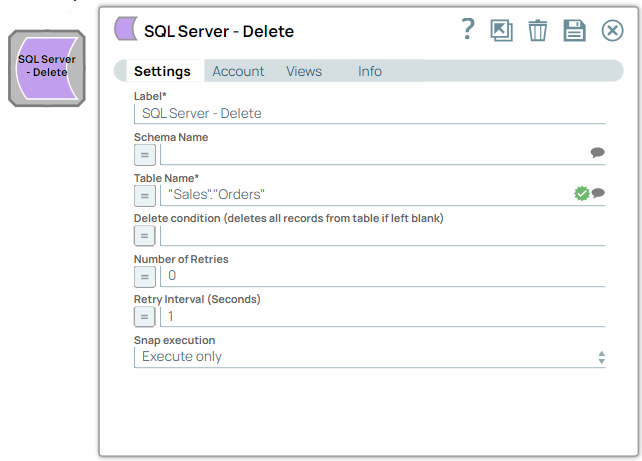
You can use this Snap to execute a SQL delete with the given properties. This Snap supports SQL Server 2008 and higher versions.
Supported Accounts
- This is a Write-type Snap.
Snap Type
The SQL Server - Delete Snap is a Write-type Snap that executes an SQL Server delete.
Support for Ultra Pipelines
Works in Ultra Pipelines.
Snap views
| Type | Description | Examples of upstream and downstream Snaps |
|---|---|---|
| Input |
This Snap allows exactly one input view.
|
|
| Output |
Optional. This Snap has at most one output view.
If an output view is available, then the original document that was used to create the statement will be output with the status of the delete executed. The Snap will output one document for each execution of the Snap with data about the number of documents deleted, hence any document processing Snap can be used downstream. |
|
| Learn more about Error handling. | ||
Snap settings
| Field/Field set | Description |
|---|---|
|
Label String
|
Required.Specify a unique name for the Snap. Modify this to
be more appropriate, especially if there are more than one of the same Snap in the
pipeline.
Default value: SQL Server - Delete |
Schema Name
String/Expression/ Suggestion |
Optional. Specify the database schema name. In case it is not defined, then the suggestion for the Table Name will retrieve all tables names of all schemas. Note: The values can be passed using the pipeline parameters but not the upstream parameter.
Default value: N/A Example: schema_demo |
Table Name
String/Expression/ Suggestion |
Required. Specify the table name to execute the delete on. Note: The values can be passed using the pipeline parameters but not the upstream parameter.
Default value: N/A Example: employees_table |
Delete condition (deletes all records from table if left blank)
String/Expression |
Optional. Specify the SQL WHERE clause of the delete statement. The delete condition may also be passed via an upstream Snap or through the pipeline parameters. Note: Specify a valid WHERE clause for the delete condition. If you leave this field blank, the Snap deletes all the records from the table.
Examples: Without using expressions
Using expressions
Warning: Using expressions that join strings together to create SQL queries or conditions has a potential SQL injection risk and is hence unsafe. Ensure that you understand all implications and risks involved before using concatenation of strings with '=' Expression enabled.
Default value: N/A Example: email = '[email protected]' |
Number of retries
Integer/Expression |
Specify the maximum number of attempts to be made to receive a response. The request is terminated if the attempts do not result in a response. Default value: 0 Example: 3 |
Retry interval (seconds)
Integer/Expression |
Specify the time interval between two successive retry requests. A retry happens only when the previous attempt resulted in an exception. Default value: 1 Example: 10 |
|
Snap execution Dropdown list
|
Choose one of the three modes in
which the Snap executes. Available options are:
Default value: Execute only |