Low-latency Ultra Tasks
Low-latency Ultra Tasks are an Ultra Task pipeline design for real-time, request-response integrations. A FeedMaster node inside the Snaplex maintains a queue of inbound HTTP requests and distributes them to continuously running pipeline instances. The pipeline processes each request document and returns a response through the FeedMaster, making this design well-suited for building high-throughput web APIs and data access layers where consistent low-latency responses are required.
Use cases
Low-latency Ultra Tasks are appropriate when your integration must respond to inbound HTTP requests with low latency and high reliability. Common use cases include:
- Real-time web APIs: Expose on-premises or cloud application logic as an always-on HTTP endpoint that external systems can call directly.
- Data access layers: Provide low-latency read and write access to backend systems for web applications.
- Request validation and transformation: Continuously validate incoming requests, apply business logic, and return structured responses.
- High-volume API endpoints: Handle peak request volumes by running multiple pipeline instances in parallel across Snaplex nodes.
- Consumer endpoints: Read from an inbound request document, transform the data, write to a downstream system such as a JMS queue, and return a confirmation response to the caller.
Pipeline design
A Low-latency Ultra pipeline has one unconnected input view and one or more unconnected output views. HTTP requests arrive at the FeedMaster, which queues them and routes each one to an available pipeline instance. The pipeline processes the input document and returns a response document to the caller through the FeedMaster. For complete design guidelines on input and output view structure, naming, and response formatting, refer to Pipeline requirements for Ultra Tasks.
Input document structure
When the input view type is a document, HTTP request headers are included in the
root of the input document and the request body is in the
content field. Header keys are always received in lowercase.
The following fields are also injected into the input document:
- uri: The original URI of the request.
- method: The HTTP request method.
- query: The parsed query string, where each key maps to a list of values.
- task_name: The name of the task.
- path_info: The portion of the path after the task URL.
- server_ip and server_port: The IP address and TCP port of the FeedMaster that received the request.
- client_ip and client_port: The IP address and TCP port of the client that sent the request.
Output document structure
For document output views, the FeedMaster expects exactly one output document per
input request. To customize the HTTP response, map the response body to the
$content field, custom headers to the root
$, and the HTTP status code to the $status
field. If no content field is present, the entire output
document is JSON-encoded and returned as the response body.
Design considerations
- Avoid spaces in pipeline names used as task invocation endpoints.
- Error views are implicitly added to all Snaps when the pipeline runs in Ultra mode, regardless of individual Snap configuration.
- Pipeline parameters cannot be changed at runtime. They are set at pipeline startup and remain fixed for the life of the instance.
- During Snaplex state transitions, more than one instance may run simultaneously even if the configured count is one. Design the pipeline to handle this condition.
Instance configuration
When you activate a Low-latency Ultra Task, the Snaplex starts one or more pipeline instances that continuously process requests from the FeedMaster queue. The Number of Instances setting controls how many pipeline instances run simultaneously. Too few instances causes request queuing under high load; too many consumes Snaplex resources unnecessarily. For field-level details, see Ultra Tasks in production.
- Manual per Snaplex: Sets a fixed total number of pipeline instances regardless of node count. Use this when downstream systems limit concurrent connections. For example, if a SOAP service can handle five simultaneous API calls, set instances to 5.
- Manual per Node: Sets the number of instances per execution node. Use this when request volume is steady and downstream systems have no concurrency limits. Instances are distributed evenly across nodes.
- Autoscale based on FeedMaster queue: Scales the instance count dynamically based on the FeedMaster queue depth. Use this when request volume varies significantly between low and peak periods.
Examples
Minimal starting pipeline
This pipeline has the minimum structure a Low-latency Ultra Task requires: a single Mapper Snap wired directly to the pipeline's input view on one side and its output view on the other. Use it as a starting point to build your own request-response pipeline.
Real-time API for a web service
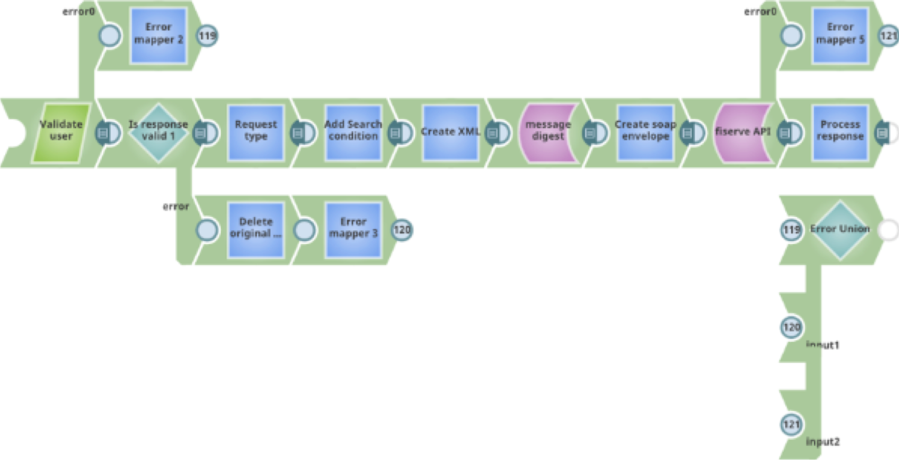
This pipeline provides a real-time API for on-premises web services accessible from the cloud. It validates the inbound user credentials, parses the request, calls the on-premises application server, and returns the response. An error handling path and an additional output view are included to return structured error responses to the caller when the pipeline fails.
Consumer endpoint
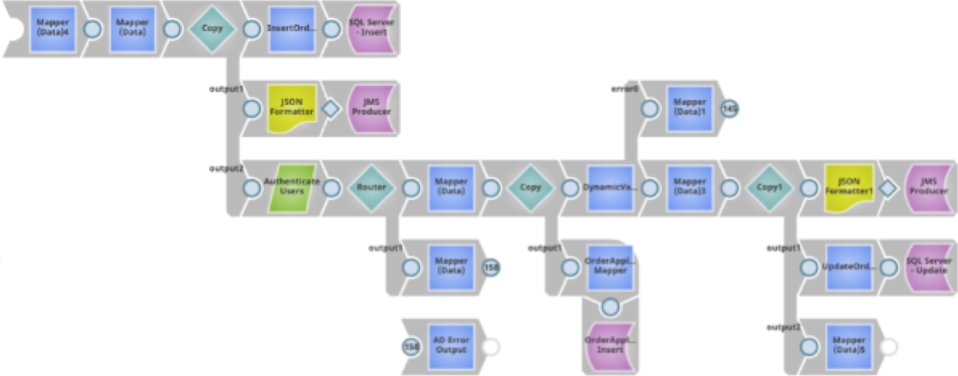
This pipeline reads from an inbound request document, parses and writes the data to a JMS queue, and returns a copy of the response to the caller. Because the FeedMaster uses a request-response framework, every input document must produce at least one output document in response.