Updating DynamoDB records with Mapper
This example demonstrates how to update data in a DynamoDB table using the DynamoDB Update Snap with an upstream Mapper Snap for attribute mappings.
Before you begin, ensure you have:
- A configured DynamoDB Account .
- An existing DynamoDB table with records to update.
- Appropriate write permissions on the DynamoDB table.
This pipeline demonstrates how to update records in a DynamoDB table using attribute mappings. The Mapper Snap prepares the update data structure, including complex types such as Sets, Lists, and Maps, and the DynamoDB Update Snap applies the updates to the specified table.
-
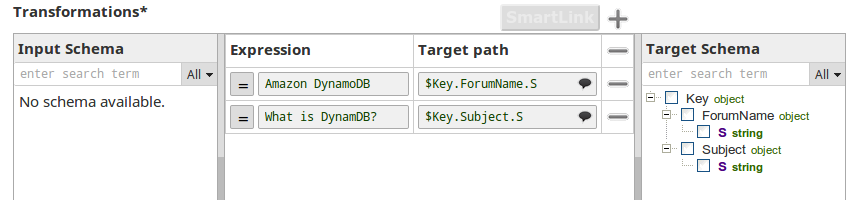
Configure the Mapper Snap to prepare update data.
The Mapper Snap defines the attribute mappings for the update operation. You can map simple data types as well as complex types:
- String Set (SS): For example,
["SnapLogic", "San Mateo", "Pipeline"] - Number Set (NS): For example,
[100, 200, 300] - List (L): Mixed-type arrays
- Map (M): Nested object structures
- String Set (SS): For example,
-
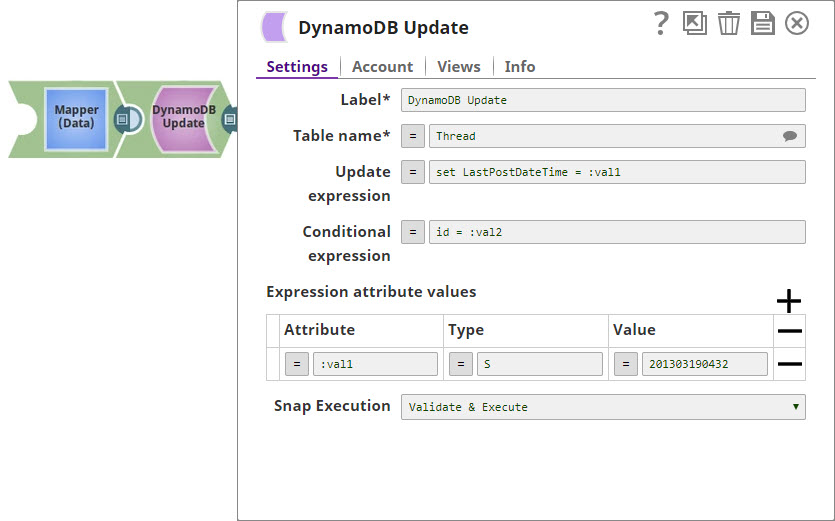
Configure the DynamoDB Update Snap.
In the DynamoDB Update Snap settings:
- Account: Select your configured DynamoDB account.
- Table name: Enter the name of the table to update. The table becomes suggestible once the account is defined.
- Update expression: Define the update expression (for example,
SET attribute1 = :val1, attribute2 = :val2). - Expression attribute values: Map the placeholders to actual values from the Mapper output.
- Condition expression: Add conditional updates if needed (optional).