


Retrieve node capacity data
GET https://{controlplane_path}/api/1/rest/public/snaplex/provision/{env_org}?{query_parameters}Use this API to analyze node provisioning trends across an entire organization or broken down by individual Snaplex.
Prerequisites
- You must have org admin permissions for the organization.
Path parameters
| Key | Description |
|---|---|
controlplane_path |
Required. The SnapLogic control plane host:
elastic.snaplogic.com (US) or
emea.snaplogic.com (EU). |
env_org |
Required. The name of the SnapLogic environment/Org. For example,
My-Dev-Env |
Query parameters
| Key | Type | Description |
|---|---|---|
start_date |
String | Required. Start date in
YYYY-MM-DD format. |
end_date |
String | Required. End date in
YYYY-MM-DD format. |
mode |
String |
Time aggregation mode for the results. Valid values:
Default: |
level |
String |
The level at which to aggregate node capacity data. Valid values:
Default: |
plex_paths |
Array | A comma-separated list of Snaplex paths to filter the results. When omitted,
data for all Snaplexes in the organization is returned.
Example: |
Request header
Basic authentication
To use basic authentication, specify Basic for authorization in the request
header, add your credentials (email and password for your SnapLogic user or service account), and
specify application/json for content type. For example:
Authorization: Basic {base64_encoded <email>:<password>}
Content-Type: application/json
Example of basic authentication using Postman:
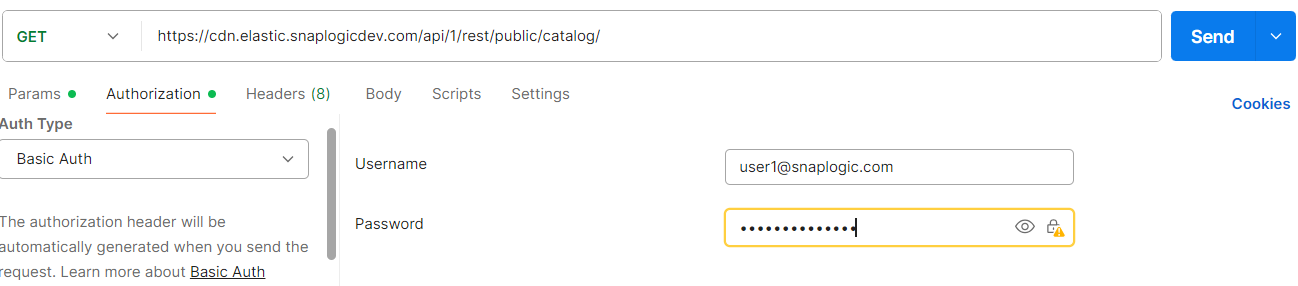
Learn more about the basic authentication header in REST API requests.
JWT authentication
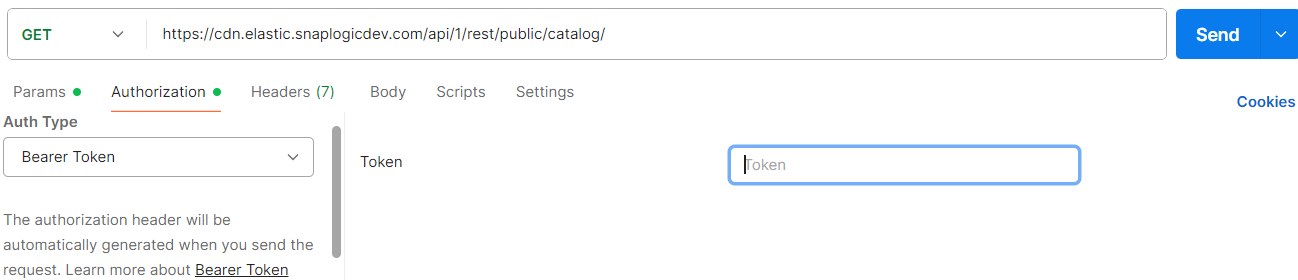
When using JWT authentication, the API request includes specific headers. In the request header,
specify Bearer Token for authorization, add the token, and specify
application/json for content type. These headers are automatically added when
you configure bearer token authentication in your API client. The authorization header contains
the word Bearer followed by a space and your JWT.
Authorization: Bearer Token {token}
Content-Type: application/json
Example of JWT authentication using Postman:
Request body
None.
Response
The response structure differs depending on the level parameter.
Response at Org/Environment level:
{
  "response_map": {
    "<org_snode_id>": {
      "data": [
        {
          "time": "YYYY-MM-DD",
          "cpu": ...,
          "mem": ...,
          "max_burst_node": ...
        }
      ]
    }
  },
  "http_status_code": 200
}
Response at Snaplex level:
{
  "response_map": {
    "<org_snode_id>": {
      "data": [
        {
          "time": "YYYY-MM-DD",
          "cpu": ...,
          "mem": ...,
          "max_burst_node": ...,
          "runtime_path_id": "...",
          "plex_path": "..."
        }
      ]
    }
  },
  "http_status_code": 200
}
| Key | Type | Description |
|---|---|---|
<org_snode_id> |
Object | A keyed object where the key is the ID of the Snaplex node that hosts the Environment/Org. Contains the data array. |
data |
Array | Array of node capacity entries for the requested date range. |
time |
String | The start date of the aggregation period, in YYYY-MM-DD
format. |
cpu |
Number | The CPU specification of the node. |
mem |
Number | The memory specification of the node. |
max_burst_node |
Number | The maximum number of nodes of that specification that were provisioned during the given period. |
runtime_path_id |
String | The internal runtime path identifier for the Snaplex. Returned only when
level=snaplex. |
plex_path |
String | The path of the Snaplex. Returned only when
level=snaplex. |
Example
Retrieve daily org-level node capacity data for a 30-day range:
GET https://elastic.snaplogic.com/api/1/rest/public/snaplex/provision/myOrg?start_date=2026-01-01&end_date=2026-01-31&mode=daily&level=org
Retrieve monthly Snaplex-level node capacity data for a specific Snaplex:
GET https://elastic.snaplogic.com/api/1/rest/public/snaplex/provision/myOrg?start_date=2025-01-01&end_date=2025-12-31&mode=monthly&level=snaplex&plex_paths=/myOrg/shared/mySnaplex
Troubleshooting
| Error | Cause | Resolution |
|---|---|---|
| Invalid date format. Date should be in format of YYYY-MM-DD. | The start_date or end_date value does not
match the required format. |
Ensure both dates use the YYYY-MM-DD format, for example
2026-01-31. |
| Node provision data is only available for the past 400 days. | The start_date is earlier than the 400-day data retention
window. |
Set start_date to a date within the last 400 days. |
| Date range should not exceed 60 days for daily mode. | The range between start_date and end_date
exceeds 60 days when mode=daily. |
Reduce the date range to 60 days or fewer, or switch to
mode=monthly. |
| Date range should not exceed 366 days for monthly mode. | The range between start_date and end_date
exceeds 366 days when mode=monthly. |
Reduce the date range to 366 days or fewer. |
| Invalid mode. Mode should be either "daily" or "monthly". | The mode parameter contains an unrecognized value. |
Use daily or monthly as the
mode value. |
| Invalid level. Level should be either "org" or "snaplex". | The level parameter contains an unrecognized value. |
Use org or snaplex as the
level value. |
| User has no org admin permission on [organization] | The authenticated user does not have org admin permissions for the specified organization. | Ensure the user calling this API is an org admin for the organization. |