


PostgreSQL Vector Search
Performs vector similarity search in a PostgreSQL database.
Overview
Performs vector similarity search in a PostgreSQL database.
- This is a Read-type Snap.
 Works in Ultra Tasks
Prerequisites
A valid PostgreSQL Account with the required permissions.
Snap views
| Type | Description | Examples of upstream and downstream Snaps |
|---|---|---|
| Input |
|
|
| Output | For each input document, all results are grouped in a single output document. | |
| Learn more about Error handling. | ||
Snap settings
| Field/Field set | Type | Description |
|---|---|---|
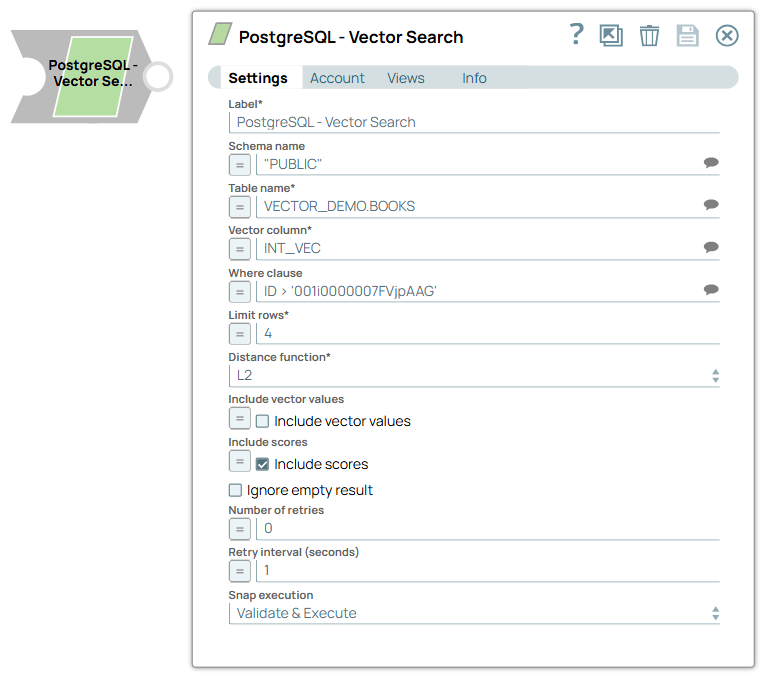
| Label
|
Specify a unique name for the Snap. Modify this
to be more appropriate, especially if more than one of the same Snaps is in the
pipeline. Default value: PostgreSQL - Vector Search Example: PostgreSQL VS |
|
| Schema name
|
Specify the schema name for searching for a vector. Default value: N/A Example: VECTOR_DEMO |
|
| Table name
|
Required. Specify the table name for searching for a vector. Default value: N/A Example: VECTOR_DEMO.BOOKS |
|
| Vector column
|
Required. Specify the vector column name to search. Default value: N/A Example: INT_VEC |
|
| Where clause
|
Specify the where clause to use in the vector search query statement. Note: Because of the limitation of the SQL standard, you cannot use the _SL_DISTANCE column in the where clause.Default value: N/A Example: ID > '001i0000007FVjpAAG' |
|
| Limit rows
|
Specify the number of rows the query must return. Default value: 4 Example: 3 Min Value: 1 |
|
| Distance function
|
Required. Choose the similarity function to compare vectors. The available options are:
Default value: L2 Example: COSINE |
|
| Include vector values
|
Select this checkbox to include vector values in the response. Note: This field does not support input schema from the upstream Snaps. Default value: Deselected |
|
| Include scores
|
Select this checkbox to include similarity scores in the response. Note:
Default value: Selected |
|
| Ignore empty result
|
Select this checkbox to ignore the empty results and not write a document to the output view when a search operation returns no results. Default value: Deselected |
|
| Number of retries
|
Specify the maximum number of retry attempts the Snap must make if a network failure occurs. Default value: 0 Example: 3 |
|
| Retry interval (seconds)
|
Specify the time period between two successive retry requests. Default value: 0 Example: 3 |
|
| Snap Execution
|
Choose one of the three modes in which the Snap executes. Available options are:
Default value: Execute only Example: Validate & Execute |
|