


OPC UA History Read
Overview
You can use this Snap to read historical (time-series) data from a variable node on a connected OPC UA server using the OPC UA HistoryRead service. This enables you to retrieve process curves and trends for reporting, analytics, data lake ingestion, troubleshooting, and quality investigations without custom development. You can specify the time range either as an absolute window (start and end timestamps) or as a relative look-back period from the current time.
The Snap writes one output document for each historical value returned by the server, and automatically follows server continuation points so that all values within the requested time range are retrieved.
- This is a Read-type Snap.
 Works in Ultra Tasks
Prerequisites
The OPC UA server must support the OPC UA Historical Access service set, and history collection must be configured for the nodes that you want to read.
Limitations
- The Snap reads raw historical values only. Processed (aggregated), modified, and event history reads are not supported.
- The Snap reads the history of one Node ID for each input document.
Snap views
| Type | Description | Examples of upstream and downstream Snaps |
|---|---|---|
| Input | This Snap has at the most one document input view. | Mapper |
| Output | This Snap has exactly one document output view. The Snap writes one document
for each historical value with the $nodeId,
$value, $status,
$statusCode, $serverTimestamp, and
$sourceTimestamp fields. |
Mapper |
| Learn more about Error handling. | ||
Snap settings
- Expression icon (
 ): Allows using
JavaScript syntax to access SnapLogic Expressions to set field values dynamically (if
enabled). If disabled, you can provide a static value. Learn more.
- SnapGPT (
 ): Generates SnapLogic Expressions
based on natural language using SnapGPT. Learn
more.
- Suggestion icon (
 ): Populates a
list of values dynamically based on your Snap configuration. You can select only one
attribute at a time using the icon. Type into the field if it supports a comma-separated
list of values.
- Upload
 : Uploads files. Learn more.
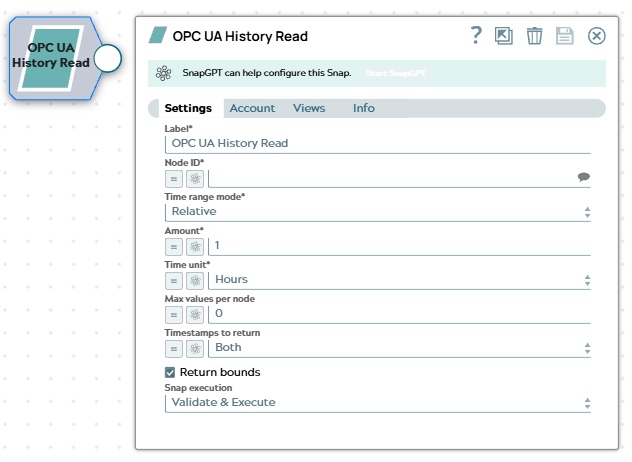
| Field/Field set | Type | Description |
|---|---|---|
| Label*
|
String |
Specify a unique name for the Snap. Modify this to be more appropriate, especially if more than one of the same Snaps is in the pipeline. Default value: OPC UA History Read Example: Read boiler temperature trend |
| Node ID | String/Expression/ Suggestion |
Required. Specify the Node ID of the variable from which to read the historical data. The input node must be of type variable and must have history collection enabled on the server. Default value: N/A Example: ns=2;s=Sensor1/Temperature |
| Time range mode | Dropdown list/Expression |
Required. Choose how to define the historical time range.
Available options are:
Default value: Relative Example: Absolute |
| Start time | String/Expression |
Appears when you select Absolute in the Time range mode field. Required. Specify the beginning of the historical time range in the ISO 8601 format. The Snap interprets the timestamp in UTC. Default value: N/A Example: 2026-08-01T00:00:00Z |
| End time | String/Expression |
Appears when you select Absolute in the Time range mode field. Required. Specify the end of the historical time range in the ISO 8601 format, or specify Now to use the current time. The end time must be later than the Start time. Default value: Now Example: 2026-08-31T23:59:59Z |
| Amount | Integer/Expression |
Appears when you select Relative in the Time range mode field. Required. Specify the number of time units to look back from the current time. The minimum value is 1. Default value: 1 Example: 24 |
| Time unit | Dropdown list/Expression |
Appears when you select Relative in the Time range mode field. Required. Choose the unit of time for the look-back
period. Available options are:
Default value: Hours Example: Days |
| Max values per node | Integer/Expression |
Specify the maximum number of historical values that the server returns for each
HistoryRead request. If the value is 0, the server-defined limit
applies.
Note: This field limits the values for each request, not the total number
of values that the Snap outputs. The Snap follows the continuation points that
the server returns until it retrieves all the values within the requested time
range. Default value: 0 Example: 1000 |
| Timestamps to return | Dropdown list/Expression |
Choose the timestamps that the server includes in the results. Available options
are:
Default value: Both Example: Source |
| Return bounds | Checkbox |
Select this checkbox to include the bounding values in the output, that is, the first value before the start time and the first value after the end time. Bounding values help you interpolate the value at the boundaries of the requested time range. Default status: Selected |
| Snap execution
|
Dropdown list |
Choose one of the three modes in
which the Snap executes. Available options are:
Default value: Validate & Execute Example: Execute only |
Troubleshooting
| Error | Reason | Resolution |
|---|---|---|
| No historical data available for node: node ID | The node exists, but the server returned no historical values for the requested time range. | Verify that history collection is configured for the node on the server, and that the time range covers a period for which the server retains history. |
| Invalid time range | The start time is later than or the same as the end time. | Adjust the start and end times so that the start time is earlier than the end time. |
| Invalid field: value | The timestamp that you specified is not in the ISO 8601 format. | Specify a valid ISO 8601 timestamp, such as 2026-08-01T00:00:00Z, or specify Now in the End time field. |
| OPC UA History Read error | The server rejected the HistoryRead request or the connection failed. | Check the Node ID, the time range, and the server connection. Verify that the server supports the OPC UA Historical Access service set. |