


Setting Permissions in API Manager
How to set, manage, and delete permissions for users and groups at the APIM space, API, and version levels in the API Manager console.
Overview
Permissions grant access to assets in the APIM space. You can set permissions at the three
levels of the asset hierarchy in the API Manager console: the /apim space,
APIs, and Versions. The Permissions tab for all three levels lists the
username or group permission is assigned to, the access type of the permission, and if it
applies to all APIs and Versions.
As an Environment admin, you can set permissions for users at the /apim space level
in addition to the APIs and versions for users and groups. When you create an API, you can
set permissions at the API and version levels. The owner of the API is automatically added as
a user.
Access Types
The API Manager console has the following permission types:
- Owner/Full Access: Automatically assigned to the creator of an API asset or version. Accordingly, you cannot select this option.
- Read and Execute: Select to give access to view API assets and call API endpoints.
- Read Only: Select to give access to view API assets.
- Read and Write: Select to give read and write access to API assets.
- Full Access: Select to give permissions to view, create, modify, and call API calls.
For details, see API Management User Permissions.
Adding Permissions in the APIM Space
- In Project Manager, click API Management > API
Manager on the left pane, and then click the Add icon to view the
Add Permission dialog.

- In the Add Permission dialog, configure the following settings and
then click Add.
- Username or group: Choose the user or group.
- Access: Choose the permission type.
- Apply access to APIs and versions: Select the checkbox to
give permissions at all three levels - the
/apimspace, APIs, and Versions.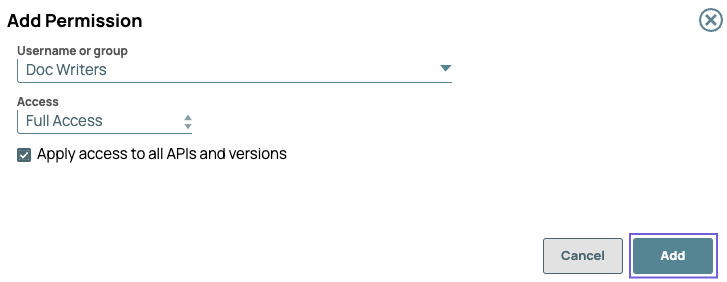
- Verify that the correct permissions are set for the target user in the API > Permissions tab.
Add Permissions to APIs
- Navigate to API Management > API Manager, then select the target API.
- Click the Permissions tab.

- Click the Add icon to view the Add Permissions dialog window, then
select the following options:
- Username or group: Choose the user or group.
- Access: Choose the Permission type.
- Apply access to all APIs and versions: Select the checkbox to
give permissions to an API and its versions.
- Verify that the correct permissions are set for the target user in the Permissions tab for that API.
Add Permissions to Versions
- Navigate to API Management > API Manager, and select the target version of the API.
- Click the Permissions tab.

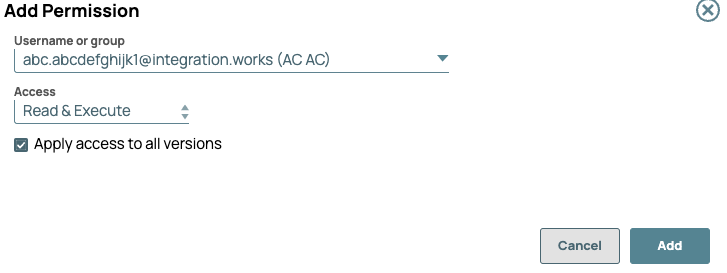
- Click the Add icon to view the Add Permissions dialog window, then
make the following selections:
- Username or group: Choose the user or group
- Access: Choose the permission type.
- Apply access to all APIs and versions: Select the checkbox to
give permission to all versions of an API.
- Verify that the correct permissions are set for the target user in the Permissions tab for that API version.
Deleting a Permission
As an Environment admin, you can delete a permission at any level of the API Manager hierarchy.
To delete a permission:
- Navigate to the target permission.
- Click the Delete icon to delete the permission from a version, API, or the API Manager
console. The following image shows the delete icon at the version level.

API Management User Permissions
In the API Management feature, permissions are based on the same model as other assets in the IIP. Only the Environment admin, Owner, and User with Full Access can edit the permissions. Refer to Managing Your Developer Portal Settings for more information.
Users and Groups created in Project Manager. Permissions can apply to both users and groups:
- Username: The email of the user
- Group: <Group_Name>(Group)
The following table provides a matrix for access at the different levels of the APIM hierarchy:
| User Type | API Details | Version | Permissions |
|---|---|---|---|
| Environment admin | Edit | Edit | Edit |
| User with Read access | Read Only | Read Only | Read Only |
| User with Read and Execute | Read Only | Read Only | Read Only |
| User with Read and Write | Edit | Edit | Read Only |
| User with Full Access | Edit | Edit | Edit* |
| Owner/Full Access | Edit | Edit | Edit |