


MongoDB Atlas Vector Search
The MongoDB - Atlas Vector Search Snap enables you to efficiently perform advanced vector-based queries.
Overview
The MongoDB - Atlas Vector Search Snap enables you to efficiently perform advanced vector-based queries. This Snap is useful for Similarity searches, Approximate Nearest Neighbor (ANN) queries, and Range queries on vector data stored in MongoDB Atlas. Learn more about vector search queries.
Supported Accounts
- This is a Read-type Snap.
Prerequisites
- Create a MongoDB Atlas account.
- Create a vector search index in MongoDB Atlas.
- Configure MongoDB Atlas cluster and allow your IP in network security settings.
Limitations
The listSearchIndexes command can only be run on a deployment hosted on MongoDB Atlas, and requires an Atlas cluster tier of at least M10. Hence, for the suggestions list to populate in the Search index field, you must deploy the MongoDB Atlas cluster with at least an M10 tier. However, you can add the index manually, even if the Snap displays an error when populating the suggestions.
Known issues
None.
Snap views
| Type | Description | Examples of upstream and downstream Snaps |
|---|---|---|
| Input | Requires the MongoDB aggregate command to perform vector search. | |
| Output | Retrieves query results from the collection as specified in the settings. | |
| Learn more about Error handling. | ||
Snap settings
| Field/Field set | Description |
|---|---|
Label
String |
Required.Specify a unique name for the Snap. Modify this to
be more appropriate, especially if there are more than one of the same Snap in the
pipeline.
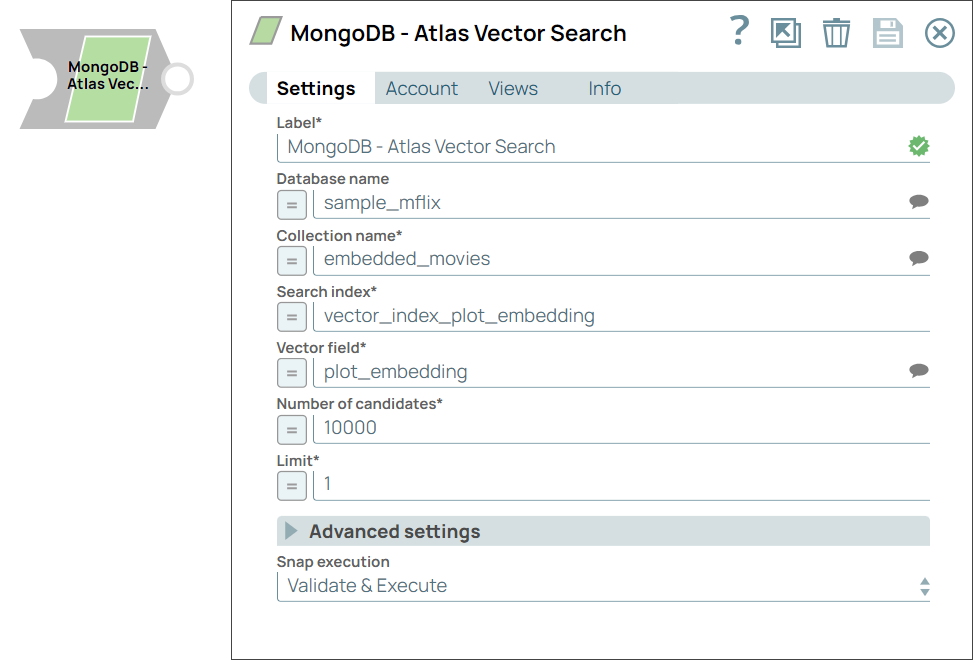
Default value: MongoDB - Atlas Vector Search Example: Atlas Vector Search |
Database name
String/Expression/ Suggestion |
Specify the database where the query is executed. If you do not specify, the database configured in the account is used. Default value: N/A Example: chunking_strategy |
Collection name
String/Expression/ Suggestion |
Required. Specify or select a MongoDB collection name to find indexes for vector search. Default value: N/A Example: chunk_metadata |
Search index
String/Expression/ Suggestion |
Required. Specify the name of the vector search index to query. Alternatively, click the Suggestions icon to select the vector search index. Note: For search index suggestions to work, you must deploy the MongoDB Atlas cluster with at least an M10 tier. Otherwise, you can add the index manually, even if the Snap displays an error when you click the Suggestion icon.
Default value: N/A Example: vector_index |
Vector field
String/Expression/ Suggestion |
Required. Specify the name of the vector field that you want to search. Default value: N/A Example: embedding |
Number of candidates
Integer/Expression |
Required. Specify the number of candidates for vector search. Note: The Number of candidates value must be higher than the Limit value to increase the accuracy of the results.
Maximum value 10000 Minimum value: 0 Default value: 100 Example: 50 |
Limit
Integer/Expression |
Required. Specify the number of results to return for each query. Maximum value 10000 Minimum value: 0 Default value: 4 Example: 10 |
| Advanced settings | Optional configuration for batch processing, timezone offset, and retry behavior. |
Batch size
Integer |
Required. Specify the number of documents to return per batch. Default value: 0 Example: 10 |
Timezone hours offset
Integer |
Specify the time zone hour offset to apply to all DateTime fields. Note: The values for this field must be in the range of -12 through 14.
Default value: 0 Example: 12 |
Timezone minutes offset
Integer |
Specify the time zone minutes offset to apply to all DateTime fields. Note: The values for this field must be in the range of 0 through 59.
Default value: 0 Example: 1 |
Number of retries
Integer/Expression |
Specify the maximum number of attempts to be made to receive a response. The request is terminated if the attempts do not result in a response. Note:
Default value: 0 Example: 4 |
Retry interval (seconds)
Integer/Expression |
Specify the time interval between two retry requests. Default value: 1 Example: 5 |
|
Snap execution Dropdown list
|
Choose one of the three modes in
which the Snap executes. Available options are:
Default value: Validate & Execute Example: Execute only |
Temporary files
During execution, data processing on Snaplex nodes occurs principally in-memory as streaming and is unencrypted. When processing larger datasets that exceed the available compute memory, the Snap writes unencrypted pipeline data to local storage to optimize the performance. These temporary files are deleted when the pipeline execution completes. You can configure the temporary data's location in the Global properties table of the Snaplex node properties, which can also help avoid pipeline errors because of the unavailability of space. Learn more about Temporary Folder in Configuration Options.
Troubleshooting
| Error | Reason | Resolution |
|---|---|---|
| The vector search operation failed. | The specified vector might be invalid. | Specify a valid vector and retry. |
| Unable to process the input document. | The input document might be invalid. | Specify valid input and retry. |
| The collection provided cannot be found. | The specified collection is not available. | Specify a valid collection and retry. |
| The index is not specified. | The index field is mandatory. | Specify a valid index and retry. |
| The input document does not have a 'vector' specified in the structure. | The input document must have a valid vector. | Add the vector to query the input document and retry. |
|
Unrecognized pipeline stage <name-of-the-pipeline>. | Ensure the cluster runs on MongoDB Atlas and has a cluster tier of at least M10. Additionally, confirm that the user has the required permissions to access the search index. |