


WorkdayQL
Overview
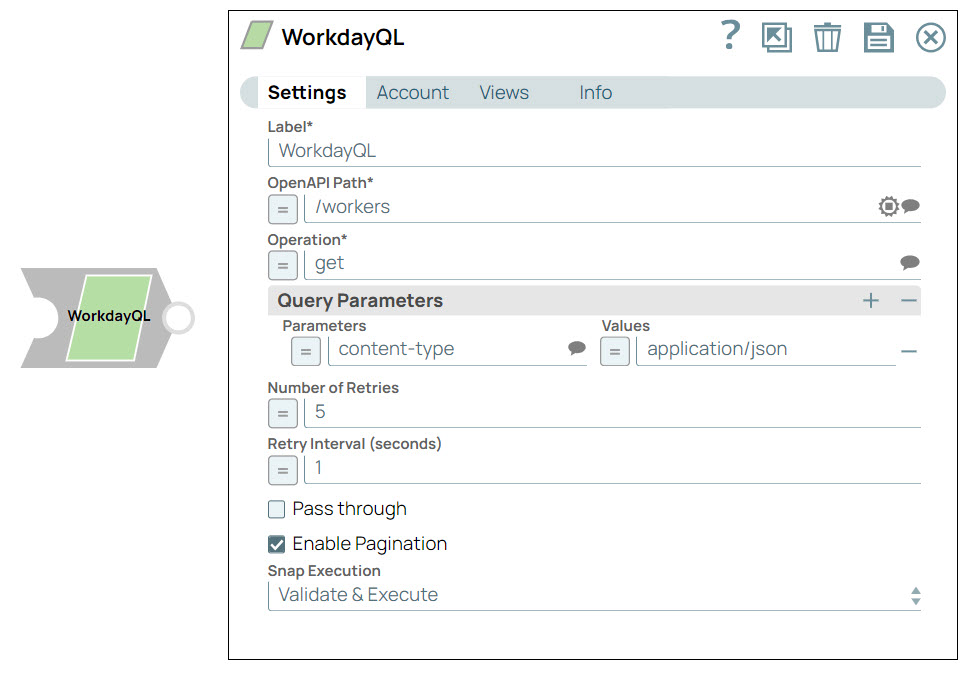
The WorkdayQL Snap connects with Workday Query Language (WQL) endpoints to retrieve data from the Workday system programmatically.
WQL is a query language used in the Workday system for retrieving data. WQL endpoints refer to the specific API endpoints that enable you to execute WQL queries against the Workday system.
- This is a Read-type Snap.
 Works in Ultra Tasks
Prerequisites
To make WQL API calls, you need:
- Access to the Workday Query Language security domain.
- To create an API client or repurpose an existing one.
Limitations
- When you provide valid data in searchString for
/datasources/{ID}/dataSourceFiltersin the OpenAPI path field, the Snap does not provide output.
Known Issues
None.
Snap views
| Type | Description | Examples of upstream and downstream Snaps |
|---|---|---|
| Input |
This Snap has at most one document input view. The OpenAPI path, operation, and query parameters of the endpoint. |
|
| Output |
This Snap has exactly one document output view. The data fetched from the WQL endpoint. |
|
| Learn more about Error handling. | ||
Snap settings
- Expression icon (
 ): Allows using
pipeline parameters to set field values dynamically (if enabled). SnapLogic Expressions
are not supported. If disabled, you can provide a static value.
): Allows using
pipeline parameters to set field values dynamically (if enabled). SnapLogic Expressions
are not supported. If disabled, you can provide a static value. - SnapGPT (
 ): Generates SnapLogic Expressions
based on natural language using SnapGPT. Learn
more.
): Generates SnapLogic Expressions
based on natural language using SnapGPT. Learn
more. - Suggestion icon (
 ): Populates a
list of values dynamically based on your Snap configuration. You can select only one
attribute at a time using the icon. Type into the field if it supports a comma-separated
list of values.
): Populates a
list of values dynamically based on your Snap configuration. You can select only one
attribute at a time using the icon. Type into the field if it supports a comma-separated
list of values. - Upload
 : Uploads files. Learn more.
| Field/Field set | Description |
|---|---|
Label
String |
Required. Specify a unique name for the Snap. Modify this to be more appropriate, especially if more than one of the same Snaps is in the pipeline. Default value: WorkdayQL Example: Workday QL Snap |
OpenAPI Path
String/Expression/ Suggestion |
Required. Enter the path for the REST endpoint. Based on the service and version, the Snap downloads the open API specification and populates the list.
Default value: N/A Example: /data |
Operation
String/Expression/ Suggestion |
Required. Specify the operation to perform on the selected OpenAPI path or select from the suggestions list. The available options are:
Default value: N/A Example: get |
Query
String |
Appears when you select /data in the OpenAPI Path.
Specify an encoded query string to filter the records. Default value: N/A Example: SELECT worker FROM allWorkers |
Limit
Integer |
Appears only when you select /data in OpenAPI Path and GET in Operation.
Specify the number of rows to return from the query. Default value: N/A Example: 10 |
Offset
Integer |
Appears only when you select /data in OpenAPI Path and GET in Operation.
Specify the offset for the limit clause. Default value: N/A Example: 5 |
Query Parameters
Fieldset |
Use this fieldset to define the name and value for query parameters on request. |
Parameters
String/Expression |
Appears when you select /data in the OpenAPI Path.
Specify the name of the query parameter for retrieving assets. Default value: N/A Example: alias |
Values
String |
Appears when you select /data in the OpenAPI Path.
Specify the value for the query parameter for retrieving assets. Default value: N/A Example: cds_FTPUI |
Number of Retries
Integer |
Specify the number of attempts the Snap should make to perform the selected operation in case of connection failure or timeout.
Minimum value: 0 Default value: 0 Example: 3 |
Retry Interval (seconds)
Integer |
Specify the time interval in seconds between retry attempts.
Minimum value: 1 Default value: 1 Example: 3 |
Enable Pagination
Checkbox |
Select this checkbox to enable the Snap to return the response in multiple pages when the input document contains the query parameters.
When you deselect this checkbox, the Snap limits the number of output documents to 100, with only one page of records. The maximum limit value of the page size is 100—the Snap fetches all records until the last page with 100 records on each page. Default value: Selected |
Snap execution
Dropdown list |
Choose one of the three modes in
which the Snap executes. Available options are:
|
Video
Watch the video to learn how to execute a query in the WorkdayQL Snap using the Workday REST OAuth2 Account.
Troubleshooting
| Error | Cause | Resolution |
|---|---|---|
| 403 Error: Unauthorized user. | The permissions are insufficient. | Ensure that you assign the required permissions and retry. |
| "statusCode": 500 "statusPhrase": "Internal Server Error" "protoVersion": "HTTP/1.1" | Offset is greater than or equal to total row size. When the offset value provided in the Snap is greater than number of the existing records, then the Snap fails. | Provide an offset value lesser than the number of records. |