


Open Table Iceberg Account
Overview
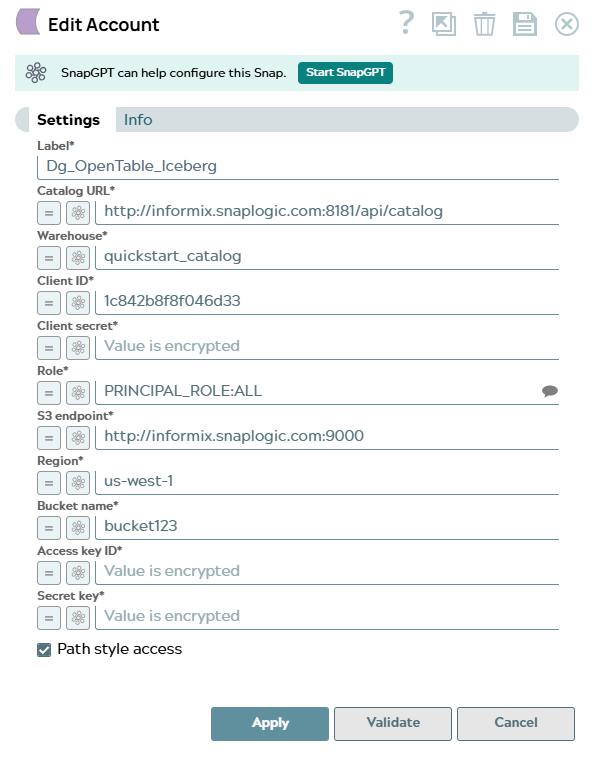
Use this account type to connect Open Table Iceberg Snaps to an Iceberg REST catalog (such as Polaris) backed by S3-compatible object storage such as MinIO. The account authenticates with the catalog using OAuth2 client credentials and validates S3 access directly before use.
During account validation, four checks are performed in sequence:
- Catalog connectivity — verifies the catalog is reachable.
- Warehouse access — lists namespaces in the configured warehouse.
- S3 credentials — performs a direct bucket check using the provided AWS credentials.
- Storage connectivity through catalog — lists namespaces via the catalog to confirm end-to-end access.
Prerequisites
- An Iceberg REST catalog (for example, Polaris) that is accessible from the SnapLogic Snaplex.
- OAuth2 client credentials (client ID and client secret) with read/write access to the target warehouse and namespaces.
- An S3-compatible bucket with AWS access key ID and secret key for the IAM user or role that has read/write permissions on the bucket.
Account settings
| Field/Field set | Description |
|---|---|
Label*
String |
Specify a unique label for the account. Default value: Open Table Iceberg Account Example: Iceberg Prod Account |
Catalog URL*
String/Expression |
Specify the base URL of the Iceberg REST catalog API. Default value: None Example: |
Warehouse*
String/Expression |
Specify the name of the warehouse in the Iceberg catalog. In Polaris, this corresponds to a catalog name. Default value: None Example: |
Client ID*
String/Expression |
Specify the OAuth2 client ID used to authenticate with the Iceberg catalog. Default value: None Example: |
Client Secret*
String/Expression |
Specify the OAuth2 client secret that corresponds to the Client ID. This field is obfuscated. Default value: None Example: |
Role*
String/Expression |
Specify the principal role to assume in the Iceberg catalog. Click the Suggest
icon Default value: None Example: |
S3 Endpoint*
String/Expression |
Specify the endpoint URL for the S3-compatible object storage service where Iceberg table data is stored. For AWS S3, use the standard AWS endpoint. For MinIO or other S3-compatible services, use the service-specific URL. Default value: None Example: |
Region*
String/Expression |
Specify the AWS region where the S3 bucket is located. Default value: None Example: |
Bucket Name*
String/Expression |
Specify the name of the S3 bucket where Iceberg table data is stored. Default value: None Example: |
Access Key ID*
String/Expression |
Specify the AWS access key ID for authenticating with S3. This field is obfuscated. Default value: None Example: |
Secret Key*
String/Expression |
Specify the AWS secret access key that corresponds to the Access Key ID. This field is obfuscated. Default value: None Example: |
Path Style Access
Checkbox |
Select this checkbox to use path-style S3 URLs
( Default value: Selected Example: Deselected |
 to retrieve available
roles from the catalog.
to retrieve available
roles from the catalog.Troubleshooting
| Error | Reason | Resolution |
|---|---|---|
| Failed to connect to the Iceberg catalog | The Catalog URL is unreachable or incorrect, or the OAuth2 credentials are invalid. | Verify that the Catalog URL is correct and accessible from the Snaplex. Confirm that the Client ID and Client Secret are valid and have not expired. |
| Failed to access the warehouse | The specified Warehouse does not exist in the catalog, or the principal role does not have access to it. | Confirm that the Warehouse name is correct and that the configured Role has access to it in the catalog. |
| Failed to connect to S3 | The S3 Endpoint, Region, Bucket Name, Access Key ID, or Secret Key is incorrect, or the IAM user does not have sufficient permissions. | Verify all S3 credential fields. Confirm that the IAM user has
s3:HeadBucket permission on the configured bucket. |