


Box Add Folder
create a new folder in your Box.com account.
Overview
You can use this Snap to create a new folder in your Box.com account.
 Write-type Snap
-
 Works in Ultra Tasks
Support and limitations
Works in Ultra Tasks.
Snap Views
| Type | Description | Examples of upstream and downstream Snaps |
|---|---|---|
| Input | This Snap has at most one document input view. It accepts an optional input document that can be used to pass dynamic values (such as folder name or parent folder ID) into the Snap.bYou can connect an upstream Snap and reference those fields in the configuration using expressions. | |
| Output | This Snap has exactly one document output view. It creates a new folder in your Box.com account and provides a single output document containing details about the newly created folder. | |
| Learn more about Error handling. | ||
Snap settings
Note: Learn about
the common controls in the Snap settings dialog.
| Field/Field set | Description |
|---|---|
|
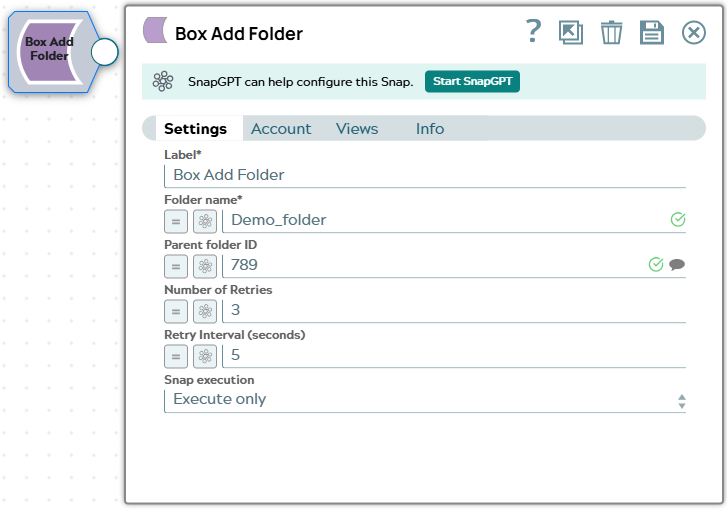
Label String
|
Required. The name for the Snap. You can modify this to be more specific, especially if you have more than one of the same Snap in your pipeline. |
|
Folder Name String
|
Required. The name for the new folder to be created. Default: None Example: Demo-folder |
|
Parent ID String
|
The ID of the parent folder where the new folder will be created. Default: None Example: 34567 |
|
Number of retries Integer
|
Enter the integer value to specify the number of attempts the Snap makes to
perform the selected operation in case of connection failure or timeout. Minimum value: 0 Default value: 3 Example: 5 |
|
Retry interval (seconds) Integer
|
Enter the time interval in seconds between retry attempts. Minimum value: 1 Default value: 5 Example: 10 |
|
Snap execution Dropdown list
|
Choose one of the three modes in
which the Snap executes. Available options are:
|