


SnapLogic B2B Integration
SnapLogic's B2B solution allows you to integrate the EDI gateway of 1 EDI Source with another EDI gateway or B2B solution to send and receive B2B data. You can integrate with multiple applications supported by SnapLogic, such as NetSuite, SAP, and Oracle.
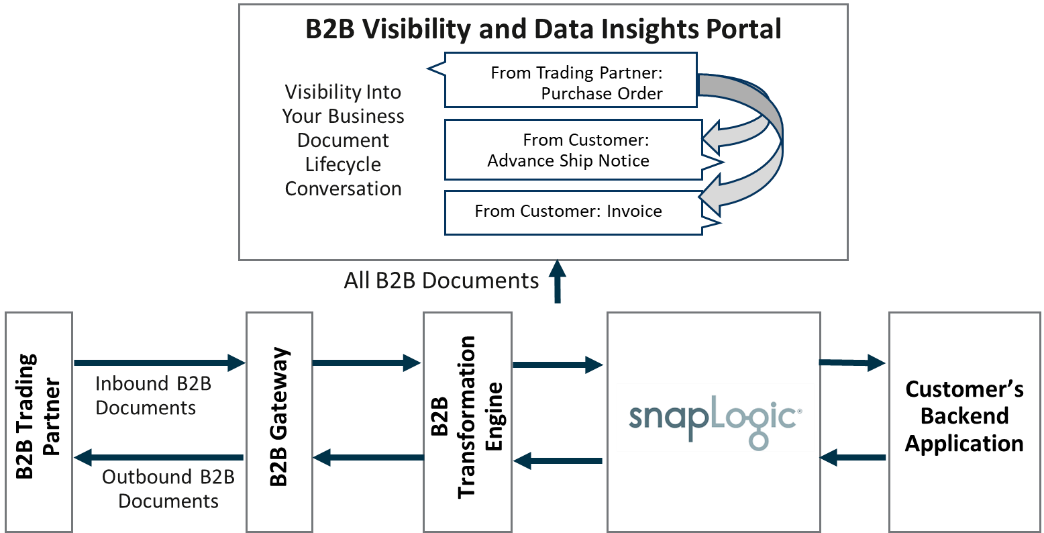
The following workflow explains the lifecycle of the B2B integrated solution:
Supported B2B gateway protocols
- File Transfer Protocol (FTP)
- SSH File Transfer Protocol (SFTP)
- File Transfer Protocol secure (FTPs)
- Applicability Statement 2 (AS2)
- HTTPS Web Service
In addition to the preceding protocols, you can leverage a Value Added Network (VAN) through 1 EDI Source to support all common B2B protocol requirements.
Prerequisites
- Working knowledge of the SnapLogic Intelligent Integration Platform (IIP).
- Appropriate level of access to the target endpoints to integrate.
- Access to the 1 EDI Source web visibility portal.
Implementing a B2B solution
To implement SnapLogic's B2B solution, you must first integrate the B2B gateway with SnapLogic. While each gateway has its own specifications and requirements, the general procedure to integrate it with SnapLogic is as follows:
-
Establish B2B requirements. Enter your requirements in the SnapLogic Discovery Questionnaire. This establishes your requirements from the SnapLogic B2B solution, such as the trading partners to integrate and the transaction types.
-
Set up and configure the B2B platform. Make a note of the account attributes (such as tenant URLs, passkeys, and client IDs) and the file paths that you might need while configuring the accounts in SnapLogic. The File Reader and File Writer Snaps that read from or write to the B2B platform's account require these account attributes and file paths. Additional requirements might come up based on the specific account, available Snaps, and client solution implementation. Typically, such requirements become clear during the implementation phase with 1 EDI Source.
-
Design and develop the SnapLogic pipelines per your requirements. Use the account attributes that you stored earlier during this step. You must build one pipeline each for outbound and inbound transactions with the B2B platform, as follows:
-
Handling outbound transactions from the B2B trading partner to the backend application (endpoint):

-
Handling inbound transactions from the backend application (endpoint) to the B2B trading partner:

-
-
Monitor the B2B system to ensure that the associated processes are running as expected and that status reports are created and sent. The 1 EDI Source Managed Services team is notified of any errors or data exceptions from either the client's trading partner or backend application. Error resolution by either 1 EDI Source, the trading partner, or the customer is based on the error type.
1 EDI Source configures the B2B platform using the Discovery Questionnaire and follow-up conversations through the implementation process. At the end of this process, you can expect the following three components to be configured:
- B2B gateway
- B2B transformation engine
- Customer-facing visibility and data insights web portal