


Lead Write
Overview
You can use the Lead Write Snap to interact with leads using commands and make modifications to the Lead database. Lead Database objects include the following:
- Leads
- Companies
- Named Accounts
- Named Account List
- Static List
- Opportunities
- Opportunity Roles
- Sales Persons
- Custom Objects
- Activities
- This is a Write-type Snap.
 Works in Ultra Tasks
Prerequisites
- A valid account with the required permissions. For more info, see Roles and Permissions.
Limitations
- Daily Quota: The subscriptions are allocated 50,000 API calls per day (which resets daily at 12:00AM CST).
- API Rate Limit: All Marketo APIs are rate-limited. API access per instance is limited to 100 calls per 20 seconds.
- Concurrency Limit: You can make a maximum of 10 concurrent API calls.
Known issues
- If the API rate limit of 100 calls per 20 seconds is exceeded, the API responds with a 606 error code and the Snap fails.
- This Snap fails with 709 error on selecting Update Email Full Content, Update Landing Page Dynamic Content Section, Approve program, and Activate smart campaign commands.
- This Snap fails with 702 error on selecting Delete Landing Page and Discard Email Draft commands.
- This Snap fails to discard drafts with 1003 error on selecting Discard Custom Activity Type Draft command.
- Marketo Snaps do not support some special characters (for example, (𝖖𝖗𝖘𝖬𝖭𝖮𝗕𝗖𝘧𝘨𝘩𝛀𝛁𝛂𝛃𝛄𝛅𝛆𝛇,𝖗𝖘𝖬𝛌𝛗𝛘𝛙𝛴).
Snap views
| Type | Description | Examples of upstream and downstream Snaps |
|---|---|---|
| Input | This Snap has at most two document input views. The first input view accepts commands to write to the Lead database. | Mapper |
| Output | This Snap has at most one document output view. Results returned by Marketo. | Mapper |
| Learn more about Error handling. | ||
Snap settings
| Field/Field set | Description |
|---|---|
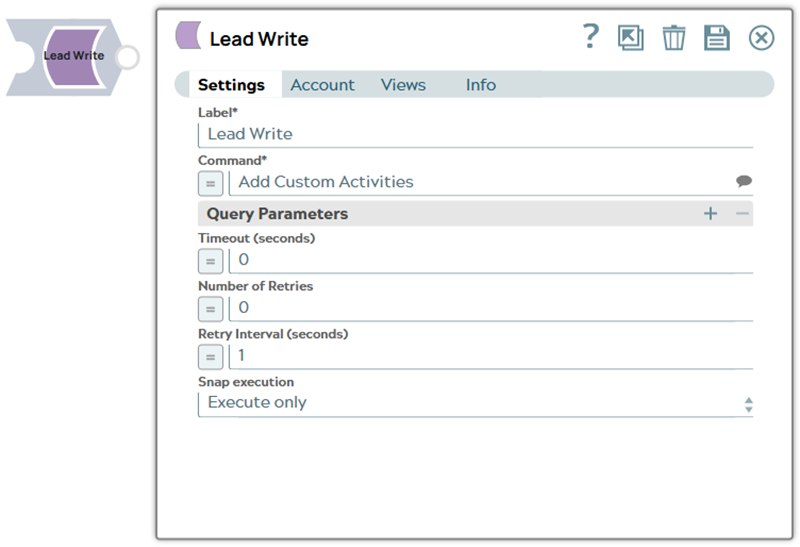
Label*
String |
Specify a unique name for the Snap. Supports expressions.
Default value: Lead Write |
Command*
String/Expression/ Suggestion |
Enter the command to query the Asset database to retrieve the desired records. Alternatively, click the Suggestion icon to fetch a list of commands. Default value: N/A Example: Merge Leads |
| Query Parameters |
Use this fieldset to define the name and value for query parameters on request. Note:
|
Name
String/Expression |
Specify the name of the query parameter. |
Value
String/Expression |
Specify the value for the query parameter. |
Timeout (seconds)
Integer/Expression |
Specify the time in seconds to wait for a response from the Marketo server. A value of zero disables the timeout. Default value: 0 |
Number of Retries
Integer/Expression |
Specify the number of attempts the Snap must make in case of connection failure or timeout. Default value: 0 |
Retry Interval (seconds)
Integer/Expression |
Specify the minimum number of seconds the Snap must wait before each retry attempt. Default value: 1 |
Snap execution
Dropdown list |
Choose one of the three modes in
which the Snap executes. Available options are:
Default value: Validate and Execute |